
POS Systems for Clothing Stores (2026 Buyer’s Guide)
We reviewed the top clothing store POS systems and ranked the best options for 2026.
How many POS terminals do you need?
Compare quotes in 30 seconds — free, no obligation.
Home → Retail POS Systems → POS Systems for Clothing Stores
By Jason Feemster, POS Industry Expert | Last Updated: March 2026
Disclosure: POSUSA may earn a referral fee when you visit a vendor through links on this page. This does not affect our rankings. Our recommendations are based on fit, inventory needs, real-world retailer feedback, and how systems perform in actual clothing store environments.
Clothing stores have inventory needs that most POS systems aren’t built for. One product comes in four sizes, six colors, and two fits. Multiply that by 200 SKUs and a general POS starts to fall apart fast. The wrong system doesn’t just slow down checkout — it creates inventory errors that cost you real money in dead stock and missed reorders.
This guide cuts through the marketing. We evaluate POS systems based on total cost, inventory capability, and real retailer feedback. Since 2011, we’ve helped retail owners compare and choose POS systems, and we’ve compiled what we’ve learned into a ranked list of the best options for clothing stores in 2026.
Quick Takeaways
- Best overall for clothing stores: Lightspeed Retail — matrix inventory built for apparel, best-in-class variant management
- Best free option: Square POS — works well for smaller boutiques with simple inventory
- Best for Shopify sellers: Shopify POS — syncs in-store and online automatically
- Best all-in-one hardware: Clover POS — solid option if you’re working with a local dealer
- Variant management matters more than anything else — if a POS can’t handle size and color cleanly, cross it off your list
- Always check whether purchase orders are included — receiving vendor shipments in your POS saves hours every week
- Processing fees often cost more than software fees — factor both into your total cost
Top 3 Clothing Store POS Picks for 2026

- Matrix inventory for size/color variants
- Built-in purchase orders
- Multi-location support

- Free plan available
- No contracts
- Same-day setup

- Syncs in-store and online
- Handles variants well
- Native Shopify integration
The 4 Best POS Systems for Clothing Stores in 2026
- Lightspeed Retail — Best Overall for Clothing Stores
- Square POS — Best for Small Boutiques and Startups
- Shopify POS — Best for Clothing Stores Already on Shopify
- Clover POS — Best for Clothing Stores Working with a Local Dealer
Lightspeed Retail

Lightspeed is built for exactly this. The matrix inventory system handles size and color variants without hacks or workarounds. You can import vendor catalogs, create purchase orders, transfer stock between locations, and see real-time inventory by variant. The reporting shows you which colorway of a specific style is moving fastest — that’s the information that turns into better buying decisions and less dead stock.
For any clothing store that’s past the startup phase or managing more than 100 SKUs, this is the system to look at. It integrates with Shopify and WooCommerce if you’re selling online, and the multi-location tools are genuinely strong for boutiques looking to expand.
The tradeoff is price and learning curve. Lightspeed isn’t cheap and it’s not plug-and-play. But for a clothing store with real inventory complexity, the tools pay for themselves.
→ Read our full Lightspeed Retail review | Current Lightspeed promotion: 20% off + free hardware
Square POS
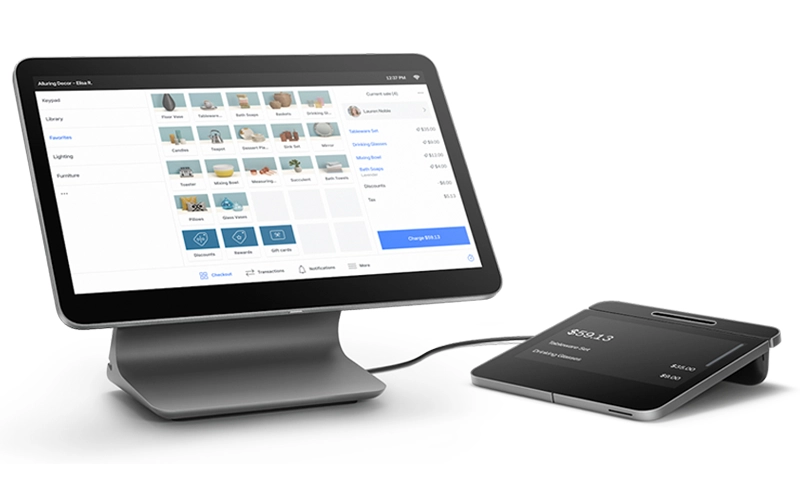
If you’re launching a clothing store or running a small boutique with a limited SKU count, Square is the most practical starting point. It’s free to start, sets up in a day, and handles basic inventory including size and color variants. You can be ringing up sales the same afternoon you unbox the hardware.
The limitation is depth. Square doesn’t have native purchase orders, the variant reporting isn’t as granular as Lightspeed, and managing large catalogs gets harder as your SKU count grows. But for a startup boutique or a small store with straightforward inventory, Square works well and the free plan is genuinely usable — not a crippled demo.
→ Read our full Square POS review | Current Square promotions
Shopify POS
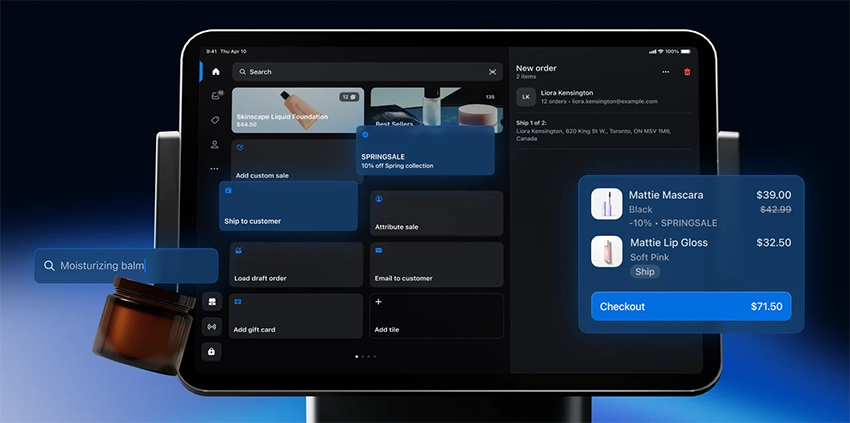
If your online store runs on Shopify, Shopify POS is the obvious choice. Inventory syncs automatically between your physical store and your website — if someone buys the last medium in a colorway in-store, your online store updates immediately. You’re managing one product catalog across both channels instead of two separate systems that need constant reconciliation.
It handles variants well, works with barcode scanners and receipt printers, and the omnichannel reporting gives you a single view of in-store and online performance. The main limitation is that the in-store POS features aren’t as deep as Lightspeed for pure retail inventory management. If your priority is online-to-offline syncing and you’re already on Shopify, this is the right pick.
→ Read our full Shopify POS review
Clover POS

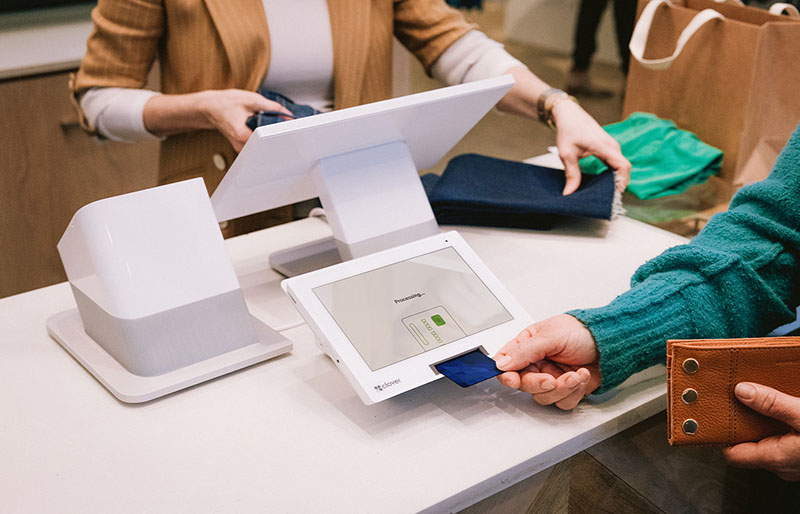
Clover is a solid all-around system that handles retail well. It’s popular with clothing store owners who work with a local merchant services provider and want dedicated hardware with a polished feel. The app marketplace lets you add features as you need them, and the inventory tools cover the basics cleanly for most boutiques.
The caveat is the same one that applies everywhere Clover is sold — who you buy from matters. Clover is sold through hundreds of independent dealers and the experience varies. Buy from a reputable source and you’ll be fine. Buy from a random ISO and you might end up in a bad contract with hidden fees. Do your homework on the dealer before signing anything.
→ Read our full Clover POS review
Not sure which POS fits your clothing store?
Compare the top systems side-by-side and find the right match.
How We Chose the Best POS Systems for Clothing Stores
We didn’t just compile feature lists from vendor websites. Clothing store inventory is genuinely different from restaurant or general retail — size matrices, seasonal buying cycles, vendor purchase orders, and sell-through rates by variant are things a general POS handles poorly. We focused on systems that solve the real problems clothing store owners run into.
Variant Management
The single most important feature for a clothing store. We looked at how each system handles size and color matrices, whether variants have their own barcodes and stock counts, and how easy it is to set up a new product with multiple combinations. Lightspeed’s matrix inventory is purpose-built for this. Square handles it adequately at small scale. Systems that can’t manage variants cleanly didn’t make the list.
Purchase Order Support
Receiving vendor shipments inside your POS keeps inventory accurate without manual entry. We prioritized systems with native purchase order functionality that lets you create orders, receive against them, and have stock update automatically. This alone saves clothing store owners hours every week and eliminates the counting errors that come from manual receiving.
Reporting Depth
Knowing that you sold 47 units of a shirt isn’t enough. You need to know which sizes and colors moved and which didn’t. We evaluated whether systems can show sell-through rate by variant — that’s the reporting that drives smarter reorders and less dead stock sitting on your shelves at the end of a season.
Total Cost Transparency
We look at software fees, processing fees, hardware costs, and contract terms together. A low monthly software fee paired with locked-in high processing rates often costs more than a higher software fee with competitive processing. We flag systems that aren’t transparent about total cost and always recommend getting a written breakdown before signing anything.
Hardware and Barcode Support
Clothing stores need barcode scanners for fast checkout and accurate receiving. We confirmed barcode scanner compatibility and evaluated hardware options for each system — from affordable tablet setups to full countertop terminals. All four systems on this list support standard retail hardware.
Best POS Systems for Clothing Stores by Use Case
Different clothing stores have different needs. A small boutique doesn’t need the same features as a multi-location apparel chain. Here’s how our top picks match up to specific situations:
| Store Type | Top Pick | Runner-Up | Why |
|---|---|---|---|
| Small boutique, simple inventory | Square POS | Clover | Free, easy, handles basic variants |
| Growing boutique, 100+ SKUs | Lightspeed Retail | Shopify POS | Inventory depth, variant reporting |
| Multi-location clothing chain | Lightspeed Retail | Shopify POS | Centralized inventory, cross-location reporting |
| Clothing + strong online presence | Shopify POS | Square | Native in-store/online sync |
| Working with a local dealer | Clover POS | Square | Hardware flexibility, dealer relationship |
| Just starting out, tight budget | Square POS | — | Free plan, no contracts, low risk |
POS Systems for Clothing Stores: Frequently Asked Questions
What is the best POS system for a clothing store?
Lightspeed Retail is our top pick for most clothing stores. It handles size and color variants through a matrix inventory system, supports purchase orders and vendor catalogs, and gives you detailed reporting by variant. For smaller boutiques just getting started, Square POS is the best free option. If your online store is on Shopify, Shopify POS is the easiest way to keep your in-store and online inventory in sync.
What POS features do clothing stores need?
Variant management is the big one. Any system you consider needs to handle size and color combinations cleanly with accurate per-variant stock counts. Beyond that, look for barcode scanning, purchase order support so you can receive inventory from vendors, solid sales reporting by product and variant, and customer profiles if you want to track buying history. Multi-location support matters if you have more than one store or plan to expand.
Can Square handle clothing store inventory?
Yes, for smaller operations. Square handles product variants including size and color and it’s free to start. The limitation is depth. It doesn’t have native purchase orders, the variant reporting isn’t as granular as Lightspeed, and it gets harder to manage as your SKU count grows. For a startup boutique or a small store with straightforward inventory, Square works fine. For anything more complex, Lightspeed is the better tool.
Does Lightspeed work for clothing stores?
Yes, and it’s specifically built for it. Lightspeed’s matrix inventory was designed for apparel. You can set up a product with all its size and color combinations, scan barcodes to receive inventory from vendors, create purchase orders, and see real-time stock counts by variant. The reporting shows you what’s selling and what’s sitting, which is critical for managing apparel inventory.
What POS works best for a boutique?
For most boutiques it comes down to size and inventory complexity. Small boutiques with a limited SKU count and one location do fine with Square POS. It’s free, easy to set up, and handles basic inventory. Growing boutiques with 100+ SKUs and multiple colorways will get more value from Lightspeed Retail. The inventory tools pay for themselves when you stop manually tracking variants and start getting accurate sell-through data automatically.
Can I use Shopify POS for a clothing store?
Yes, especially if you’re already selling on Shopify online. Shopify POS syncs your in-store and online inventory automatically so you’re managing one product catalog across both channels. It handles variants well and works with barcode scanners and receipt printers. The main limitation is that the in-store POS features aren’t as deep as Lightspeed for pure retail inventory management. But if Shopify is already your eCommerce platform, adding the POS is a natural fit.
What is the best free POS for a clothing store?
Square POS has the best free plan for clothing stores. You get unlimited products, basic inventory including variants, sales reporting, and a free online store at no monthly cost. You only pay per transaction. It’s the lowest-risk way to get started without committing to a monthly software fee.
Do clothing store POS systems support barcode scanning?
Yes. All four systems on this page support barcode scanning. This matters for clothing stores because scanning is much faster than manually searching for products, especially when you’re receiving a new shipment from a vendor or doing a stock count. Make sure you confirm hardware compatibility before buying a scanner separately.
Final Verdict
After helping retail owners since 2011 navigate POS decisions, here’s the bottom line:
- #1 Lightspeed Retail: Best overall for clothing stores with real inventory complexity. Matrix variants, purchase orders, and sell-through reporting make it worth the price for any boutique managing 100+ SKUs.
- Runner-up Square POS: Best starting point for new or small boutiques. Free plan, no contracts, handles basic variants cleanly. Switch later if you outgrow it — no penalty.
- Best for Shopify sellers — Shopify POS: If you’re already on Shopify online, connecting your in-store inventory is a no-brainer. Everything stays in sync without manual reconciliation.
Whichever direction you lean, get a demo, ask about total cost including processing, and make sure the system can handle your variant count before you commit. A 30-minute demo doesn’t tell you how a system performs on the first day of a big sale.
Our #1 Recommendation: Lightspeed Retail

Jason Feemster, President of POS USA, brings over 20 years of experience in the point of sale and information technology industries. He has helped thousands of businesses, from small startups to large enterprises, find tailored POS solutions that enhance efficiency and drive growth. Jason’s insights have been featured in leading industry publications such as Inc.com, Business.com, and Restaurant Business Online. Through POS USA, Jason continues to guide business owners toward making informed decisions that drive their success.


