
Free Restaurant Table Management Software
Build your floor plan, track table status in real-time, and see exactly how long each party has been seated. Works on any iPad or tablet — no expensive hardware required.
Built by POSUSA — trusted by thousands of restaurant owners
The Problem
Pen-and-paper seating doesn't scale.
Your host is juggling a clipboard, crossed-out names, and guessing which tables are actually ready. Meanwhile, servers are getting double-sat and guests are waiting longer than they should.
Professional table management systems cost $200-400/month. That's a lot for a tool that should be simple.
You just want to see your floor, know which tables are open, and seat people efficiently.
The Solution
A digital floor plan that your host can actually use.
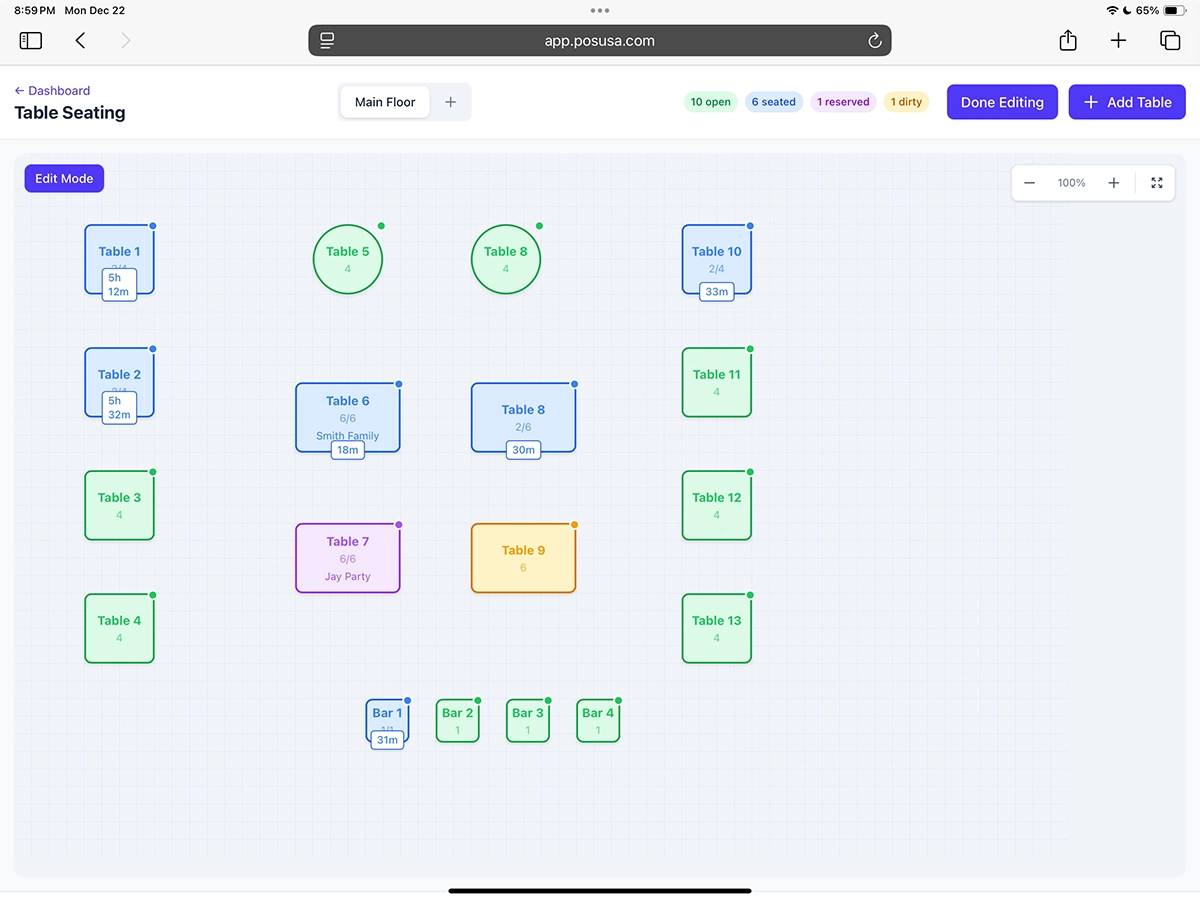
Build your restaurant layout with drag-and-drop. Tap a table to mark it seated, reserved, or available. See everything at a glance on your iPad.
No monthly fees. No per-cover charges. No complicated setup.
Everything You Need — All Free
Drag-and-Drop Floor Plan Editor
Build your layout with round, square, and bar tables. Set custom labels and capacity. Rotate, resize, and reposition anytime.
Real-Time Table Status
Color-coded status at a glance: Available, Seated, Reserved, or Dirty. Live timer shows how long each party has been seated.
Guest & Party Tracking
Track guest names, party size, and notes for each table. One-tap seating and quick status changes keep things moving.
Cloud-Synced Across Devices
Works on tablets, phones, and desktops. No app download required. Changes sync instantly across all devices.
Reservation Management
Mark tables as reserved for upcoming guests. Track table history and turnover throughout the shift.
Free Forever
No monthly fees. No per-cover charges. No credit card required. The seating software stays free.
Up and Running in Minutes
Sign Up Free
Create your account in 30 seconds. No credit card required.
Build Your Floor Plan
Drag and drop tables to match your restaurant layout.
Open on Your Tablet
Access your seating chart on any iPad or tablet at the host stand.
Start Seating Guests
Tap tables to update status. Everyone sees changes in real-time.
How Restaurants Use It
Faster Table Turns
See exactly which tables are ready to seat. No more walking the floor to check what's open.
Fair Server Rotation
Visually track which sections have been seated to keep server assignments balanced.
Manage Reservations
Mark tables as reserved for upcoming guests. See who's coming and when at a glance.
Busy Night Coordination
Your whole team sees the same floor plan. Hosts, managers, and servers stay in sync.
When You're Ready
Turn tables into revenue.
Free forever for seating. When you want to take orders and payments from tables, just connect Stripe and unlock the full POS — tableside ordering, card processing, and kitchen tickets included.
- Tap a table → open an order
- Table numbers on every ticket
- Accept card and cash payments
- No monthly fees — just processing
Why We Built This
POSUSA works with restaurant owners every day. We review POS systems, write buyer guides, and build free tools — like this seating software, our free QR code menu, and free POS system — that help real hospitality businesses run better without big software budgets.
The Insight
Hosts at smaller restaurants don't need AI-powered reservation optimization. They need a simple way to see which tables are open and mark them as seated.
The Problem
Most table management software charges $200-400/month and comes bundled with features you don't need. Per-cover fees add up fast on busy nights.
Our Philosophy
This table management software is free because basic seating tools should be accessible to every restaurant — not just the ones with big software budgets.
Who This Is For
If you seat guests and want a better way to manage your tables, this works.
- Full-service restaurants
- Fast casual with table service
- Bars and breweries
- Cafés and coffee shops
- Hotel restaurants
- Private event venues
- Food halls
- Rooftop and patio dining
Frequently Asked Questions
Ready to Manage Your Tables?
Build your floor plan in minutes. Start seating guests more efficiently today.

POSUSA is a point of sale company serving restaurants, retailers, and small businesses. Since 2011, we've sold, installed, and reviewed thousands of POS systems — and now we build our own. Whether you need our free POS or help finding the right fit, we're here to help.

