

Touchbistro
$69.00
 Jason Feemster
TouchBistro POS Review: Features, Pricing, Pros & Cons
Updated October 2026
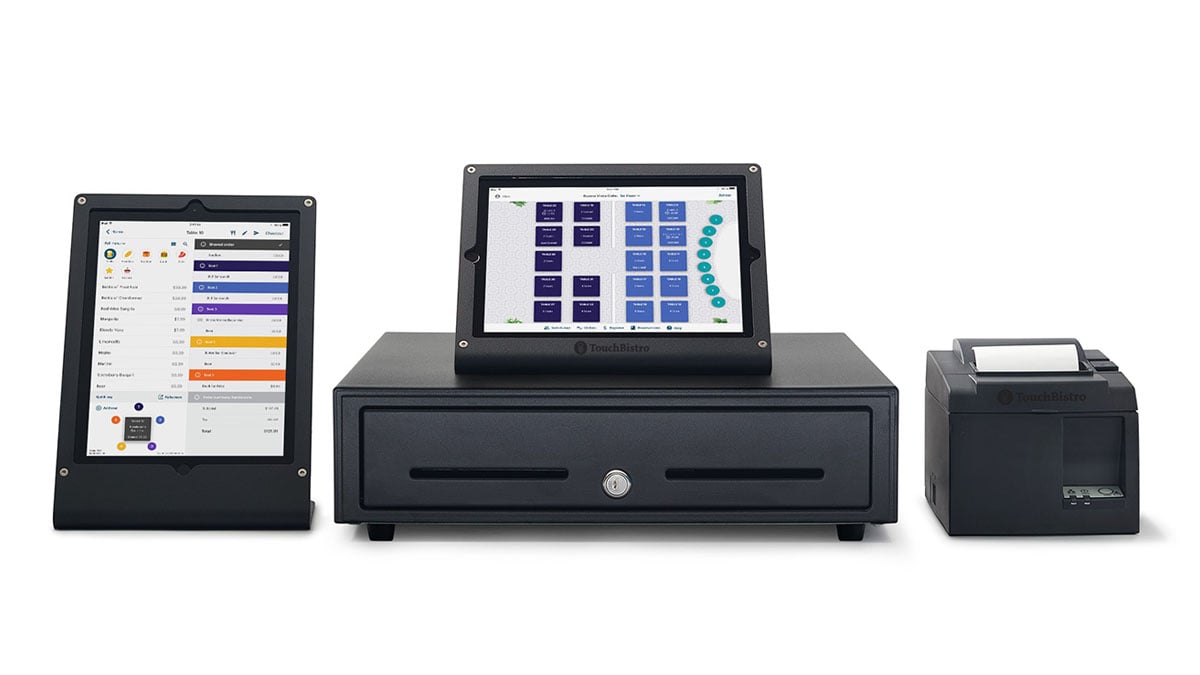
TouchBistro is an iPad-based restaurant POS starting at $69/mo for software, or $119/mo for the Essentials Bundle with hardware included. It has strong offline capabilities, intuitive table management, and built-in features that reduce third-party integration needs, and the familiar iOS interface means faster staff training. The catch: annual contracts, quote-only processing rates, and add-on fees on top of the advertised price.
👉 Compare TouchBistro to other restaurant POS systems.
I’ve tested a lot of restaurant POS systems, and TouchBistro stands out for one simple reason: it’s built around iPads instead of proprietary terminals. That means your servers aren’t learning a whole new system, they’re using something that already feels familiar. And with the new TouchBistro One handheld, servers can now take orders, payments, and print receipts tableside from a single device.
The offline capabilities are genuinely reliable, and the restaurant-specific features hit the right notes without overcomplicating things. It’s not perfect (more on that below), but it gets the fundamentals right. Founded in 2010 by Alex Barrotti, TouchBistro now powers thousands of restaurants across North America.
🎥 Video Review
👆 Watch our hands-on walkthrough of TouchBistro’s interface, table management, and reporting features.
Pros & Cons
- Familiar iPad interface reduces training
- Reliable offline mode (full hybrid)
- Restaurant-focused features built-in
- 24/7 support on every plan
- Strong table and floor plan management
- Tableside ordering with mobile iPads
- New TouchBistro One all-in-one handheld
- Runs mainly on iPads (no Android)
- Processing rates not published
- Add-ons increase costs
- Annual contract required
- Processing priced by quote only
- Mixed support/stability reviews
How Much Does TouchBistro Cost?
TouchBistro starts at $69/mo for POS software alone, or $119/mo for the Essentials Bundle, which includes restaurant-grade hardware and integrated payments. Larger operations can get a custom quote. TouchBistro notes that payment processing and additional fees apply on every plan, and the software-only plan also requires you to supply hardware.
| Plan | Monthly Cost | What’s Included | Best For |
|---|---|---|---|
| Point of Sale | From $69/mo | Menu management, reporting, floor plans and table management, staff management, 24/7 support, POS integrations (hardware not included) | Restaurants with existing iPads and hardware |
| Essentials Bundle | From $119/mo | Everything in Point of Sale, plus integrated payments and restaurant-grade hardware | New restaurants wanting an all-in-one package |
| Custom Setup | Custom quote | Everything in Essentials, plus additional FOH, BOH, and guest engagement solutions | Multi-location groups and complex operations |
Add-ons like online ordering, reservations, loyalty, KDS, inventory, gift cards, and marketing are priced separately.
Payment Processing
TouchBistro doesn’t publish a flat processing rate. TouchBistro Payments, its in-house processing (run through Chase), uses cost-plus pricing, also called interchange-plus: you pay the card networks’ actual interchange cost plus a set markup, quoted separately from your POS subscription.
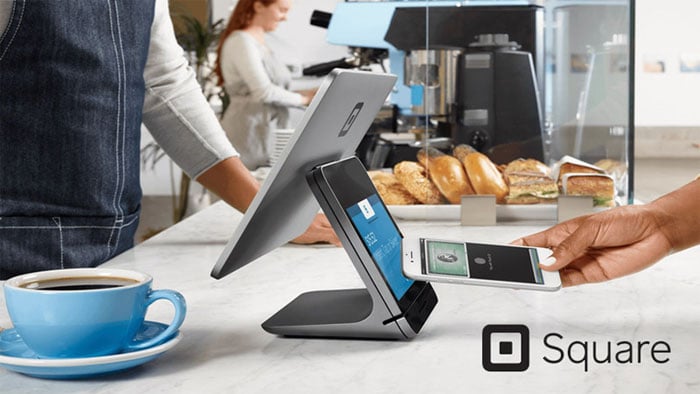
That’s different from the flat rates Toast and Square advertise, and for most restaurants it’s a good thing. On a flat rate, you pay the same percentage on a cheap debit card as on a premium rewards card. On cost-plus, debit and basic cards cost you less, so the effective rate usually comes in lower at real restaurant volume. The trade-off is that you can’t compare it at a glance, so ask for the markup in writing and your expected effective rate based on your current statements.
A couple of other details worth knowing. If you keep a Chase business account, TouchBistro Payments can fund your sales by the next business day. TouchBistro Payments is the default for new US customers, but TouchBistro also lists integrated third-party payment partners, so if you have a merchant account you’d like to keep, ask whether it’s supported before you sign.
Key Features
Quick Specs
| Feature | TouchBistro POS |
|---|---|
| Best For | Full-Service Restaurants, Quick Service, Cafes, Bars |
| Starting Price | $69/mo (software only) or $119/mo (Essentials Bundle with hardware) |
| Hardware Platform | iPad-based (iOS), plus the TouchBistro One handheld |
| Free Trial | Demo available (contact required) |
| Payment Processing | TouchBistro Payments (cost-plus, by quote); some integrated third-party partners |
| Support | 24/7 on all plans |
| Multi-Location Support | Yes |
| Offline Mode | Yes (hybrid system) |
| Contract Required | Yes (annual, auto-renew) |
Notable Features
- TouchBistro One (New): An all-in-one handheld that combines ordering, payments, and receipt printing in one device, built for full-service tableside service
- Tableside Ordering: Staff input orders directly at tables using handheld iPads or TouchBistro One, reducing trips to fixed terminals
- Floor Plan & Table Management: Drag-and-drop visual layout with real-time table status tracking
- Menu Management: Update prices, add items, or mark unavailable instantly across all terminals
- Hybrid Offline Mode: Full POS functionality during internet outages, with orders, payments, and menu edits all working offline
- Kitchen Display System (KDS): Improves FOH/BOH communication (add-on)
- Online Ordering: Accept orders from your website with no third-party fees (add-on)
- Reservations: Manage bookings, capacity, and guest information (add-on)
- Customer Facing Display: Lets diners confirm items, modifiers, and prices before paying (add-on)
- Profit Management powered by MarginEdge: Invoice processing, food cost, and financial reporting tied to POS sales (add-on)
- Labor Management: Scheduling informed by sales, guest, and shift data synced from the POS every 15 minutes (add-on)
- Reporting & Analytics: Sales, menu performance, staff tracking, and inventory reports accessible from anywhere
- Integrations: QuickBooks, Xero, 7shifts, MarginEdge, plus a loyalty program add-on
Hardware

TouchBistro runs on iPads, so you can use existing compatible devices or get hardware through the Essentials Bundle. The newer TouchBistro One handheld adds a dedicated all-in-one option for tableside service, with ordering, card payments, and a built-in receipt printer in one unit, so servers don’t need an iPad plus a separate card reader. Compatible peripherals include receipt printers, cash drawers, card readers, KDS screens, and customer-facing displays. Setup includes hardware verification and configuration assistance, and hardware financing is available for venues with two or more terminals.
Real User Feedback
TouchBistro averages roughly 4 out of 5 stars across review platforms. Users praise ease of use but report concerns about stability and support.
✅ What Users Like
- Easy menu management: “Very easy and quick to change products and prices”
- Intuitive interface: “iPad interface is intuitive for all staff levels”
- Reliable offline mode: “Excellent offline capabilities during internet issues”
- Visual floor plans: “Drag-and-drop floor plans are very helpful”
❌ What Users Don’t Like
- System stability: “System often crashes. Still no resolution in sight”
- Contract concerns: “Difficulty canceling subscription after 4 years”
- Hardware costs: “Thousands of dollars of Apple hardware required”
- Support quality: “Support lacks knowledge and reads from script”
TouchBistro vs Other Restaurant POS Systems
| Feature | TouchBistro | Toast | Square for Restaurants | Shift4 Dine |
|---|---|---|---|---|
| Best For | iPad-Based Restaurants | Full-Service Restaurants | Restaurants wanting no contract | Restaurants & Bars |
| Starting Price | $69/mo | $0/mo | $0/mo | $29.99/mo |
| Hardware | iPad (iOS) + TouchBistro One handheld | Proprietary Android | Square hardware or iPad | Proprietary Android |
| Processor | TouchBistro Payments (cost-plus) | Toast only | Square only | Shift4 required |
| Offline Mode | Full hybrid | Limited | Card payments offline | Limited |
| Contract | Annual (auto-renew) | 2-3 years | None | 36 months |
Who Should Use TouchBistro?
✅ Best fit for:
- iPad-comfortable restaurants wanting familiar technology
- Operations needing strong offline capabilities
- Restaurants wanting built-in features vs. third-party integrations
- Multi-location businesses seeking centralized management
❌ Not ideal for:
- Tight hardware budgets on the software-only plan (Apple devices are expensive)
- Businesses wanting month-to-month flexibility (see Square for Restaurants)
- Restaurants that want a published, flat processing rate
- Operations needing extensive third-party integrations
Frequently Asked Questions
How much does TouchBistro cost?
TouchBistro starts at $69/mo for software only, or $119/mo for the Essentials Bundle with hardware and integrated payments included. Larger operations get a custom quote. Payment processing and add-on fees are extra, and annual contracts are required.
What is TouchBistro One?
TouchBistro One is TouchBistro’s all-in-one handheld for full-service restaurants. It combines ordering, card payments, and receipt printing in one device and works with the existing TouchBistro POS and TouchBistro Payments, so servers can take orders and close checks at the table without juggling an iPad and a card reader.
Can I use my existing iPads?
Yes, most recent iPad models are compatible. They’ll verify during setup.
Does TouchBistro work offline?
Yes, with full POS functionality including orders, payments, and menu management. Data syncs when connectivity returns.
Can I use my own payment processor?
Possibly. TouchBistro Payments (run through Chase) is the default for new US customers, but TouchBistro also works with some integrated third-party payment partners. If you have a merchant account you’d like to keep, ask whether it’s supported before you sign.
What are TouchBistro's processing fees?
TouchBistro doesn’t publish a flat rate. TouchBistro Payments uses cost-plus (interchange-plus) pricing, where you pay the card networks’ interchange cost plus a set markup, quoted separately from your POS subscription. Ask for the markup and an estimated effective rate based on your current card mix.
Does TouchBistro require a contract?
Yes, annual contracts that auto-renew. No month-to-month option.
Does TouchBistro integrate with QuickBooks?
Yes, via MarginEdge and Shogo. It also integrates with Xero and Sage.
How does TouchBistro compare to Toast?
TouchBistro runs on iPads and starts at $69/mo on an annual contract. Toast runs on its own Android hardware, starts at $0/mo, and typically requires a 2-3 years contract. Choose TouchBistro if your staff already knows iPads and you want strong offline mode; choose Toast for deeper restaurant tooling and purpose-built hardware.
Verdict
TouchBistro delivers reliable, intuitive technology that doesn’t get in the way of service. The iPad-based approach uses familiar technology while adding restaurant-specific functionality with strong offline capabilities, and the Essentials Bundle makes it easy to get started without buying hardware separately.
Be aware of the trade-offs: Annual contracts are required, processing is priced by quote (cost-plus, which is usually a good deal but hard to compare at a glance), and user reviews show mixed experiences with support quality and system stability. Get a demo, get your processing rate in writing, and read recent reviews before committing.
Expert Rating: ⭐ 8/10. A solid iPad-based restaurant POS with strong offline capabilities and intuitive table management. Annual contracts, quote-only processing, and mixed support reviews keep it from ranking higher.

Jason Feemster
POS systems expert and founder of POSUSA.com, a trusted industry resource since 2011. With over a decade of hands-on experience testing and reviewing point-of-sale systems, he helps business owners choose solutions that actually fit their needs.
Specification: Touchbistro
|
Videos: Touchbistro


Photos: Touchbistro


2 reviews for Touchbistro
Add a review










Using this at my bar since April and it seems to be a good system. It has a few kinks, but so far most have been user error. Customer service is mostly off-shore, and in my opinion, should be US or Canada based, but they are helpful and have resolved any issues in a timely manner. Waiting to set up for my soon to be open kitchen but expect the same results.
Constant glitches, several redundant aspects of table service, no signature line on credit card receipts, they made several unauthorized charges to my credit card for services I wasnt even able to use then I had to fight them for refunds, sales man lied to me about what the POS could and couldnt do to get me to sign on then another lengthy battle to get out of the contract. They claimed they cannot give refunds, which they can and did, and they claimed they never cancel contracts, which they can and did. Now Im just stuck in my main locations contract.