
Imonggo POS
Free!
 Jason Feemster
Imonggo POS Review 2026: Features, Pricing, Pros & Cons
Updated January 2026 • Verified Q1 2026
Table of Contents
- 1 Pros & Cons
- 2 Imonggo POS Pricing
- 3 Key Features
- 4 Real User Feedback
- 5 Imonggo vs Other Free POS Systems
- 6 Who Should Use Imonggo?
- 7 FAQ
- 7.1 Is Imonggo POS really free, or will I pay later?
- 7.2 Who is Imonggo best for?
- 7.3 Can I use Imonggo for a restaurant or bar?
- 7.4 Does the free plan include support?
- 7.5 Does Imonggo have offline mode?
- 7.6 What payment processors work with Imonggo?
- 7.7 Can I upgrade to Premium without losing my data?
- 7.8 How does inventory work on Imonggo's free plan?
- 8 Verdict

Imonggo POS is a legit free POS for tiny retail and pop-up shops. The Free Forever plan lets you run one user and one branch with under 30 items and under 300 invoices per month. If you stay small, it works. If you grow, you’ll need Premium (per-branch) to lift the caps and unlock extras like offline mode.
👉 Comparing free options? See our Free POS Software guide.
If you’re hunting for a no-cost POS to get your shop off the ground, Imonggo POS is probably on your shortlist. But is it really free — and is it enough to run day-to-day retail?
Imonggo is a cloud-based retail POS that keeps things simple: ring up sales, track stock, capture customers, and run basic reports. The draw is the Free Forever plan for a single user and single branch. It’s enough for weekend markets, micro-boutiques, and validation-stage retailers who want a real POS without a monthly bill.
Below, I’ll break down what you get on the free plan, where the limitations kick in, what upgrades cost, and how Imonggo compares to other “free” point of sale solutions.
Pros & Cons
- Genuinely free for light-volume retail
- No processor lock-in — use Stripe/Authorize.net
- Simple, low-friction onboarding
- Clean path to upgrade when you outgrow it
- Offline capability available on Premium
- Strict caps on the free tier (user/branch/items/sales)
- Limited advanced features compared to paid POS suites
- Support priority goes to paid plans
- Browser-based UX feels utilitarian
Imonggo POS Pricing
Is it really free? Yes — Imonggo’s Free Forever plan covers one user and one branch as long as you stay under 30 products and under 300 invoices per month. When you outgrow those caps, upgrade to Premium at $30/branch/month or $330/branch/year (each branch needs its own subscription).
| Plan | Monthly Cost | What You Get | Best For |
|---|---|---|---|
| Free | $0 | 1 user, 1 branch, <30 products & <300 invoices/month; core POS + inventory basics | Pop-ups, kiosks, validation-stage shops |
| Premium | $30/branch (or $330/yr) | Unlimited usage, more users/branches, offline mode, priority support | Growing retail with heavier volume |
Key Features
Quick Specs
| Feature | Imonggo POS |
|---|---|
| Best For | Small retail, kiosks, pop-ups, early-stage startups |
| Starting Price | $0/mo (Free Forever plan) |
| Free Plan Limits | 1 user • 1 branch • <30 products • <300 invoices/mo |
| Devices | Web browser (desktop/tablet); iPad/Android via browser |
| Payments | Bring-your-own gateway (e.g., Stripe, Authorize.net) |
| Offline Mode | Premium only — sell offline and sync later |
| Support | Email/knowledge base on free plan; priority on Premium |
Notable Features
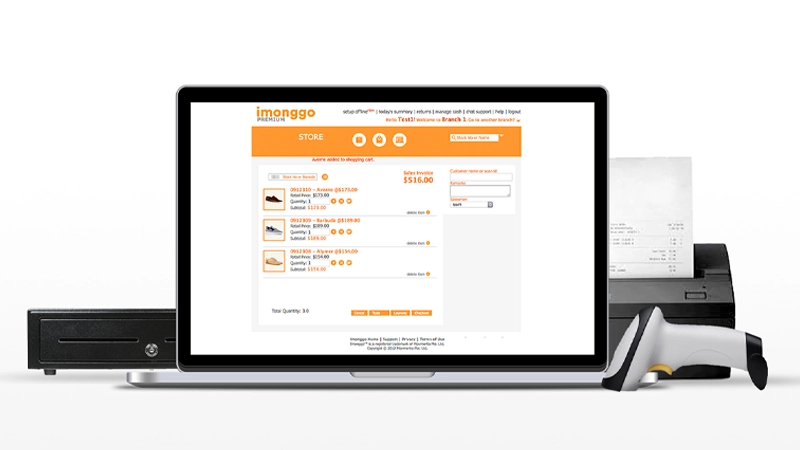
- Free plan essentials: Checkout, item catalog, customers, basic reporting
- Inventory basics: Stock counts, item details, images, simple adjustments
- Customer receipts: Email receipts; light CRM
- CSV import/export: Move items in/out quickly
- Offline mode (Premium): Keep selling during outages and sync later
- Bring-your-own processor: No forced merchant account
Real User Feedback
✅ What Users Like
- Easy to get selling: Setup is quick; you don’t need an IT person to start ringing sales.
- Value at $0: For micro-retail, the free plan covers actual day-to-day basics.
- No processor lock-in: Owners like choosing their own payment gateway.
❌ What Users Don’t Like
- Free caps sneak up: Hitting 30 items or around 300 invoices forces a plan change.
- Feature depth: Missing the deeper inventory/analytics some retailers want later.
- Support speed: Free users report slower responses during busy periods.
Imonggo vs Other Free POS Systems
| Feature | Imonggo | Loyverse | eHopper |
|---|---|---|---|
| Software Cost | $0 (within free limits) | $0 core (paid add-ons) | $0 free plan (caps apply) |
| Free Plan Limits | 30 Products, 300 Invoices per month | No strict caps; add-ons for employees/inventory | 50 items • 300 tx/mo • 1 register |
| Payment Processing | Bring-your-own (Stripe, Authorize.net) | Bring-your-own (varies by country) | Supports surcharge/cash-discount programs |
| Offline Mode | Premium only | Yes | Yes |
| Best For | Small retail & kiosks | Cafes and growing multi-store setups | Food trucks, very small shops |
| Biggest Catch | Usage caps; offline is a paid feature | Add-ons add up | Tight free limits + processor requirement |
Who Should Use Imonggo?
✅ Best fit for:
- Pop-ups & kiosks: Low overhead, quick setup
- Small retail: Light inventory and steady—but not heavy—volume
- Side businesses & startups: A way to sell without monthly software fees
- DIY processors: If you prefer Stripe/Authorize.net vs being locked into a POS processor
❌ Not ideal for:
- Multi-location retailers or chains
- Large catalogs (more than ~1,000 SKUs)
- Restaurants needing table service tools (tables, coursing, KDS)
- Teams needing granular roles/permissions across many staff
FAQ
Is Imonggo POS really free, or will I pay later?
Yes — Imonggo offers a Free Forever plan that includes one user, one branch, and up to 30 Products, 300 Invoices per month. There are no hidden fees, but if you outgrow those limits or need advanced features like offline mode, you’ll need to upgrade to a paid Premium plan.
Who is Imonggo best for?
Imonggo is ideal for small retail stores, boutiques, kiosks, and mobile sellers who need a simple, cloud-based POS without upfront costs. It’s perfect for startups or side businesses that want to manage inventory and track sales without committing to monthly fees.
Can I use Imonggo for a restaurant or bar?
While Imonggo can handle simple counter-service environments like cafés or food stands, it’s primarily built for retail. It doesn’t include restaurant-specific tools such as table layouts, coursing, or kitchen display systems.
Does the free plan include support?
Yes, the free plan provides access to a knowledge base and email support. Paid users receive faster response times and priority assistance, but most small businesses find the free support sufficient for basic use.
Does Imonggo have offline mode?
Offline mode is available only on the Premium plan. The free version requires an internet connection to process transactions and sync data in real time, so if you operate in areas with spotty Wi-Fi, upgrading may be worth it.
What payment processors work with Imonggo?
Imonggo integrates with Stripe for credit card processing, allowing you to use your existing account and benefit from transparent fees. It also supports other processors in certain regions, like Authorize.net, for more flexibility.
Can I upgrade to Premium without losing my data?
Yes, you can upgrade seamlessly from the Free plan to Premium without losing your existing sales history, inventory, or customer data. Everything transfers automatically once your subscription is activated.
How does inventory work on Imonggo's free plan?
The free plan supports up to 300 products with basic stock tracking and pricing. You can easily manage quantities, apply discounts, and track top sellers. Premium plans expand these limits and add advanced inventory reports and multi-location controls.
Verdict
If you want a real POS without a monthly software fee, Imonggo’s free plan is one of the better starter options for small retail. It covers checkout, inventory basics, customer records, and reporting — and you can bring your own payment processor.
Once you outgrow the caps (or need multi-location, deeper analytics, or offline mode), you’ll need to upgrade — or compare alternatives like Square POS, SkyTab POS, or eHopper depending on your industry.
Expert Rating: ⭐ 6.5/10 — A solid free POS option for small retailers and pop-ups that want simplicity and zero monthly costs, but its limited features and lack of offline mode keep it from ranking higher among top free systems.

Jason Feemster
POS systems expert and founder of POSUSA.com, a trusted industry resource since 2011. With over a decade of hands-on experience testing and reviewing point-of-sale systems, he helps business owners choose solutions that actually fit their needs.
Specification: Imonggo POS
|
Photos: Imonggo POS
User Reviews
Be the first to review “Imonggo POS”













There are no reviews yet.