

Shopify POS
$89.00
 Mark Delzer
Shopify POS Review: Pricing, Features, Pros vs Cons
Updated: January 2026 • Verified Q1 2026
Table of Contents

Shopify POS is the in-person selling solution from Shopify, the eCommerce platform powering millions of online stores worldwide. Founded in 2006 in Ottawa, Canada, Shopify launched its POS system in 2013 to help online merchants sell at physical locations, pop-ups, and markets.
Looking for QuickBooks POS? Intuit discontinued QuickBooks Desktop POS in 2023 and partnered with Shopify to offer the QuickBooks Desktop Connector. If you were a QuickBooks POS user, Shopify POS is now Intuit’s recommended replacement — with native QuickBooks Online integration for seamless accounting sync.
The system is now available as a standalone product — you no longer need an eCommerce subscription to use Shopify POS. However, the real power comes from unifying online and in-store sales on one platform. Inventory syncs in real-time, customer data flows between channels, and you manage everything from a single dashboard.
Shopify POS works on iPad and iPhone (optimized) and Android devices (limited features). It’s ideal for retailers who already use or plan to use Shopify for eCommerce, or anyone who wants tight online-offline integration without cobbling together multiple systems.
Pros & Cons
- Seamless sync with Shopify eCommerce
- Unified inventory across all channels
- POS Lite included free with all plans
- Omnichannel selling (BOPIS, local delivery)
- Intuitive, modern interface
- 24/7 customer support
- POS Pro ($89/mo) required for advanced features
- Must use Shopify Payments or pay extra fees
- Android app has poor reviews (2.9/5)
- Limited offline functionality
- Advanced features require paid apps
- Less robust than dedicated retail POS systems
Shopify POS Pricing
Shopify POS pricing has two components: your Shopify plan (which includes POS Lite) and the optional POS Pro upgrade for brick-and-mortar locations.
Shopify Plans (Includes POS Lite)
| Plan | Monthly (Annual) | Monthly (Month-to-Month) | In-Person Processing |
|---|---|---|---|
| Basic | $29/mo | $39/mo | 2.6% + 10¢ |
| Grow | $79/mo | $105/mo | 2.5% + 10¢ |
| Advanced | $299/mo | $399/mo | 2.4% + 10¢ |
POS Pro Add-On
| Add-On | Cost | What It Adds |
|---|---|---|
| POS Pro | $89/mo per location | Staff permissions, smart inventory, in-store analytics, unlimited registers |
Third-Party Payment Processor Fees
If you don’t use Shopify Payments, Shopify charges additional transaction fees: 2% (Basic), 1% (Shopify), or 0.6% (Advanced) on top of your processor’s rates.
Key Features
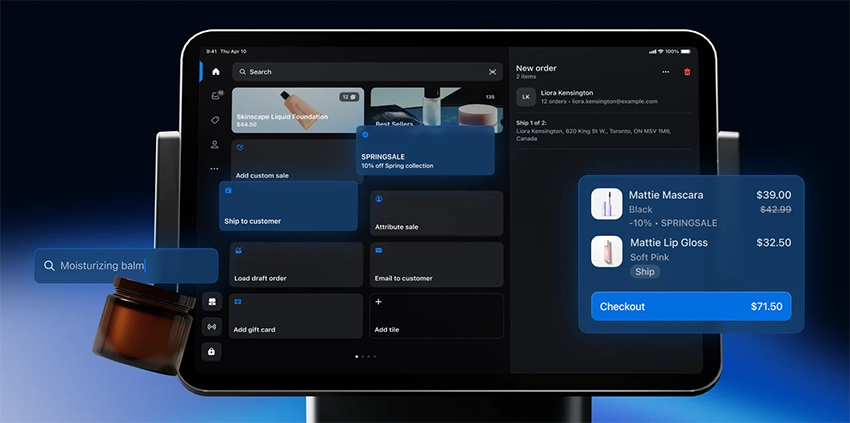
Omnichannel Selling
- Buy online, pick up in store (BOPIS): Customers order online and collect in-store
- Local delivery: Fulfill orders from your store to nearby customers
- Endless aisle: Sell products not physically in-store and ship to customer
- Unified cart: Customers can start shopping online, finish in-store
Inventory Management
- Real-time sync across online store and all physical locations
- Low-stock alerts and inventory counts (POS Pro)
- Purchase orders and vendor management (POS Pro)
- Barcode scanning and label printing
- Product variants (size, color, etc.)
Checkout & Payments
- Customizable smart grid for quick access to products
- Split payments, gift cards, store credit
- Custom discounts and automatic promotions
- Email or printed receipts
- Returns and exchanges with inventory adjustment
Customer Management
- Unified customer profiles (online + in-store)
- Purchase history and lifetime value
- Customer notes and tags
- Loyalty program integration via apps
Staff Management (POS Pro)
- Unlimited staff accounts and PINs
- Role-based permissions
- Sales attribution by staff member
- Performance tracking
Reporting & Analytics
- Sales reports by product, location, staff, time period
- Inventory reports and forecasting
- Customer insights and purchase patterns
- Cash tracking and register shifts
Hardware Options
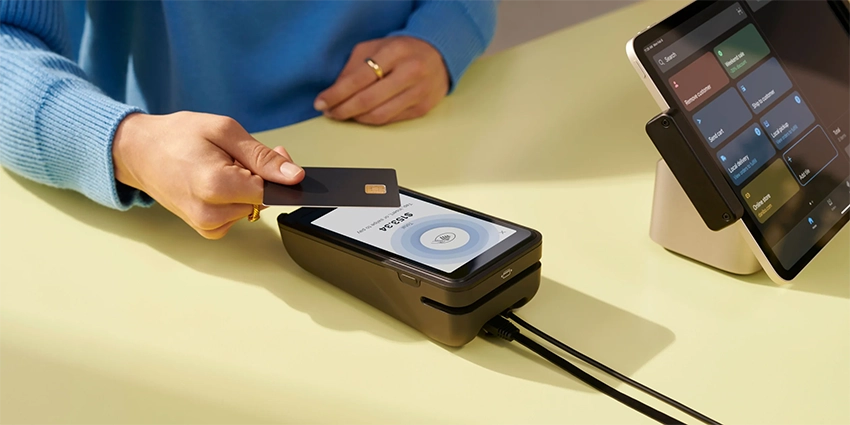
Shopify POS runs on iPad (recommended), iPhone, and Android. Shopify sells hardware bundles or you can use compatible third-party equipment.
| Hardware | Price |
|---|---|
| Tap & Chip Card Reader | $49 |
| POS Terminal (card reader + display) | $349 |
| Tap & Chip Countertop Kit | $219 |
| Retail Kit (stand + reader + dock) | $159 |
| Cash Drawer | $139 |
| Receipt Printer | $299-$369 |
Real User Feedback
✅ What Users Like:
- “Shopify POS seamlessly integrates online and offline sales, making inventory management centralized.”
- “It’s easy to train staff — the interface is intuitive and the smart grid is customizable.”
- “Omnichannel features like BOPIS and local delivery are game-changers for our business.”
- “7 years on the product and service continue to improve and offer astonishing value.”
❌ What Users Don’t Like:
- “Many essential features require third-party apps which add monthly costs.”
- “The receipt printer and barcode scanners disconnect daily and require manual resets.”
- “POS can be slow to update and integrate with online store and back-end inputs.”
- “Android app is buggy and unreliable compared to iOS.”
Shopify POS vs. Competitors
| Feature | Shopify POS | Square POS | Lightspeed Retail | Clover |
|---|---|---|---|---|
| Best For | eCommerce + retail | Small businesses | Inventory-heavy retail | Quick setup retail |
| Starting Price | $29/mo + POS Pro $89/mo | $0/mo | $89/mo | $14.95/mo |
| In-Person Rate | 2.4%-2.6% + 10¢ | 2.6% + 15¢ | 2.6% + 10¢ | 2.3%-2.6% + 10¢ |
| eCommerce Integration | Native (best-in-class) | Square Online | Native + Shopify | Limited |
| Inventory Depth | Good | Basic | Excellent | Basic |
| Hardware Required | iPad/iPhone/Android | Any device | iPad | Proprietary |
| Free Plan | POS Lite with paid plan | Yes | No | No |
Who Should Use Shopify POS?
✅ Best fit for:
- Retailers already using Shopify for eCommerce
- Online-first brands expanding to physical retail
- Pop-up shops and market vendors
- Multi-channel sellers (online, social, in-store)
- Boutiques and apparel stores
- Businesses wanting unified online/offline inventory
❌ Not ideal for:
- Restaurants or food service (use Shopify’s restaurant partners instead)
- Retail-only businesses with no online presence
- Android-dependent operations (app is unreliable)
- Businesses needing advanced inventory without eCommerce
- High-volume retailers needing deep customization
- Those wanting to avoid Shopify Payments
FAQ
How much does Shopify POS cost?
Shopify POS Lite is included free with all Shopify plans ($29-$299/mo). For brick-and-mortar stores needing staff management, detailed reporting, and inventory tools, upgrade to POS Pro at $89/month per location.
What's the difference between POS Lite and POS Pro?
POS Lite handles basic checkout, payments, and inventory sync — good for pop-ups and occasional in-person sales. POS Pro adds staff permissions, smart inventory management, purchase orders, detailed analytics, and unlimited registers — essential for permanent retail locations.
Can I use Shopify POS without an online store?
Yes. Shopify POS is now available as a standalone product. However, you still need a Shopify subscription, and the main value comes from syncing online and in-store sales.
Does Shopify POS work on Android?
Yes, but with limitations. The Android app has a 2.9/5 rating with reports of bugs and connectivity issues. iOS (iPad/iPhone) is the recommended and better-supported platform.
Can I use my own payment processor?
Yes, but Shopify charges additional transaction fees (0.6%-2%) if you don’t use Shopify Payments. Most users stick with Shopify Payments to avoid the extra cost.
Does Shopify POS work offline?
Limited. You can process cash transactions offline if the app is already open, but credit card payments require an internet connection. The system syncs when connectivity is restored.
Verdict
Shopify POS is the obvious choice if you’re already on Shopify for eCommerce or plan to sell both online and in-store. The seamless inventory sync, unified customer data, and omnichannel features (BOPIS, local delivery, endless aisle) are hard to match.
For pop-ups and occasional in-person sales, POS Lite (included free) gets the job done. For permanent retail locations, plan to add $89/month per location for POS Pro — the staff management, inventory tools, and reporting are worth it.
The main drawbacks: Android support is weak, you’re effectively locked into Shopify Payments, and some features require paid third-party apps. If you’re retail-only with no online presence, Lightspeed or Square may be better fits.
Recommendation: If eCommerce is core to your business and you want tight online-offline integration, Shopify POS delivers. Try it free for 3 days, then $1/month for 3 months with the current promo. Also compare with Square POS (free tier) and Lightspeed Retail (stronger inventory).

Jason Feemster
POS systems expert and founder of POSUSA.com, a trusted industry resource since 2011. With over a decade of hands-on experience testing and reviewing point-of-sale systems, Jason helps restaurant and retail owners find solutions that fit their needs and budget. For questions, reach out at info@posusa.com.
Specification: Shopify POS
|
Videos: Shopify POS

Photos: Shopify POS
User Reviews
Be the first to review “Shopify POS”













There are no reviews yet.