Square is one of the most popular payment processors for small businesses — and for good reason. No contracts, no monthly fees on the basic plan, and you can start taking payments in minutes. But their fee structure changed significantly in late 2025, and most guides online still show the old rates.
We’ve helped thousands of businesses choose (and set up) their payment processing since 2011. Here’s what Square actually costs right now, what changed, and whether it still makes sense for your business.
Table of Contents
- 1 Square Processing Fees by Plan (2026)
- 2 What Changed in 2025 (And Why It Matters)
- 3 Square’s Pricing Plans
- 4 What You’ll Actually Pay: Real-World Examples
- 5 Hardware Costs
- 6 Square for Specific Businesses
- 7 Add-On Fees and Extra Costs
- 8 Deposits, Holds, and Getting Your Money
- 9 Customer Support
- 10 Compatible Hardware and Devices
- 11 Is Square Right for Your Business?
- 12 Where Does Square’s ~2.75% Fee Actually Go?
- 13 Frequently Asked Questions
- 13.1 How much does Square charge per transaction in 2026?
- 13.2 Can I negotiate Square’s fees?
- 13.3 What does Square charge for Apple Pay?
- 13.4 How do I calculate my Square fees?
- 13.5 Are Square fees the same for every card brand?
- 13.6 What are Square card reader fees?
- 13.7 Does Square charge a monthly fee?
- 13.8 Does Square refund processing fees on returned transactions?
- 13.9 How fast does Square deposit my money?
- 14 Bottom Line
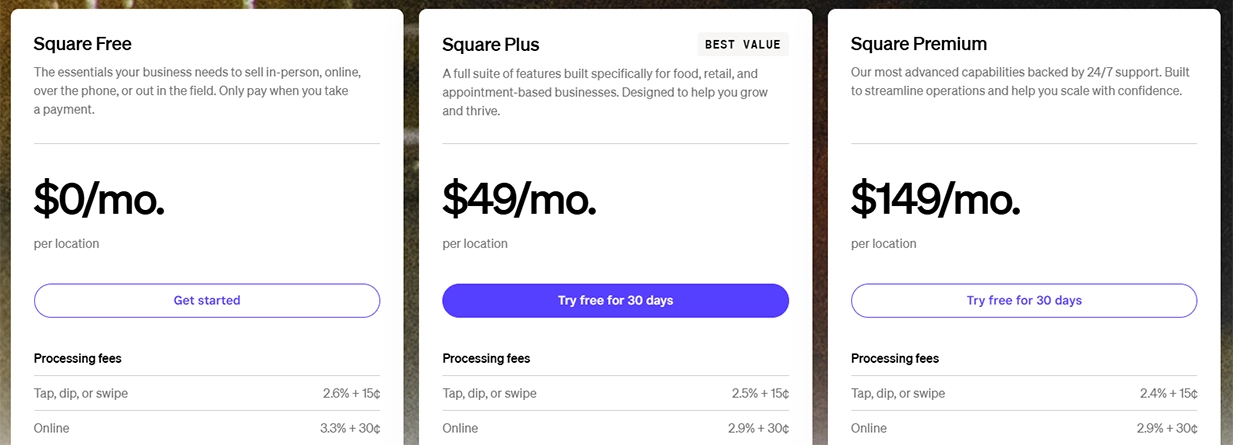
Square now charges 2.6% + 15¢ per in-person transaction on the Free plan (up from 10¢). Online payments jumped to 3.3% + 30¢ unless you’re on the Plus ($49/mo) or Premium ($149/mo) plan, which drops online rates to 2.9% + 30¢. Manually keyed payments remain 3.5% + 15¢ across all plans.
Quick Summary
- Square overhauled its pricing in October 2025 — all business types now share three unified tiers: Free ($0), Plus ($49/mo), and Premium ($149/mo).
- The per-transaction fee on the Free plan went from 10¢ to 15¢ for in-person sales. Online fees on the Free plan jumped to 3.3% + 30¢.
- Paying for Plus or Premium lowers your processing rates — but only makes financial sense above a certain monthly volume.
- Square uses flat-rate (bundled) pricing, which is simple to understand but can cost more than interchange-plus processors at higher volumes.
Square Processing Fees by Plan (2026)
This is the part most people get wrong. Square doesn’t have one processing rate — it has different rates depending on which subscription plan you’re on and how the payment is accepted. Here’s the current breakdown, pulled directly from Square’s pricing page:
| Payment Type | Free ($0/mo) | Plus ($49/mo) | Premium ($149/mo) |
|---|---|---|---|
| In-person (tap, dip, swipe) | 2.6% + 15¢ | 2.5% + 15¢ | 2.4% + 15¢ |
| Online / Invoices | 3.3% + 30¢ | 2.9% + 30¢ | 2.9% + 30¢ |
| Manually keyed / Card on file | 3.5% + 15¢ | 3.5% + 15¢ | 3.5% + 15¢ |
| Afterpay | 6% + 30¢ | 6% + 30¢ | 6% + 30¢ |
| ACH bank transfer | 1% ($1 min) | 1% ($1 min, $10 cap) | 1% ($1 min, $10 cap) |
| Gift card load fee | 2.5% | 2.5% | 0% |
One thing that hasn’t changed: Visa, Mastercard, Amex, and Discover all process at the same rate. No surprises there. Cash and check payments are free.
What Changed in 2025 (And Why It Matters)
If you set up Square before October 2025, pay attention. Square made its biggest pricing overhaul since launch. The old system — where restaurants paid one price, retail paid another, and appointments had its own tier — is gone. Every business type now shares the same three plans.
The changes that actually hit your wallet:
- Per-transaction fee went up 5¢. In-person payments moved from 2.6% + 10¢ to 2.6% + 15¢ on the Free plan. That’s an extra nickel per sale. On 500 monthly transactions, you’re paying $25 more per month than before.
- Online rates on the Free plan spiked. They jumped from 2.9% + 30¢ to 3.3% + 30¢. If you do any meaningful volume online, that alone could justify upgrading to Plus.
- Plus plan is now $49/mo (it was $29/mo for some business types). But it comes with lower processing rates that can offset the monthly cost if your volume is high enough.
- Premium tier added at $149/mo with the lowest rates (2.4% + 15¢ in-person) plus 24/7 phone support and no gift card load fees.
If you’re still on a legacy plan (the old Square for Restaurants Plus at $60/mo, for example), you can keep it for now — but Square is nudging everyone toward the new structure. Check your Dashboard under Settings > Pricing & Subscriptions to see what you’re actually paying.
Square’s Pricing Plans
Square Free ($0/month)
Square’s Free plan is still the best entry point for new businesses. No monthly fee, no contract, and you get the full POS app with basic reporting, inventory tracking, and unlimited items. You only pay processing fees when you make a sale.
The catch? You’re paying the highest processing rates in Square’s lineup. And after the 2025 changes, online transactions cost 3.3% + 30¢ — noticeably more than before. For a business doing mostly in-person sales under $10,000/month, the Free plan still works fine. Once you start selling online or pushing past that volume, run the numbers on Plus.
Square Plus ($49/month)
Square Plus drops your in-person rate to 2.5% + 15¢ and online rate to 2.9% + 30¢. You also get advanced reporting, team management tools, and features that used to be scattered across different industry-specific plans.
Here’s the math: the 0.1% in-person savings means you need roughly $49,000 in monthly card-present sales before Plus pays for itself on processing alone. But if you do any online sales, the savings from 3.3% → 2.9% stack up faster. A business doing $5,000/month online saves about $20/month on processing — so the total break-even drops significantly.
Square Premium ($149/month)
Premium gets you the lowest in-person rate at 2.4% + 15¢, plus 24/7 phone support, waived gift card load fees, and advanced features. This plan really only pencils out for businesses pushing $50,000+ in monthly sales or those who need around-the-clock support.
Here’s how to sign up for a new Square Account.
What You’ll Actually Pay: Real-World Examples
Rates on a page are one thing. What matters is how much Square takes out of your actual revenue each month. We ran the numbers for three common scenarios — all assuming 100% in-person card payments with an average ticket of $25:
| Monthly Card Sales | Free Plan Fees | Plus Plan Fees | Premium Plan Fees |
|---|---|---|---|
| $5,000 (200 transactions) | $160 | $174 ($125 + $49) | $269 ($120 + $149) |
| $15,000 (600 transactions) | $480 | $424 ($375 + $49) | $509 ($360 + $149) |
| $30,000 (1,200 transactions) | $960 | $799 ($750 + $49) | $869 ($720 + $149) |
The crossover point is around $12,000–$13,000/month in card sales where Plus starts saving you money over Free. Premium doesn’t beat Plus until you’re well above $50,000/month. Most small businesses we work with land on either Free or Plus.
Hardware Costs
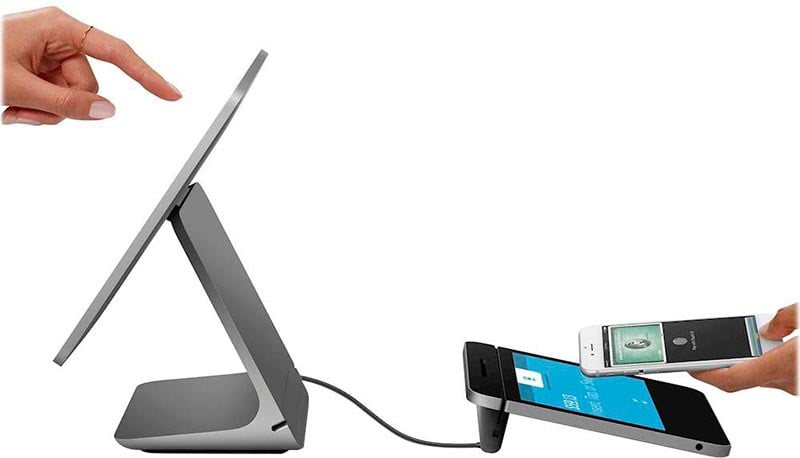
When people search for “Square card reader fees,” they’re usually asking about hardware — not processing rates. Square doesn’t charge ongoing fees for hardware. You buy it once (or finance it), and that’s it.
| Hardware | Price | Best For |
|---|---|---|
| Magstripe Reader | Free (first one), $10 after | Getting started, backup reader |
| Contactless + Chip Reader | $59 | Mobile sellers, farmers markets |
| Square Stand (iPad) | $149 or $14/mo × 12 | Counter checkout (iPad required) |
| Square Terminal | $299 or $27/mo × 12 | All-in-one portable terminal |
| Square Handheld | $399 | Tableside, line-busting |
| Square Register | $899 or $49/mo × 24 | Full countertop POS with dual screens |
Square also sells kits that bundle hardware together — register + printer + cash drawer combos can run $500–$1,500 depending on what you need. Check out the latest Square Hardware here.
>> RELATED: How to save on Square POS Hardware
Square for Specific Businesses

Even though Square unified its pricing tiers, it still offers specialized POS apps tailored to different industries. The software features differ — the pricing doesn’t.
Retail
Square for Retail includes inventory management, purchase orders, vendor management, barcode printing, and ecommerce integration. The Free plan covers the basics. Plus ($49/mo) adds advanced inventory tools and team management. If you’re running a clothing shop, gift store, or specialty retail — this is the version you want.
Restaurants
Square for Restaurants handles menu management, table layouts, coursing, kitchen display systems (KDS at $20/device/mo), and tip management. The Plus plan is where restaurant-specific features really open up — split checks, auto-gratuity by party size, close-of-day reports. Keep in mind: 24/7 phone support now requires Premium ($149/mo).
>> Related: Top Software for Restaurants
Appointments
Square Appointments works well for salons, barbers, spas, and professional services. It includes online booking, automated reminders, no-show protection, and a client management tool. The Free plan supports a single user. Plus adds Google Calendar sync, cancellation fees, and multi-staff scheduling.
Add-On Fees and Extra Costs

Square’s processing fees are only part of the picture. These are the add-ons that can quietly inflate your monthly bill:
| Add-On | Cost |
|---|---|
| Square Payroll | $35/mo + $6/employee |
| Square Shifts (scheduling) | Free (≤5 employees), then $2–$4.50/employee/mo |
| Team Communication | $2.50/employee/mo |
| Invoices Plus | $20/mo |
| Loyalty Program | Starting at $45/mo |
| Email Marketing | Starting at $15/mo |
| Text Message Marketing | Starting at $20/mo |
| KDS (Kitchen Display) | $20/device/mo |
| Kiosk | $15/device/mo |
| Instant/Same-Day Transfer | 1.75% per transfer |
None of these are required. But a restaurant running payroll for 10 employees, a KDS, and the Loyalty program could easily add $200+/month on top of processing fees and the Plus subscription. That’s worth thinking about before you commit.
Deposits, Holds, and Getting Your Money

Standard deposits land in your bank account in 1–2 business days with no extra fee. If you need money faster, instant and same-day transfers cost 1.75% of the transfer amount ($25 minimum, $10,000 max per transfer). Or you can skip transfer fees entirely by using a Square Checking account — your sales hit the account immediately.
The Account Freeze Problem

This is the biggest complaint we hear from Square users. Because Square is a payment aggregator (not a traditional merchant account provider), they don’t underwrite your business upfront. That means faster approval — but it also means Square can hold your funds or freeze your account if their risk algorithms flag something unusual.
Common triggers include sudden spikes in transaction volume, high chargeback rates, or selling in a category Square considers higher-risk. When it happens, funds can be held for days or weeks while Square investigates. There’s no real way to prevent it beyond keeping your account in good standing and avoiding dramatic swings in processing patterns.
If cash flow predictability matters to your business — and you’re doing $15,000+ monthly — this alone might be reason enough to look at a dedicated merchant account instead.
Customer Support
Square’s support is a mixed bag. The self-service resources are solid — help center, community forums, and the dashboard itself is intuitive enough that most people rarely need help. Phone support is available Monday–Friday, 6 AM–6 PM PT for Free and Plus plan users.
But if something goes wrong with your account — a freeze, a deposit issue, a dispute — getting a real human who can actually fix it can be frustrating. Response times for email support are inconsistent. That’s a trade-off of the “free to start” model. Premium ($149/mo) gets you 24/7 phone support, which is worth considering if you rely heavily on Square for daily operations.
Compatible Hardware and Devices
Square works with a broad range of POS hardware beyond their own products. The system supports iOS and Android phones and tablets, USB barcode scanners, receipt printers (USB or Ethernet), printer-driven cash drawers, and kitchen display systems. If you already own an iPad, you can pair it with a $59 reader and be up and running for under $100.
Is Square Right for Your Business?

Square makes sense when…
- You’re a new business and don’t want to sign a contract or pay monthly fees before you’ve made a sale.
- Your monthly card volume is under $15,000 and mostly in-person.
- You need a fast, clean setup — farmers market booth, pop-up shop, small café, service business.
- You want one platform handling payments, inventory, online orders, and basic reporting without stitching together multiple tools.
Consider alternatives when…
- You’re processing $25,000+/month and want to negotiate interchange-plus rates that could save you hundreds.
- You have a lot of keyed-in or phone orders (3.5% + 15¢ per transaction adds up fast).
- You need guaranteed access to your funds without risk of holds or freezes.
- You process high-value returns regularly — Square keeps processing fees on refunded transactions.
>> MORE: Clover vs. Square: Which POS System Is Best For Your Business?
>> MORE: 5 Tips for Choosing the Right Credit Card Processor
Where Does Square’s ~2.75% Fee Actually Go?

Square bundles everything — interchange, assessments, markup — into one flat rate. Here’s roughly how that breaks down on a typical in-person transaction:
- ~63% goes to interchange fees — the cut that goes to your customer’s card-issuing bank (Chase, Capital One, etc.).
- A small slice covers assessment fees — dues paid to Visa, Mastercard, and other card networks.
- ~3% covers security and PCI compliance — end-to-end encryption, fraud prevention, chargeback protection.
- ~34% is Square’s margin — paying for the POS software, reporting tools, dispute management, customer support, and everything else that comes “free.”
The advantage of this model: simplicity. You never have to decode an interchange table or wonder why one transaction cost more than another. The downside: at higher volumes, you’re overpaying on debit card transactions (where interchange is much lower) because Square charges you the same flat rate regardless.
Frequently Asked Questions
How much does Square charge per transaction in 2026?
Can I negotiate Square’s fees?
What does Square charge for Apple Pay?
How do I calculate my Square fees?
Are Square fees the same for every card brand?
What are Square card reader fees?
Does Square charge a monthly fee?
Does Square refund processing fees on returned transactions?
How fast does Square deposit my money?
Bottom Line
Square is still one of the best POS systems for small businesses — especially if you want zero upfront cost and a dead-simple setup. The 2025 pricing overhaul made things a bit more expensive on the Free plan, but it also simplified the tier structure and gave growing businesses a clearer upgrade path.
If you’re processing under $12,000/month in mostly in-person sales, stick with Free. Between $12,000 and $50,000, Plus is probably worth the $49. Above $50,000, run the numbers on Premium — or start shopping for an interchange-plus processor that can beat Square’s flat rate.
The biggest risk with Square isn’t the fees — it’s the account stability. If your business can’t afford a surprise fund hold, that’s reason enough to consider a traditional merchant services provider with proper underwriting.
Have questions about Square’s fees or need help picking the right payment processor? Drop a comment below — our team responds to every one.