
Updated October 2026
Clover and Square are the two biggest names in small business POS systems, and they take very different approaches. Square gives you a free plan and dead-simple pricing. Clover is sold through thousands of merchant services providers and authorized dealers, which means room to negotiate lower rates. We’ve set up and worked with both systems across hundreds of businesses since 2011 (POSUSA is an authorized dealer for both), and this guide breaks down exactly where each one wins.
Is Clover better or Square? Here’s the short version:
Square POS: Our top pick overall. Best for the vast majority of small businesses thanks to a genuinely free, fully functional POS and, just as importantly, no contracts. You’re never locked in. Learn more in our Square POS review.
Clover POS: Best for established, higher-volume businesses that want to negotiate lower interchange-plus rates and want premium, purpose-built hardware. More flexible on processing, but usually comes with a multi-year contract. Learn more in our Clover POS review.
Square vs Clover at a Glance
| Clover | Square | |
|---|---|---|
| Starting Price | $16/mo (retail POS plan) | $0/mo (Free plan) |
| In-Person Processing | 2.3%–2.6% + 10¢ | 2.6% + 15¢ (Free), 2.5% + 15¢ (Plus), 2.4% + 15¢ (Premium) |
| Online Processing | 3.5% + 10¢ | 3.3% + 30¢ (Free), 2.9% + 30¢ (Plus/Premium) |
| Keyed-In Processing | 3.5% + 10¢ | 3.5% + 15¢ |
| Monthly Plans | $16/mo (retail) to $135/mo (restaurant), varies by industry | $0/mo / $49/mo / $149/mo |
| Hardware Cost | $199 (Go) to $1,899 (Station Duo) | Free (reader) to $899 (Register) |
| Rate Negotiation | Yes, through Clover dealers and merchant services providers | Published rates only (custom pricing above $250K/year) |
| Contract Required | Often 36 months | None |
| Free Trial | 90 days | 30 days (Plus and Premium) |
| Best For | Established businesses wanting lower rates and customization | New/small businesses wanting zero-risk entry |
Clover
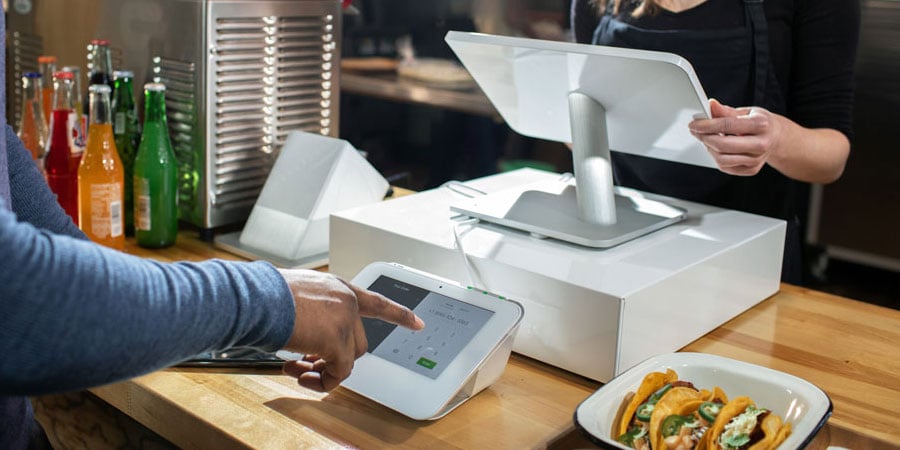
Clover Station
Clover POS System: Features and Benefits
Clover’s biggest strength is flexibility. Because it’s sold through thousands of merchant services providers and authorized dealers, not just one company, businesses with real volume can negotiate interchange-plus rates that beat Square’s flat rate. Here’s what else stands out:
Customizable to Your Business
Clover offers industry-specific plans for full-service dining, quick-service, retail, professional services, personal services, and home/field services, so you’re not paying for restaurant features when you run a hair salon. The Clover App Market adds hundreds more integrations if the built-in tools don’t cover your needs.
Purpose-Built Hardware
Clover’s hardware lineup is more polished than Square’s. The Station Duo (with its customer-facing display) looks and feels like a premium setup. The Flex handheld is great for tableside ordering. The Go reader handles mobile payments. Every device is PCI-compliant out of the box, supports EMV and NFC, and runs on Clover OS.
Current hardware pricing: Clover Go ($199), Flex ($749), Mini ($849), Station Duo ($1,899). Financing is available on most devices.
Accepts All Payment Types
Apple Pay, Google Pay, PayPal, Venmo, contactless, chip, swipe, cash, checks, and gift cards. Clover covers it all, and processes every major card brand at the same rate.
Staff and Tax Management
Clover’s built-in employee management tools let you assign roles, track hours, and manage permissions without a third-party app. Item-level tax configuration is automatic: set your rates by location and Clover applies them at checkout. Small detail, but it eliminates a common headache for multi-location businesses.
Clover Pricing: What You’ll Actually Pay
Clover’s pricing depends on your business type and whether you buy hardware upfront or finance it. At Clover’s published rates, in-person processing runs 2.3%–2.6% + 10¢ per transaction, depending on your plan. Keyed-in transactions are 3.5% + 10¢.
POS software plans start at $16/mo for retail and run to $135/mo for full restaurant setups, depending on your industry and tier. The key advantage: if you buy through an authorized dealer or merchant services provider, you can often negotiate lower rates, especially interchange-plus pricing, that beat both Clover’s published rates and Square’s flat rate.
Clover also offers the Clover Go mobile device for accepting payments on the go, similar to Square’s reader.
If you’re considering Clover, buy from Clover directly or from an authorized dealer that shows you published pricing upfront. A good dealer can often beat Clover’s published rates and terms; just make sure you see the rate, contract length, and any early termination fee in writing before you sign. POSUSA is an authorized Clover dealer, and you can get a Clover dealer quote to compare against Clover’s published pricing.
Why We Recommend Clover for Higher-Volume Businesses
Clover earns its spot for businesses that have outgrown flat-rate pricing. It combines solid hardware, flexible software, and, most importantly, the ability to shop around for the best processing rates. We like it for restaurants, retail stores, salons, and service businesses that have enough volume to benefit from lower interchange-plus rates and don’t mind a contract.
The hardware is easy to set up, the App Market expands functionality without switching platforms, and the 90-day free trial gives you real time to evaluate before committing.
Square
Square POS
Square POS System: Features and Benefits
Square’s pitch is simple: sign up for free, start accepting payments in minutes, no contract. It’s the fastest way to go from zero to operational, and the free plan isn’t watered down. You get real POS software with inventory, reporting, an online store, a built-in AI assistant, and more.
Mobile Payments and Hardware Flexibility
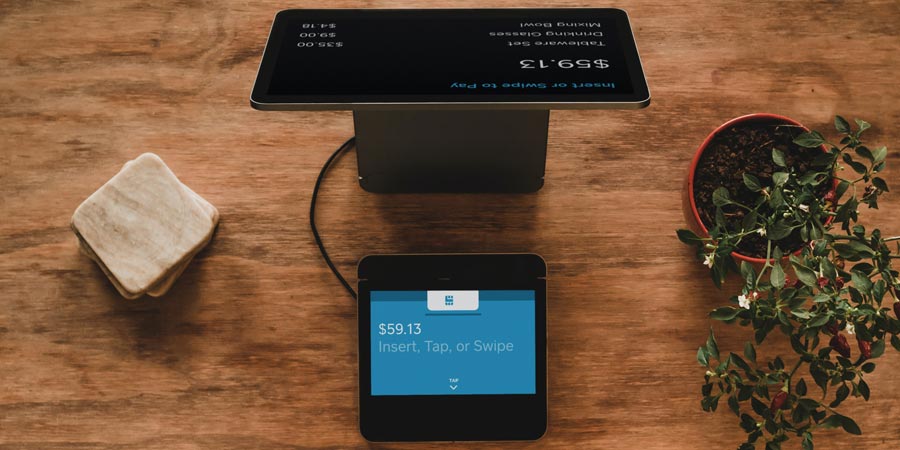
Square accepts Apple Pay, Google Pay, contactless, chip, and swipe payments. You can run the software on any iPhone, iPad, or Android device, with no proprietary hardware required, and Tap to Pay lets you take contactless payments on your phone with no reader at all. The free magstripe reader gets you started immediately, and you can add a $59 contactless reader, $149 Stand, $299 Terminal, or $899 Register as your business grows.
Square’s $399 Handheld is great for tableside ordering, line-busting, and inventory counts at busy locations.
Zero Upfront Cost
This is Square’s real advantage. No monthly fee on the Free plan, no hardware purchase required (use your phone), no contract. Whether you have a brick-and-mortar store, run a food delivery service, or sell at farmers markets, you can start accepting cards today for nothing out of pocket.
Built-In Business Tools
Square’s ecosystem is surprisingly deep for a “free” platform. Invoicing, inventory tracking, online ordering, gift cards, customer directory, basic reporting, it’s all included. The built-in AI assistant lets you build menus, edit items, and troubleshoot problems in plain English without calling support. The integrations library connects to QuickBooks, WooCommerce, and dozens of other platforms. If you need restaurant-specific features, check out our Square for Restaurants review.
Square Pricing: What You’ll Actually Pay
Square overhauled its pricing in October 2025. The old industry-specific plans are gone, every business now shares three unified tiers:
- Free ($0/mo): 2.6% + 15¢ in-person, 3.3% + 30¢ online. Full POS with basic features.
- Plus ($49/mo per location): 2.5% + 15¢ in-person, 2.9% + 30¢ online. Adds loyalty, email and text marketing, advanced industry features, and team management.
- Premium ($149/mo per location): 2.4% + 15¢ in-person, 2.9% + 30¢ online. 24/7 phone support, advanced reporting, more marketing texts, waived gift card load fees.
Note: the per-transaction fee went up 5¢ (from 10¢ to 15¢) and online rates on the Free plan jumped from 2.9% to 3.3% in this update. If you’re comparing old articles that still show 2.6% + 10¢, those rates are outdated. For the full breakdown, see our Square fees and pricing guide.
Square is best for low-to-medium volume businesses with mostly in-person sales. If you serve high volume, high average tickets, or need to negotiate rates, Clover gives you more flexibility. Check the current Square offer before buying hardware.
Clover vs. Square: Head-to-Head Breakdown
Processing Fees
Winner: Clover. Clover’s published in-person rate of 2.3%–2.6% + 10¢ already undercuts Square’s 2.6% + 15¢ on the Free plan. More importantly, Clover rates are negotiable through dealers and merchant services providers. A business doing $20,000+/month can often get interchange-plus pricing that significantly undercuts both Clover’s published rates and Square’s flat rate.
Square locks you into its own processing at a flat rate. Simple? Yes. Cheapest option? Usually not, especially once you’re past the startup stage.
Monthly Software Cost
Winner: Square. Square’s Free plan is genuinely free and includes real POS features: inventory, online store, invoicing, and more. For actual POS software, Clover starts at $16/mo (retail) and goes up to $135/mo for restaurant plans. Square’s paid tiers ($49/mo and $149/mo) are competitive with Clover’s higher tiers, and Plus includes loyalty and marketing tools at no extra cost.
Hardware
Winner: Depends on your budget. Square wins on entry cost: free reader or Tap to Pay, a $59 contactless reader, bring your own iPad. Clover wins on build quality and professional appearance, the Station Duo is one of the best-looking countertop POS systems available. But Clover’s hardware is proprietary and expensive ($849 to $1,899 for countertop units). Square gives you more flexibility to start small and scale up.
Ease of Use
Winner: Square. Square’s interface is cleaner, and the setup process is faster. Most businesses can go from signup to first sale in under 15 minutes, and the AI assistant handles a lot of setup questions on its own. Clover’s software is capable but can feel cluttered, and onboarding takes longer.
Customer Support
Winner: Clover. Clover offers 24/7 phone support on all plans, and buying through a dealer adds a local point of contact. Square limits phone support to business hours (Mon–Fri, 6 AM–6 PM PT) on the Free and Plus plans. You need Premium ($149/mo) for 24/7 access. If something breaks at 10 PM on a Saturday, Clover has a clear edge.
Contracts and Flexibility
Winner: Square. No contracts, no cancellation fees, cancel anytime. Clover often involves 36 months commitments (especially on financed hardware), and early termination fees can apply. This is a real consideration: if you’re not sure this is the right POS, Square lets you walk away cleanly.
Clover POS vs. Square POS: The Verdict
Both systems are on our best POS for small business list for good reason. But they serve different stages and different needs.
Choose Square if: You want a fully functional POS with zero upfront cost and no contract. That last part is the decider for most businesses. You’re never locked in, you can cancel anytime with no termination fee, while Clover usually ties you to a multi-year deal. The free plan is genuinely useful (real inventory, reporting, online store, invoicing), it’s the easiest software to learn, and you can be taking cards in minutes.
Choose Clover if: You’re an established, high-volume business that wants to negotiate lower interchange-plus rates, or you need premium hardware and industry-specific tools. The flexibility can save you money at scale. Just know it usually comes with a multi-year contract, so get the terms in writing.
Our overall pick: Square wins for most small businesses. A genuinely free, fully functional POS plus no contract makes it the lowest-risk choice, and Square keeps adding features, so it’s a system you grow with rather than outgrow. The clincher: you’re never locked in, so if it isn’t working, you can walk away clean. Clover is still the better call for high-volume operations that want negotiated rates. For everyone else, start with Square.