

Square POS
$60.00
 Jason Feemster
Square POS Review: Pricing, Features & Pro vs Cons
Updated: January 2026 • Verified Q1 2026
Table of Contents

Square periodically offers discounts on POS hardware. Check for the latest Square promo codes here.
Square POS is a modern, tablet-based register system that simplifies payment processing for small businesses. Founded in 2009 by Jack Dorsey (co-founder of Twitter), Square has grown to serve millions of merchants across the US, Canada, UK, Australia, and Japan.
The platform’s appeal is straightforward: download the free app, plug in a card reader, and start accepting payments. No merchant account applications, no long-term contracts, no monthly fees on the basic plan. You only pay when you make a sale.
Square works for retail stores, restaurants, coffee shops, food trucks, salons, and service providers. They also offer industry-specific versions — Square for Restaurants and Square for Retail — with features tailored to those businesses.
Pros & Cons
- Free plan available
- No contracts
- Easy setup
- Next-day deposits
- Account holds possible
- Limited phone support (free plan)
- Higher rates than interchange-plus
- Locked to Square processing
Square POS Pricing

Square offers three plan tiers. The free plan works for most small businesses; paid plans reduce processing fees and add advanced features.
Software Plans
| Plan | Monthly Fee | In-Person Rate | Online Rate |
|---|---|---|---|
| Free | $0 | 2.6% + 15¢ | 2.9% + 30¢ |
| Plus | $49/mo | 2.5% + 15¢ | 2.9% + 30¢ |
| Premium | $149/mo | 2.4% + 15¢ | Custom |
Additional Processing Fees:
- Keyed-in transactions: 3.5% + 15¢
- Invoices: 3.3% + 30¢
- Afterpay: 6% + 30¢
Hardware Prices
| Hardware | Price | Financing |
|---|---|---|
| Magstripe Reader | Free (first), $10 each | — |
| Contactless + Chip Reader | $59 | — |
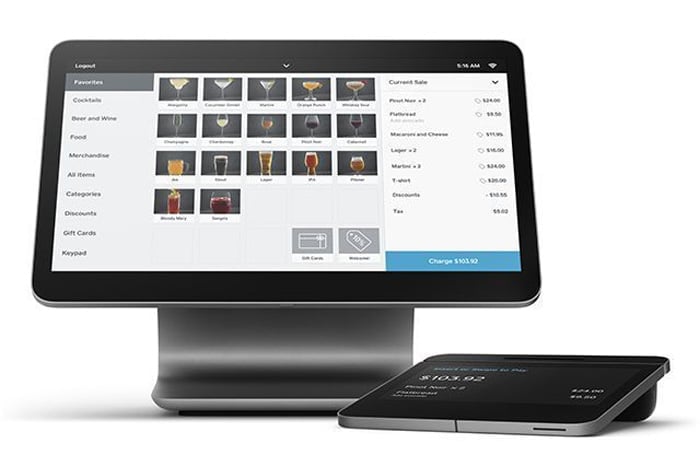
| Square Stand (iPad) | $149 | $14/mo × 12 |
| Square Terminal | $299 | $27/mo × 12 |
| Square Register | $899 | $49/mo × 24 |
Key Features

Payment Processing
- All Major Cards: Visa, Mastercard, Amex, Discover — same rate
- Contactless: Apple Pay, Google Pay, Samsung Pay
- Tap to Pay: Accept payments on iPhone or Android without hardware
- Offline Mode: Process payments without internet connection
- Next-Day Deposits: Free to linked bank account
- Instant Deposits: Available for 1.75% fee
Business Management
- Inventory Tracking: Real-time stock levels, low-stock alerts
- Sales Reporting: Dashboard with sales trends, item performance
- Employee Management: Time tracking, permissions, tip reporting
- Customer Directory: Profiles with purchase history
- Online Store: Free Square Online site included
Integrations
- QuickBooks, Xero (accounting)
- DoorDash, Uber Eats, Postmates (delivery)
- WooCommerce, BigCommerce (eCommerce)
- Homebase, Deputy (scheduling)
Real User Feedback
✅ What Users Like
- Simple setup — can start accepting payments in minutes
- Clean, intuitive interface easy to train staff on
- Free plan genuinely useful for small operations
- Reliable hardware that “just works”
❌ What Users Don’t Like
- Account holds/freezes on large or unusual transactions
- Phone support limited on free plan (M-F, 6am-6pm PT)
- Processing fees add up for high-volume businesses
- Can’t use own payment processor
Square vs. Competitors

| Feature | Square | Clover | Toast |
|---|---|---|---|
| Free Plan | Yes | No ($0 processing only) | Yes (limited) |
| Monthly Fee | $0-$149 | $14.95-$84.95+ | $0-$69+ |
| In-Person Rate | 2.6% + 15¢ | 2.3%-2.6% + 10¢ | 2.49%-2.99% + 15¢ |
| Contract Required | No | Often (36 mo) | Yes (2 years) |
| Hardware Start | Free (magstripe) | $49+ | $0 (with contract) |
| Best For | Small business, retail | Retail, services | Restaurants |
Who Should Use Square?
✅ Best Fit For
- Small businesses wanting simple, no-contract POS
- Food trucks and pop-ups needing mobile payments
- Retail shops with straightforward inventory needs
- Cafes and coffee shops with quick transactions
- Service providers (salons, contractors) taking payments on-site
- New businesses wanting to start with zero upfront costs
❌ Not Ideal For
- High-volume businesses where flat-rate fees exceed interchange-plus
- Complex restaurants needing advanced table management (consider Toast)
- Businesses wanting processor flexibility (Square locks you in)
- High-risk industries more likely to trigger account holds
FAQ
Is Square POS really free?
Yes. The Square POS app is free to download, and there are no monthly fees on the free plan. You only pay processing fees when you make a sale (2.6% + 15¢ for in-person transactions). Hardware costs extra, but you can start with just your phone using Tap to Pay.
What are Square's processing fees?
On the free plan: 2.6% + 15¢ for in-person (tap, dip, swipe), 2.9% + 30¢ for online, and 3.5% + 15¢ for keyed-in transactions. Paid plans ($49-$149/mo) reduce in-person rates to 2.4%-2.5% + 15¢.
Does Square require a contract?
No. Square is month-to-month with no long-term contracts. You can cancel anytime without penalty. This is one of Square’s biggest advantages over competitors like Toast and Clover, which often require multi-year commitments.
Can Square freeze my funds?
Yes, Square may place holds on funds if it detects unusual activity — large transactions, sudden volume spikes, or activity inconsistent with your account history. Most holds resolve within a few days, but it’s a common complaint. Keeping good records and gradually building transaction history helps avoid this.
Is Square good for restaurants?
Square works well for cafes, coffee shops, and quick-service restaurants. For full-service restaurants needing table management, coursing, and kitchen display systems, Square for Restaurants ($0-$60/mo) adds those features. However, dedicated restaurant POS systems like Toast may be better for complex operations.
Verdict
Square remains the go-to POS for small businesses that want simplicity without commitments. The free plan is genuinely useful — not a crippled trial — and you can run a real business on it indefinitely. The no-contract policy means you’re never locked in.
The main tradeoff is processing fees. At 2.6% + 15¢, Square is competitive for small transactions but gets expensive at volume. Businesses processing over $10,000/month should compare total costs against interchange-plus processors. The potential for account holds is also a real concern, especially for new or high-ticket businesses; otherwise, we’d probably give Square a 9 instead of an 8.5.
Recommendation: Square is excellent for small businesses, food trucks, retail shops, and anyone wanting to start accepting payments with zero upfront costs. For high-volume operations or complex restaurants, compare against Clover or Toast.

Jason Feemster
POS systems expert and founder of POSUSA.com, a trusted industry resource since 2011. With over a decade of hands-on experience testing and reviewing point-of-sale systems, Jason helps restaurant and retail owners find solutions that fit their needs and budget.
Specification: Square POS
|
Videos: Square POS


Photos: Square POS


User Reviews
Be the first to review “Square POS”















There are no reviews yet.