

AccuPOS
$84.00
 Jason Feemster
AccuPOS Review: Pricing, Features & Pros vs Cons
Updated: January 2026 • Verified Q1 2026
Table of Contents
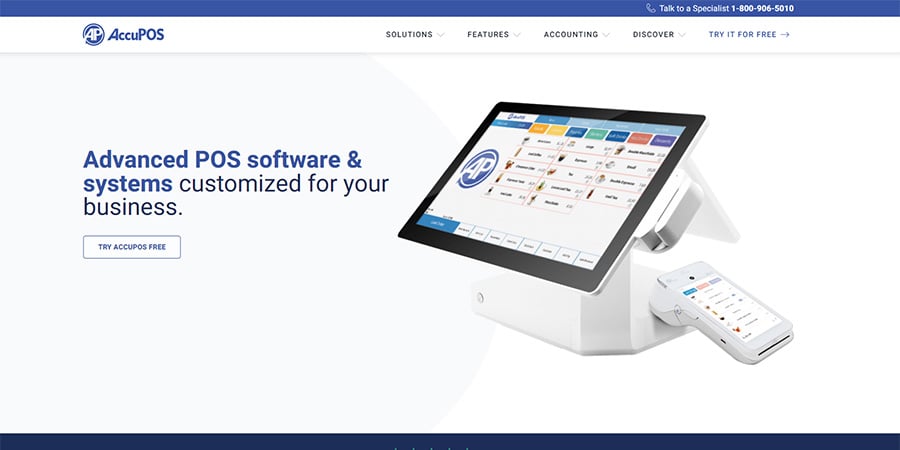
AccuPOS is a US-based point of sale provider headquartered in Westerville, Ohio. Founded in 1999, the company serves restaurants, bars, retail stores, dispensaries, and small businesses across multiple industries.
The platform’s main selling point is its deep integration with QuickBooks and Sage accounting software — AccuPOS is a Gold Developer Partner with both Intuit and Sage. If syncing your POS directly to your accounting software is a priority, AccuPOS delivers on that promise.
However, the interface feels dated compared to modern competitors, and customer reviews are mixed. The platform works on Android and Windows devices but doesn’t support iPad — a dealbreaker for some.
Pros & Cons
- Excellent QuickBooks and Sage integration
- Works on Android and Windows
- Bring your own hardware option
- Cloud-based reporting
- Free trial available
- 24/7 support available
- A+ BBB rating
- Outdated interface design
- No iPad/iOS support
- $64/month extra for unlimited support
- Limited third-party integrations
- Mixed customer service reviews
- System reliability concerns reported
Pricing
AccuPOS publishes pricing on their website — a refreshing change from many competitors:
AccuPOS Plans
| Item | Cost | Notes |
|---|---|---|
| First Terminal | $84/month | Includes POS software |
| Additional Stations | $45/month each | Per additional terminal |
| Unlimited Tech Support | $64/month | Optional add-on |
| Hardware | Contact for quote | Or bring your own |
Example monthly cost:
- 1 terminal + support: $84 + $64 = $148/month
- 2 terminals + support: $84 + $45 + $64 = $193/month
- 3 terminals + support: $84 + $90 + $64 = $238/month
Key Features
Accounting Integration
This is AccuPOS’s standout feature. As a Gold Developer Partner with both Intuit and Sage, the platform offers deep integration with:
- QuickBooks Online (US & Canada)
- QuickBooks Pro, Premier, and Enterprise
- Sage 50 (US & Canada)
- Sage 100 ERP/MAS
- Sage BusinessWorks
- Sage Intacct
Sales data syncs automatically to your accounting software — no double entry, no manual imports. For businesses that live in QuickBooks or Sage, this alone may justify the platform.
Restaurant Features
- Menu building: Create customizable menus with modifiers and variations
- Tableside ordering: Use Android tablets for table-to-kitchen ordering
- Tab management: Pre-authorize cards, split bills, combine checks
- Floor plans: Visual table layout for dine-in restaurants
- Kitchen printing: Route orders to appropriate prep stations
Retail Features
- Inventory management: Track stock levels, receive deliveries, adjust counts
- Barcode scanning: Fast checkout with barcode support
- Customer loyalty: Build rewards programs for repeat customers
- Gift cards: Sell and redeem gift cards
Reporting & Management
- Cloud reporting: Access sales data from anywhere
- Employee management: Time clock, scheduling, permissions
- Email receipts: Send digital receipts to customers
- Custom branding: Add your logo to interface and receipts
Hardware
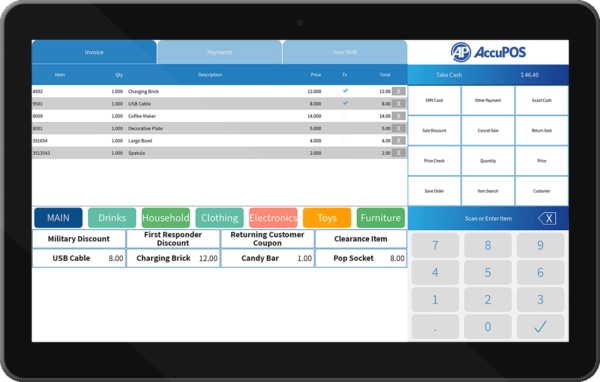
AccuPOS offers flexibility in hardware — you can purchase from them or bring your own compatible devices:
Supported platforms:
- Android: Tablets and purpose-built terminals
- Windows: PCs and touchscreen systems
NOT supported:
- iPad/iOS: Not available — if you want Apple devices, look elsewhere
Peripherals needed:
- Touchscreen terminal or tablet
- Cash drawer
- Card reader (EMV compatible)
- Receipt printer
Hardware pricing requires a quote. The ability to use your own compatible hardware can save money if you already have equipment.
Integrations
AccuPOS has limited third-party integrations compared to competitors. The focus is squarely on accounting:
Accounting (excellent):
- QuickBooks (all versions)
- Sage (multiple versions)
Payment processing:
- Worldpay (primary partner)
- Third-party processors (may not be fully integrated)
Other integrations: Limited. AccuPOS doesn’t offer the extensive app marketplaces you’ll find with Toast, Square, or Clover. If you need integrations for online ordering, delivery, marketing, or advanced inventory, you may need to look elsewhere.
Payment Processing
AccuPOS partners with Worldpay for integrated payment processing. EMV-compliant card readers are supported.
The company states they’re compatible with third-party processors, but integration depth varies. Some processors may require a standalone terminal rather than full POS integration — clarify this before signing up.
Payment processing rates aren’t published. You’ll need to get a quote based on your volume and business type.
Customer Service
AccuPOS advertises 24/7 support via phone, live chat, and support tickets. However, unlimited technical support costs an additional $64/month.
Support options:
- Phone: 1-800-906-5010
- Live chat
- Support ticket system
- Training videos and documentation
Customer feedback is mixed. Some users praise the knowledgeable support staff and quick resolution of issues. Others report:
- Long hold times (45+ minutes reported)
- Disconnected calls during critical issues
- Support staff unable to resolve complex problems
- Pressure to purchase expensive hardware upgrades
Review scores:
- 63% User Satisfaction (SelectHub, 70 reviews)
- 3/5 stars (Capterra)
- 3/5 stars (Software Advice)
- A+ BBB rating (not accredited)
Who Should Use AccuPOS?
✅ Best fit for:
- Small businesses needing QuickBooks or Sage integration
- Retail stores and restaurants with basic POS needs
- Businesses already using Android or Windows devices
- Operators who prioritize accounting sync over modern features
- Those comfortable with a dated but functional interface
❌ Not ideal for:
- Businesses wanting iPad/iOS support
- Restaurants needing extensive integrations (delivery, online ordering)
- Those expecting a modern, polished interface
- Large restaurants or multi-location chains
- Operators who need reliable customer support without extra fees
AccuPOS vs. Competitors
| Feature | AccuPOS | Toast | Square | Clover |
|---|---|---|---|---|
| Starting Price | $84/mo | $0/mo | $0/mo | $14.95/mo |
| Hardware | Android/Windows | Proprietary | iPad/Square | Proprietary |
| iPad Support | No | No | Yes | No |
| QuickBooks Integration | Excellent | Good | Good | Good |
| Free Support | Limited ($64 extra) | Included | Included | Included |
| Best For | Accounting-focused | Restaurants | Simple operations | Retail/versatile |
FAQs
How much does AccuPOS cost?
AccuPOS starts at $84/month for the first terminal, with additional stations at $45/month each. Unlimited technical support is an extra $64/month. Hardware costs require a quote, or you can bring your own compatible devices.
Does AccuPOS work with iPad?
No. AccuPOS only supports Android and Windows devices. If you need an iPad-based POS, consider TouchBistro, Square, or Lightspeed instead.
Does AccuPOS integrate with QuickBooks?
Yes — this is AccuPOS’s strongest feature. As a Gold Developer Partner with Intuit, AccuPOS offers deep integration with QuickBooks Online, Pro, Premier, and Enterprise. Sales data syncs automatically to your accounting software.
Is there a free trial?
Yes. AccuPOS offers a free trial so you can test the system before committing. No credit card is required to start the trial.
Is AccuPOS good for restaurants?
AccuPOS works for restaurants and offers features like tableside ordering, menu building, and kitchen printing. However, the interface is dated compared to modern restaurant POS systems like Toast or Square for Restaurants. It’s best suited for small restaurants that prioritize accounting integration.
What's the BBB rating for AccuPOS?
AccuPOS has an A+ rating with the Better Business Bureau, though they are not BBB accredited. The company is based in Westerville, Ohio and has been in business since 1999.
Final Verdict: ⭐ 6/10
AccuPOS fills a specific niche: businesses that need rock-solid QuickBooks or Sage integration above all else. If syncing your POS data to your accounting software is your top priority, AccuPOS delivers better than most competitors.
However, the platform shows its age. The interface feels outdated, the integration ecosystem is limited, and customer support reviews are inconsistent. At $84/month plus $64/month for support, you’re paying premium prices for a system that lacks the polish and features of modern alternatives.
The lack of iPad support is a significant limitation for many businesses. And the extra charge for unlimited support — while transparent — adds real cost that competitors include for free.
Rating: 6/10 — Solid accounting integration, but outdated interface, limited features, and mixed support hold it back.
Recommendation: If QuickBooks or Sage integration is your #1 requirement and you’re comfortable with Android/Windows, AccuPOS is worth a free trial. For everyone else, consider Toast (Android, restaurant-focused), Square (iPad, simple and affordable), or Clover (versatile retail/restaurant) instead.

Jason Feemster
POS systems expert and founder of POSUSA.com, a trusted industry resource since 2011. With over a decade of hands-on experience testing and reviewing point-of-sale systems, he helps business owners choose solutions that actually fit their needs.
Specification: AccuPOS
|
Videos: AccuPOS

Photos: AccuPOS


User Reviews
Be the first to review “AccuPOS”

















There are no reviews yet.