

Clover Mini
$849.00
 Jason Feemster
Clover Mini: Pricing, Specs & What to Know
Updated July 2026 • Verified Q3 2026
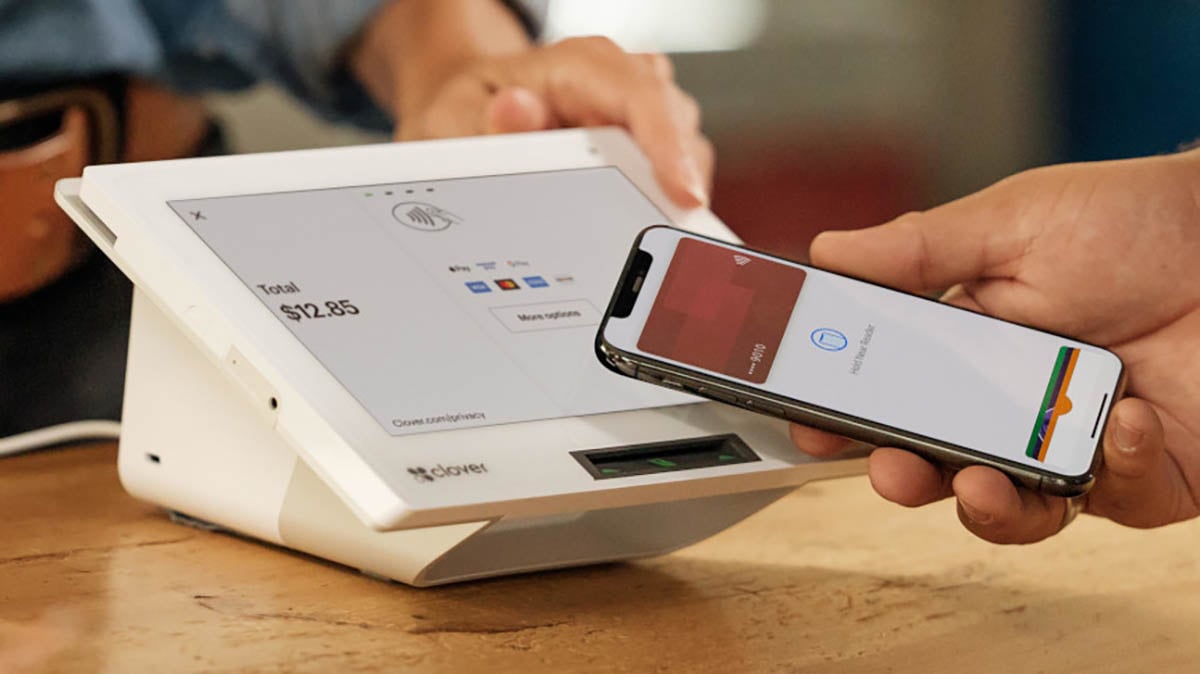
The Clover Mini is a compact countertop POS with an 8″ touchscreen, a built-in receipt printer, and a built-in barcode scanner. It costs $849 upfront, or from $45 per month financed over 36 months. It’s the smallest countertop device Clover makes, built for businesses that want a full register in a small footprint.
The Mini sits in the middle of Clover’s hardware range. It’s more than the handheld Flex and less than the Station Solo or Station Duo, and it’s the device to look at when counter space is tight but you still want a fixed register with a printer and an optional cash drawer.
This page covers the device: what it costs, how it compares to the rest of the Clover lineup, the specs that matter, and who it fits. For Clover’s full software plans, processing details, contract terms, and company reputation, see our Clover POS review.
Pros & Cons
- Small footprint, full register
- Built-in receipt printer
- Built-in barcode scanner
- Ethernet, WiFi, and LTE
- Takes an optional cash drawer
- Accepts chip, tap, and swipe
- Cheaper than a Station
- 2 GB RAM and Android 10
- Cash drawer costs extra
- 8″ screen is small for busy tickets
- Cheaper Flex has newer internals
- Hardware locked to your processor
- No customer-facing screen
How Much Does Clover Mini Cost?
Clover Mini costs $849 upfront no matter which plan you choose. Financed over 36 months, it starts at $45 per month for retail and services on the entry plan, and $135 per month for restaurants on the higher restaurant plan. If you buy the hardware outright, software runs from $0 on the entry tier up to about $85 per month on the top tier, and processing lands between 2.3% and 2.6% + 10¢ depending on the plan.
| Path | Cost |
|---|---|
| Buy hardware upfront | $849, plus a monthly software plan |
| Finance (retail/services) | From $45/mo for 36 months |
| Finance (restaurants) | From $135/mo for 36 months |
Higher software tiers raise the monthly fee and lower your processing rate, so the right plan depends on your card volume. The full tier breakdown, the retail versus restaurant plan differences, and the fees that don’t show up on the price card are covered in the Clover POS review.
Clover notes that the prices on its site are only available through Clover.com. Resellers set their own terms, so a quote from an independent sales office won’t necessarily match these numbers.
How Clover Mini Compares to Other Clover Devices
The Mini is the compact countertop option. The Flex is handheld, the Stations are full-size countertop units with larger screens and included cash drawers. Here’s the range.
| Flex | Mini | Station Solo | Station Duo | |
|---|---|---|---|---|
| Upfront | $749 | $849 | $1,799 | $1,899 |
| Financed | $40/mo | $45/mo | $174/mo | $180/mo |
| Screen | 5.99″ | 8″ | 14″ | 14″ + 8″ |
| Form factor | Handheld | Countertop | Countertop | Countertop |
| Receipt printer | Built in | Built in | Built in | Built in |
| Cash drawer | No | Optional add-on | Included | Included |
| Customer screen | N/A | No | No | Yes, 8″ |
| Best for | Tableside, mobile | Small counter, tight space | Back office, low interaction | Counter service, high volume |
Mini vs. Station Solo
The jump from Mini to Station Solo is $950 upfront, and what you get for it is a 14″ screen instead of 8″ and an included cash drawer instead of an optional one. If you handle cash regularly and ring up complex orders, the larger screen and bundled drawer can be worth it. If your tickets are simple and counter space is limited, the Mini does the same core job for a lot less.
Mini vs. Flex
This is the one that catches people out. The Clover Flex costs $100 less than the Mini and has newer internals, running Android 13 with 4 GB of RAM against the Mini’s Android 10 and 2 GB. The Mini still makes sense when you want a fixed countertop register with a bigger screen and the option of a cash drawer, neither of which the handheld Flex offers. But if you don’t need it anchored to the counter, the Flex is the more modern device for less money.
Clover Mini Specs
| Spec | Detail |
|---|---|
| Operating system | Clover-hardened Android 10 (API Level 29) |
| Processor | Qualcomm Snapdragon octa-core |
| Memory | 2 GB RAM, 16 GB Flash |
| Display | 8″ LCD, 1280 x 800 |
| Camera | Front-facing, 1D/2D barcode scanning |
| Payments | EMV chip, NFC contactless, magstripe |
| Connectivity | Ethernet, WiFi, 4G/LTE |
| Printer | Internal thermal receipt printer |
| Ports | 2x USB-A, 1x USB-B, RJ12 |
| Cash drawer | Optional add-on |
| Audio | 3.5mm jack, speaker, microphone |
Source: Clover Developer Documentation
What the Specs Mean for Long-Term Use
The Mini runs a Qualcomm Snapdragon octa-core with 2 GB of RAM on Android 10. For payments and everyday register work, that’s fine, and the built-in scanner and printer make it a genuinely complete countertop unit. The constraint is the same as on the Station Duo: 2 GB of RAM gets tight if you load the device with marketplace apps, since they all share it.
Keep the app count modest on the Mini and it stays responsive. The other thing to weigh is that you’re on a 36-month commitment with hardware built around an older chipset. If you tend to keep equipment well past the contract, that’s worth knowing. It’s also why the Flex, with newer internals at a lower price, is worth a look before you settle on the Mini for a use case that doesn’t strictly need a fixed counter unit.
What to Know Before You Buy the Mini
Two things carry over from Clover generally and apply to this purchase.
The hardware is tied to your processor. A Clover device is provisioned for Fiserv or your reseller’s processor and can’t be reprogrammed for a different one. If you switch processors later, the Mini doesn’t come with you, which is also why a used Mini is usually worthless to a buyer who isn’t already on the same processor.
Most plans run 36 months. The financing above is a 36-month commitment, and canceling early triggers fees. Buying the hardware outright doesn’t remove the software subscription, but it lowers your total cost and gives you room to negotiate rates.
The full picture on contract mechanics, reseller pricing differences, and the ancillary fees that show up on Clover statements is in the Clover POS review. Read that before signing anything.
Clover Mini vs. Square Terminal
The closest non-Clover comparison for a compact all-in-one is Square Terminal, though the two aren’t identical. The Mini is a fixed countertop unit with a larger screen and a cash drawer option. Square Terminal is a smaller handheld that can sit on a counter. The real split is cost and contract.
| Clover Mini | Square Terminal | |
|---|---|---|
| Hardware cost | $849 | $299 |
| Screen | 8″ | 5.5″ |
| Receipt printer | Built in | Built in |
| Cash drawer | Optional add-on | Via optional Hub |
| Contract | 36 months if financed | None |
| Monthly software | $0–$84.95 | $0 on the free plan |
| Processing | 2.3%–2.6% + 10¢ | 2.6% + 15¢ |
Square Terminal is cheaper upfront and has no contract, but the Mini gives you a bigger screen, a proper cash drawer option, and Clover’s app marketplace. For a retail counter that scans a lot of inventory and needs a full-size register feel, the Mini fits better. For a small shop or cafe that wants the lowest entry cost, Square Terminal is the leaner choice. Our Square Terminal review covers it in full.
Who Should Buy the Clover Mini?
✅ Good fit for
- Retail stores with limited counter space that need a scanner and printer built into one small unit
- Quick-service restaurants and cafes ringing up straightforward orders at a fixed counter
- Salons, barber shops, and service counters that want a tidy, professional register without a full-size station
- Boutiques and specialty shops that scan inventory and want the Clover app marketplace for loyalty and reporting
- Businesses adding a second register alongside an existing Clover setup in a tight space
If you’re comparing options across brands, our roundup of POS systems for small business covers the alternatives in this range.
❌ Not ideal for
- Tableside and mobile operations, where the Clover Flex handheld fits and costs less
- High-volume counters with complex tickets, where the 14″ Station Duo and its customer screen move faster
- App-heavy setups planning to run many marketplace apps on the device, given the 2 GB of RAM
- Anyone likely to switch processors, since Clover hardware doesn’t transfer between them
- Businesses that want no contract, where Square Terminal is the simpler path at a lower upfront cost
Frequently Asked Questions
How much does Clover Mini cost?
Clover Mini costs $849 upfront regardless of plan, or from $45 per month financed over 36 months for retail and services, and from $135 per month for restaurants. If you buy the hardware outright, software runs from $0 up to about $85 per month depending on tier, and processing is 2.3% to 2.6% + 10¢ per in-person transaction.
What's the difference between Clover Mini and Clover Flex?
The Clover Mini ($849) is a fixed 8″ countertop unit that takes an optional cash drawer. The Clover Flex ($749) is a 5.99″ handheld with no cash drawer support. The Flex also has newer internals, running Android 13 with 4 GB of RAM against the Mini’s Android 10 and 2 GB. Choose the Mini for a fixed counter register, the Flex for mobility.
Does the Clover Mini have a built-in printer?
Yes. The Clover Mini has an internal thermal receipt printer built into the device, so no separate printer is needed. It also has a built-in front-facing camera that scans 1D and 2D barcodes, which covers retail inventory lookups without an external scanner.
Does the Clover Mini come with a cash drawer?
No. The cash drawer is an optional add-on for the Clover Mini, not included in the base price. If you need a drawer bundled in, the Station Solo and Station Duo include one. The Mini connects to a compatible cash drawer through its RJ12 port.
Does the $450 Clover promo apply to the Mini?
Yes. The Clover Mini is an eligible device for Clover’s $450 statement credit, along with the Flex, Flex Pocket, Station Solo, and Station Duo. New merchants who qualify and meet the activation requirements get the credit applied automatically. See our Clover promo details for current terms.
Does Clover Mini work without WiFi?
Yes. The Mini has Ethernet, WiFi, and 4G/LTE connectivity, so it can run on a wired connection or fall back to cellular if WiFi drops. For a fixed countertop register, most businesses run it on Ethernet or WiFi and keep LTE as a backup.
Can I use a Clover Mini with a different payment processor?
No. Clover hardware is provisioned for Fiserv or your reseller’s processor and cannot be reprogrammed for another one. Switching processors means buying new hardware, which is also why secondhand Clover devices usually can’t be activated by a new owner.
Is the Clover Mini good for restaurants?
It works for quick-service restaurants and cafes with straightforward orders. For full-service restaurants with complex tickets, table management, and higher volume, the larger 14″ Station Duo is a better fit. Clover prices the Mini’s restaurant plan from $135 per month financed.
Our Verdict
The Clover Mini is a lot of register in a small footprint. You get an 8″ touchscreen, a built-in printer, a built-in barcode scanner, and the option of a cash drawer in a unit that fits where a Station won’t. For a retail counter or a quick-service spot with limited space, it does exactly what it needs to.
The catch is value relative to its siblings. At $849 the Mini runs Android 10 and 2 GB of RAM, while the Flex costs $100 less and ships with newer internals. The Mini earns its price when you specifically need a fixed countertop unit with a bigger screen and a cash drawer option, which the handheld Flex can’t give you. If you don’t need those things, the money goes further elsewhere in the lineup.
If you go with the Mini, buy the hardware upfront rather than financing, and get your rates and contract terms in writing before signing. And take the $450 credit if you qualify.
Expert Rating: ⭐ 8.0/10 – A capable compact register with a printer and scanner built in, priced a step above where its aging internals sit. The score covers the device. Clover’s contract terms, software costs, and support reputation are evaluated in our Clover POS review.

Jason Feemster
POS systems expert and founder of POSUSA.com, a trusted industry resource since 2011. With over a decade of hands-on experience testing and reviewing point-of-sale systems, he helps business owners choose solutions that actually fit their needs.
Specification: Clover Mini
|
User Reviews
Be the first to review “Clover Mini”













There are no reviews yet.