

Oracle Simphony POS
$55.00
 Jason Feemster
Oracle Simphony POS Review: Prices, Features & Pros vs Cons
Updated: January 2026 • Verified Q1 2026
Table of Contents
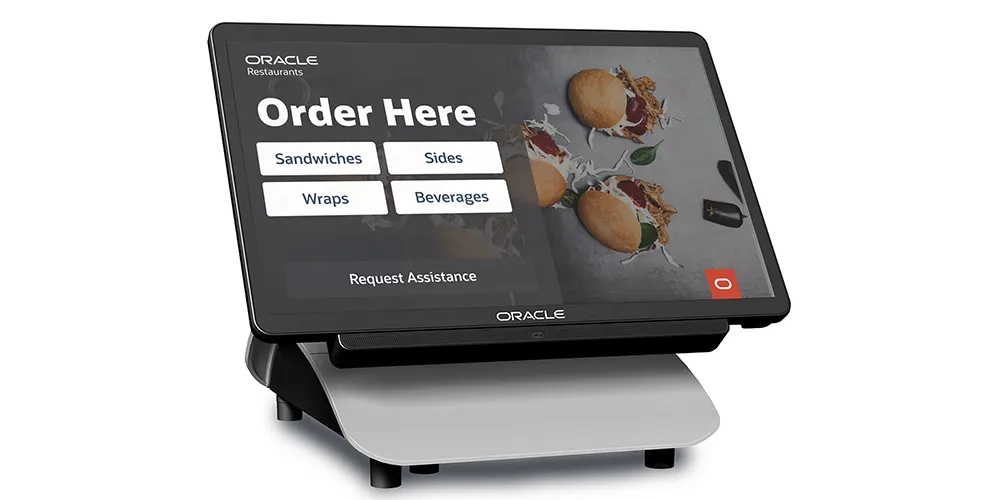
Oracle Simphony is the flagship restaurant POS from Oracle, one of the world’s largest technology companies. This cloud-based platform powers hundreds of thousands of locations globally—from local cafés to major chains like Wendy’s, Taco Bell, and international hotel brands.
Originally known as MICROS (acquired by Oracle in 2014), Simphony has evolved into a comprehensive restaurant management platform with features for online ordering, kitchen operations, inventory, loyalty programs, and enterprise analytics. The open API and 200+ integrations make it highly customizable for complex operations.
Pros & Cons
- Enterprise-grade reliability and security
- $1 hardware when switching
- 200+ integrations via Oracle Marketplace
- Scales from 1 location to global chains
- Strong multi-location management
- 24/7 global support
- Integrates with Oracle OPERA (hotels)
- Complex setup and steep learning curve
- Mixed customer support reviews
- Must use Oracle hardware
- Add-on costs for advanced modules
- Overkill for simple operations
- Contract terms not transparent
Oracle Simphony Pricing
| Plan | Monthly Cost | Best For |
|---|---|---|
| Simphony Essentials | $55/month | Small restaurants, bars, cafés |
| Simphony Plus | $75/month | Multi-location, franchises, advanced analytics |
| Single-Tenant | Custom quote | Enterprise with dedicated infrastructure |
What’s Included
Essentials ($55/mo):
- Cloud-based POS
- Menu management
- Online ordering (GloriaFood integration)
- Basic reporting and analytics
- Payment processing
- 24/7 support
Plus ($75/mo) adds:
- Advanced analytics and forecasting
- Inventory management
- Marketing and loyalty tools
- Multi-location dashboard
- Labor management
Hardware Pricing
| Hardware | Cost | Notes |
|---|---|---|
| Workstation 8 Series | $1 | 14″ touchscreen, latest model |
| Workstation 6 Series | $1 | Flagship large-screen terminal |
| Workstation 3 Series | $1 | Compact for limited space |
| Tablet 700 Series | $1 | Mobile/tableside ordering |
| Self-Service Kiosks | Quote | Customer-facing ordering |
*$1 hardware pricing available when switching from another POS provider. Contact Oracle for details.
- Contract Length: Varies (contact Oracle)
- Hardware: $1 with subscription when switching
- Processing: Oracle Payments or bring your own processor
Key Features
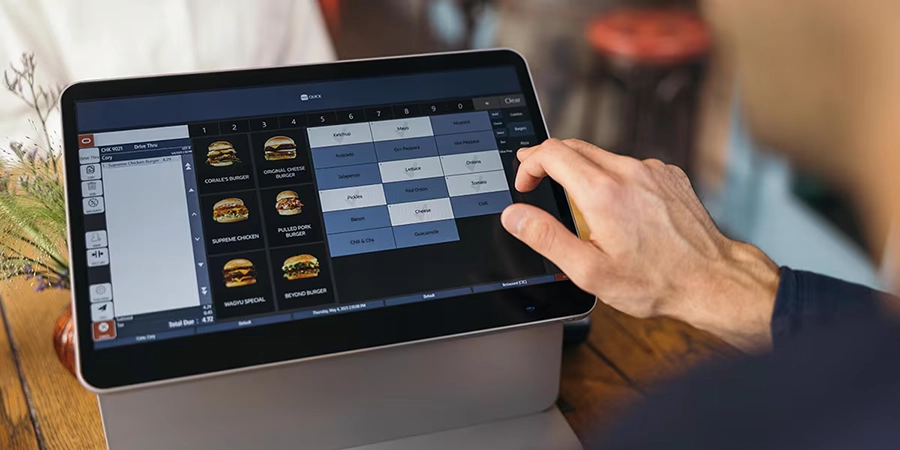
Restaurant Operations
- Conversational ordering: Intuitive interface encourages upselling
- Table management: Real-time floor plans, reservations, waitlists
- Menu management: Update menus across all channels instantly
- Kitchen Display System (KDS): Multi-station order routing
- Offline mode: Continue operations when internet is down
Online & Delivery
- GloriaFood integration: Commission-free online ordering
- Third-party delivery: DoorDash, Uber Eats, Deliveroo integration
- Mobile ordering: QR code menus, app ordering
- Curbside pickup: Order status alerts for customers
Analytics & Reporting
- Real-time dashboards: Sales, labor, inventory visibility
- Multi-location reporting: Compare performance across sites
- Forecasting: AI-powered sales and labor predictions
- Business Intelligence API: Export to third-party BI tools
Loyalty & Gift Cards
- Built-in loyalty programs: Points, rewards, personalized offers
- Gift card management: Physical and digital cards
- Customer profiles: Track preferences across visits
Industries Served
Oracle Simphony is built for hospitality at scale:
- Quick Service (QSR): Drive-thru, high-volume chains
- Fast Casual: Counter service with speed focus
- Full Service: Table management, course firing
- Hotels & Resorts: Integrates with Oracle OPERA PMS
- Stadiums & Arenas: High-volume, multi-vendor events
- Theme Parks: Large-scale entertainment venues
- Casinos: Integrated hospitality management
Hardware
Oracle provides purpose-built restaurant hardware:
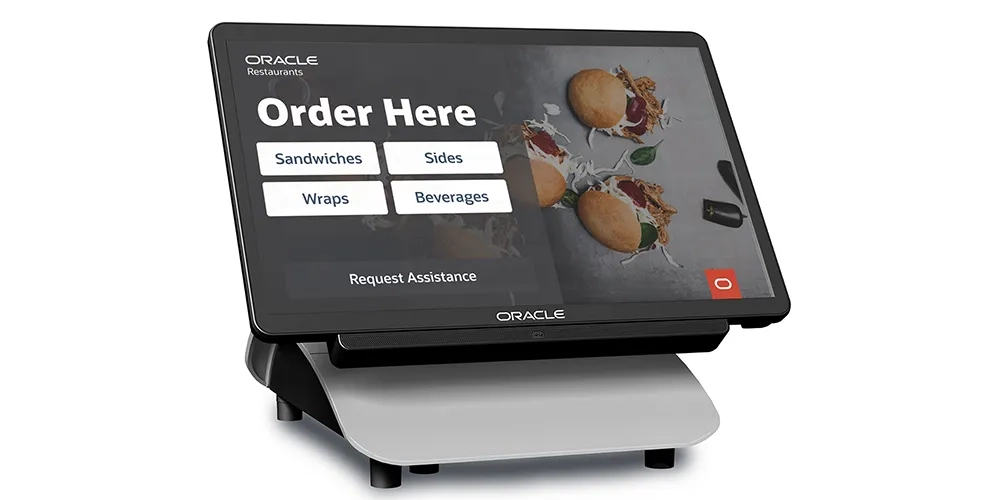
- Workstation 8 Series: Newest model, 14″ touchscreen, slim design
- Workstation 6 Series: Flagship large-screen terminal
- Workstation 3 Series: Compact for small spaces
- Tablet 700 Series: Mobile tableside ordering with card reader
- Self-Service Kiosks: Customer ordering stations
- Kitchen Display Systems: Multi-station order management
Note: You must use Oracle hardware—no BYOD (bring your own device) option for iPads or Android tablets.
Integrations
Simphony’s open API connects to 200+ partners via the Oracle Cloud Marketplace:
- Online Ordering: GloriaFood (owned by Oracle), Olo, ChowNow
- Delivery: DoorDash, Uber Eats, Grubhub, Deliveroo
- Accounting: QuickBooks, Xero, Restaurant365
- Scheduling: 7shifts, HotSchedules
- Inventory: MarketMan, BlueCart
- Reservations: SevenRooms, OpenTable
- Hotel PMS: Oracle OPERA (native integration)
Payment Processing
Oracle offers flexibility with payment processing:
- Oracle Payment Cloud Service: Integrated end-to-end processing
- Third-party processors: Bring your own merchant account
- Payment methods: Credit/debit, Apple Pay, Google Pay, Samsung Pay
Processing rates are not publicly disclosed—contact Oracle for quotes.
Oracle Simphony vs. Competitors
| Feature | Oracle Simphony | Toast | Square | NCR Aloha |
|---|---|---|---|---|
| Starting Price | $55/mo | $0-$69/mo | $0-$60/mo | Quote |
| Hardware | $1 (switching) | $0 or $799+ | $149-$799 | Quote |
| Best For | Enterprise/Hotels | Mid-size restaurants | Small/Simple | Large chains |
| Integrations | 200+ | 100+ | 50+ | 100+ |
| Hotel PMS | Yes (OPERA) | Limited | No | Yes |
| Global Support | 180+ countries | US/UK/Canada | 6 countries | Global |
Customer Support
Oracle provides enterprise-level support:
- 24/7 phone support: Global coverage in 180+ countries
- Online portal: Ticketing, resources, documentation
- Implementation services: Professional setup and training
Customer feedback is mixed: While Oracle’s infrastructure is reliable, many users report slow ticket resolution times and difficulty reaching knowledgeable support staff. Complex issues often get “escalated” and can take weeks or months to resolve. Enterprise customers with dedicated account managers report better experiences.
Oracle holds an A+ rating with the Better Business Bureau.
Who Should Use Oracle Simphony?
✅ Best fit for:
- Multi-location restaurant groups and franchises
- Hotels and resorts needing PMS integration (OPERA)
- Enterprise operations wanting robust analytics
- Stadiums, arenas, and large entertainment venues
- International chains needing global support
- Businesses switching POS (take advantage of $1 hardware)
❌ Not ideal for:
- Small single-location restaurants on tight budgets
- Businesses wanting iPad/tablet flexibility
- Operators who prefer simple, plug-and-play systems
- Those who need fast, responsive customer support
- Food trucks or mobile operations
FAQ
How much does Oracle Simphony cost?
Oracle Simphony starts at $55/month for Essentials (small restaurants) and $75/month for Plus (multi-location, advanced features). Single-Tenant enterprise deployments require a custom quote. Hardware is available for $1 when switching from another POS.
Is Oracle Simphony good for small restaurants?
Oracle now offers Simphony Essentials at $55/month for small restaurants, but it may be overkill if you don’t need enterprise features. For simpler needs, consider Square for Restaurants or Toast.
Can I use my own iPad with Simphony?
No. Oracle Simphony requires Oracle’s proprietary hardware (Workstation or Tablet series). You cannot bring your own iPad or Android devices.
Does Simphony integrate with hotel property management?
Yes. Oracle Simphony natively integrates with Oracle OPERA, the leading hotel property management system. This makes it ideal for hotel restaurants, room service, and resort F&B operations.
What is the $1 hardware deal?
When switching from another POS provider to Oracle Simphony, you can purchase Oracle’s restaurant hardware (Workstation 6, 8, or Tablet 700 series) for just $1 per device. This significantly reduces upfront costs.
How does Oracle Simphony compare to NCR Aloha?
Both are enterprise-grade restaurant POS systems. Simphony has stronger hotel/hospitality integration (OPERA) and more transparent pricing. NCR Aloha is strong for large restaurant chains. Both have similar learning curves and support challenges.
Verdict
Oracle Simphony is a powerful, enterprise-grade POS built for complex hospitality operations. The platform excels at multi-location management, hotel integration (via OPERA), and scaling from a single café to a global chain. The recent pricing changes—$55/month Essentials and $1 hardware—have made it more accessible to smaller businesses.
However, Simphony comes with enterprise complexity. The learning curve is steep, customer support can be slow, and you’re locked into Oracle’s hardware ecosystem. For simple single-location restaurants, it’s likely overkill.
Rating: 8.5/10 — A robust enterprise solution with strong features and global reach, but the steep learning curve, mixed support reviews, and lack of hardware flexibility hold it back from a higher score.
Recommendation: Oracle Simphony is an excellent choice for multi-location restaurants, franchises, and hotels that need enterprise-grade analytics and integrations. Take advantage of the $1 hardware deal if you’re switching. For simpler operations, consider Toast or Square for Restaurants instead.

Jason Feemster
POS systems expert and founder of POSUSA.com, a trusted industry resource since 2011. With over a decade of hands-on experience testing and reviewing point-of-sale systems, he helps business owners choose solutions that actually fit their needs.
Specification: Oracle Simphony POS
|
Videos: Oracle Simphony POS

Photos: Oracle Simphony POS


2 reviews for Oracle Simphony POS
Add a review















There has not been a resolution on outstanding tickets opened two years ago during the initial implementation. Simple things like time reporting, creating buttons, and marking items as “unavailable” have issues. The system has a lag when servers log out of checks that prevents them from opening the checks on another terminal without a wait that feels like an eternity in the restaurant industry and with direct impact to the guest. Good luck calling support. Most of my experience involves the person I spoke with having no idea how to fix my issue and having to “escalate the ticket.” This escalation process will last weeks, months, and in our case, years with no resolution. Don’t waste your money.
I can’t even find 1 good thing about this pos.the bad things about the pos, dont know where to start.1 The screen turned dark out of nowhere and you have to restart the system. 2 for split payment the system force you to split the check and pay 1 by 1 which is wasting tons of time. Imagine if you have to split into 4 payment even you could easly count how much you have to charge each card but you cant do it that way, the perso created the system probably got this job not because of his/her ability. 3 still spliting check payment, in the case of big order the screen wont be able to show the whole check but at the sametime the system wont let you scroll the page to the bottom so even when u key in order you cant tell what you put in if the total order wont fit in the page so as payment you have to guess which check to with card as you cant see the bottom of the check. The most idiot thing I’ve ever encountered in pos.I wont even want to use it for free, I would rather do everything manually if I can afford to open a restaurant. 4 the screen really really really insensitive for a touchscreen, also really slow respond and cant keep up with the speed. If you type too fast it will show up slower in the screen which lead to mistakes. When u tap the screen, delayed respond that lead to another tap which lead to mistake cause the screen pop up slower than your taps and to delete even 1 item takes forever so basically the good thing of this pos is to slow you down. Everything lead to mistakes that take up more time to delete the mistakes. I’ve wrote areview before but I cant see my review as they deleted my review.