

Square for Restaurants
Free!
 Jason Feemster
Square for Restaurants POS Review: Pricing, Features & Pros vs Cons
Updated: January 2026 • Verified Q1 2026
Table of Contents
- 1 Pros & Cons
- 2 Square for Restaurants Pricing
- 3 Key Features
- 4 Hardware Options
- 5 Real User Feedback
- 6 Square for Restaurants vs. Competitors
- 7 Who Should Use Square for Restaurants?
- 8 FAQ
- 8.1 Is Square for Restaurants really free?
- 8.2 How much does Square for Restaurants cost per month?
- 8.3 Can I use my own payment processor with Square?
- 8.4 Does Square for Restaurants work offline?
- 8.5 What's the difference between Square POS and Square for Restaurants?
- 8.6 Does Square hold funds or freeze accounts?
- 9 Verdict

Square periodically offers discounts on POS hardware. Check for the latest Square promo codes here.
Square for Restaurants is a restaurant-specific POS application from Square, the popular payment processing company that revolutionized mobile payments with its iconic square card readers. Launched as a dedicated solution for food service businesses, it builds on Square’s ecosystem to provide menu management, table service, online ordering, and integrated payment processing in one platform.
The system runs primarily on iPad (with limited Android support) and integrates seamlessly with Square’s broader suite of tools including Payroll, Loyalty, Marketing, and Capital. This makes it particularly attractive for restaurant owners who want an all-in-one solution without juggling multiple vendors.
Square for Restaurants serves a wide range of food service establishments—from quick-service counters and coffee shops to full-service restaurants and food trucks. While it handles high order volumes competently, it’s best suited for small to medium operations rather than large multi-location chains requiring enterprise-level customization.
Pros & Cons
- Genuinely free tier with essential features
- Extremely intuitive interface
- Built specifically for restaurants
- Tiered processing fees reward higher plans
- Offline payment processing
- Strong integration ecosystem
- No long-term contracts
- Locked into Square payment processing
- Limited hardware options (iPad-centric)
- Not ideal for large chains or franchises
- History of fund holds on flagged accounts
- KDS and Kiosk apps cost extra on all plans
- 24/7 phone support only on Premium plan
Square for Restaurants Pricing
Square offers three pricing tiers with processing fees that decrease as you move up. All plans include core POS functionality, with higher tiers adding advanced restaurant features and better rates.
| Free | Plus | Premium | |
|---|---|---|---|
| Monthly Fee | $0/mo per location | $49/mo per location | $149/mo per location |
| In-Person Processing | 2.6% + 15¢ | 2.5% + 15¢ | 2.4% + 15¢ |
| Online Processing | 3.3% + 30¢ | 2.9% + 30¢ | 2.9% + 30¢ |
| Manual Entry/Card on File | 3.5% + 15¢ | 3.5% + 15¢ | 3.5% + 15¢ |
| Square KDS App | Not available | $30/mo per device | $20/mo per device |
| Square Kiosk App | Not available | $50/mo per device | $30/mo per device |
| Phone Support | M-F 6am-6pm PT (first 90 days) | M-F 6am-6pm PT | 24/7 |
*Pricing verified January 2026. Subject to change.
Key Features
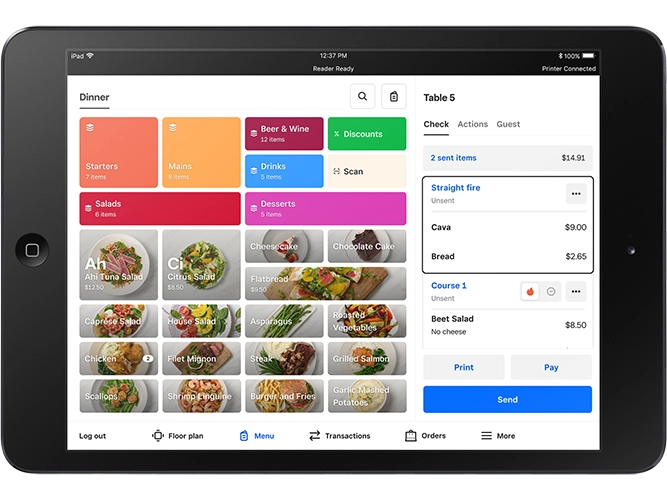
Menu & Order Management
- Real-time menu sync: Update menus across POS, online ordering, kiosks, and delivery apps instantly
- Bulk editing: Make mass changes to items, prices, and availability from the dashboard
- Item availability: Mark items as sold out across all channels with one tap
- Advanced modifiers: Build complex modifier flows for customizable items
- Third-party order consolidation: Manage DoorDash, Grubhub, and other delivery orders in one place
Table Service & Floor Plans
- Custom floor plans: Drag-and-drop table layouts with color-coded status indicators (Plus/Premium)
- Seat management: Assign dishes to specific seats for accurate delivery (Plus/Premium)
- Course management: Control timing of appetizers, mains, and desserts (Plus/Premium)
- Split checks: Divide by item, seat, or equal amounts (Plus/Premium)
- Reservation integrations: Connect with OpenTable, SevenRooms, and Yelp (Plus/Premium)
Payments & Checkout
- All payment types: Tap, chip, swipe, Apple Pay, Google Pay, Cash App Pay
- Offline mode: Process payments without internet (syncs when reconnected)
- Bar tab preauthorization: Hold cards for open tabs
- QR code payments: Let customers pay from their phones
- Automatic gratuity: Set party-size thresholds for auto-gratuity (Plus/Premium)
Reporting & Analytics
- Sales dashboard: Real-time sales tracking by item, category, time period, and location
- Labor vs. sales reports: Compare staffing costs to revenue
- Menu performance: See which items drive profit and which underperform
- Close-of-day reports: Detailed shift summaries with tip payouts (Plus/Premium)
- Daily email summaries: Automatic performance snapshots delivered to your inbox
Team Management
- Time tracking: Clock in/out from POS with break and overtime tracking
- Role-based permissions: Control what each staff member can access
- Shift scheduling: Create and publish schedules, manage time-off requests
- Tip pooling: Automatically distribute tips among eligible staff
Hardware Options
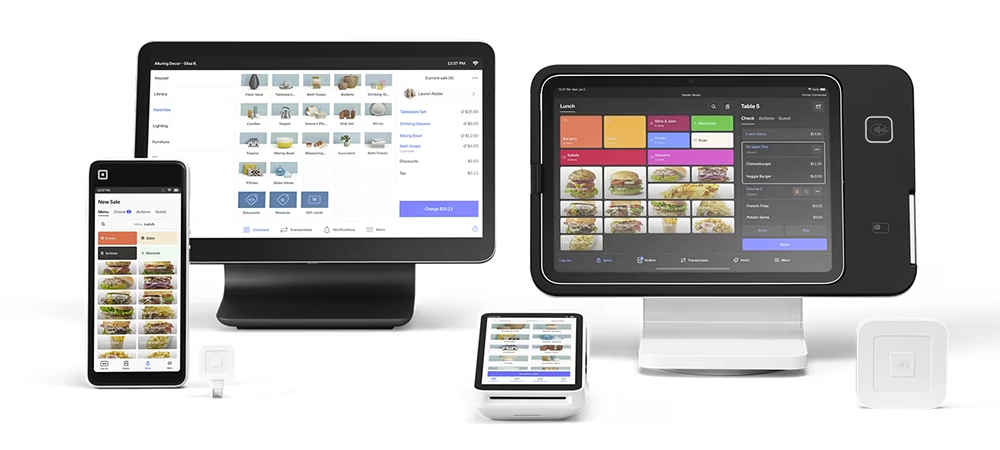
Square offers flexible hardware configurations. You can use your own compatible iPad or purchase complete kits:
Square Stand Restaurant Station (iPad Not Included) – $1,074
- Square Stand for Contactless and Chip
- USB Receipt Printer + 25 rolls paper
- Ethernet Kitchen Printer + 25 rolls paper
- 16″ Printer-Driven Cash Drawer
Stand Restaurant Station with Terminal (iPad Not Included) – $1,473
- Everything above, plus Square Terminal for tableside payments
Square Terminal – $299
- Portable card reader with built-in receipt printer
- Financing available: $27/mo for 12 months
Square Handheld – Starting at $149
- All-in-one mobile device for tableside ordering and payments
Real User Feedback
✅ What Users Like:
- “Square is the most complete ecosystem we’ve used in 13 years of business. We used to subscribe to multiple operating systems that do the same thing.” – Frankie DiCarlantonio, Scaffidi Restaurant Group
- “Having our sales, payments, and financing all integrated into one Square ecosystem has significantly simplified managing our restaurant.” – Fumio Tashiro, Mirror Tea and Sake House
- “I really like to go through Square and look for all of these different ways of presenting the data because I’m trying to find that little needle in a haystack, and they’re always there.” – Matt Longwell, Blue Bottle Coffee
❌ What Users Don’t Like:
- “The fees get a little expensive at times, especially when you manually enter info.”
- “Certain functions not available on free version, and even the paid version didn’t leave great options for our use case.”
- “Square has held funds without clear explanation—frustrating when you need cash flow.”
Square for Restaurants vs. Competitors
| Feature | Square for Restaurants | Toast | Clover | SkyTab |
|---|---|---|---|---|
| Starting Price | $0/mo | $69/mo | $89.95/mo | $29.99/mo |
| In-Person Processing | 2.4%–2.6% + 15¢ | 2.49% + 15¢ | 2.3% + 10¢ | 2.75% + 15¢ |
| Best For | Small/mid restaurants | Full-service, complex ops | Hardware-focused | Full-service restaurants |
| iPad Compatible | Yes | No | Yes | No (proprietary) |
| Processor Flexibility | No (Square only) | No (Toast only) | Limited | No (Shift4 only) |
| Free Online Ordering | Yes | Yes | Add-on | Yes |
Who Should Use Square for Restaurants?
✅ Best fit for:
- Small to mid-sized restaurants wanting an affordable, all-in-one solution
- New restaurant owners who want to start free and scale up
- Quick-service restaurants, cafés, and coffee shops
- Food trucks needing mobile, offline-capable payments
- Bars wanting easy tab management and preauthorization
- Restaurants already using other Square products (Payroll, Marketing, etc.)
❌ Not ideal for:
- High-volume operations where processing fees add up significantly
- Large chains or franchises needing enterprise customization
- Restaurants that want to choose their own payment processor
- Businesses requiring Android-native hardware solutions
- Operations with complex inventory needs beyond basic tracking
FAQ
Is Square for Restaurants really free?
Yes, the Free plan has no monthly fee—you only pay processing fees (2.6% + 15¢ per in-person transaction). The free tier includes menu management, online ordering, basic reporting, and offline payments. However, you won’t get features like split checks, custom floor plans, course management, or KDS integration without upgrading.
How much does Square for Restaurants cost per month?
Square offers three plans: Free ($0/mo), Plus ($49/mo per location), and Premium ($149/mo per location). Processing fees decrease on higher plans. Hardware costs are separate. KDS runs $20-30/mo per device, and Kiosk runs $30-50/mo per device depending on your plan.
Can I use my own payment processor with Square?
No. Square for Restaurants requires using Square’s integrated payment processing. This is one of the main trade-offs for using the platform—you get simplicity and integration, but lose the ability to shop for better processing rates.
Does Square for Restaurants work offline?
Yes. Square supports offline payment processing. Transactions are stored locally and processed automatically when your internet connection is restored. Payments must sync within 24 hours, and you accept the risk of declined cards discovered after the fact.
What's the difference between Square POS and Square for Restaurants?
Square POS is the general-purpose point-of-sale app suitable for any business type. Square for Restaurants is specifically designed for food service with features like table management, coursing, kitchen display integration, and check splitting that the general POS doesn’t include.
Does Square hold funds or freeze accounts?
Square has been known to place holds on funds or suspend accounts when their fraud detection system flags unusual activity. While this protects against fraud, it can be frustrating for legitimate businesses. Maintaining consistent processing patterns and keeping documentation ready can help avoid issues.
Verdict
Square for Restaurants remains one of the best entry points for small to mid-sized food service businesses in 2026. The genuinely free tier offers enough functionality to run a simple operation, while the Plus and Premium plans add the full-service features (floor plans, coursing, advanced reporting) that growing restaurants need—all without long-term contracts.
The biggest strengths are ease of use and ecosystem integration. If you’re already using or considering Square for payments, payroll, or marketing, the restaurant POS slots in seamlessly. The tiered processing fees are a nice touch, rewarding businesses that commit to higher plans with better rates.
The main drawbacks are the lack of processor choice and the potential for fund holds. If you process high volumes or have large average tickets, the flat-rate processing may cost more than interchange-plus pricing from a dedicated merchant account. And while Square’s fraud prevention is generally a positive, their account review process can catch legitimate businesses off guard.
Recommendation: Square for Restaurants is an excellent choice for new restaurants, small operations, and businesses that value simplicity over customization. If you’re a high-volume operation or need processor flexibility, consider Toast or SkyTab as alternatives.

Jason Feemster
POS systems expert and founder of POSUSA.com, a trusted industry resource since 2011. With over a decade of hands-on experience testing and reviewing point-of-sale systems, he helps business owners choose solutions that actually fit their needs.
Specification: Square for Restaurants
|
Videos: Square for Restaurants


Photos: Square for Restaurants


User Reviews
Be the first to review “Square for Restaurants”















There are no reviews yet.