
Best POS Systems for Restaurants (2026 Buyer’s Guide)
We reviewed the top restaurant POS systems and ranked the best options for 2026.
How many POS terminals do you need?
Compare quotes in 30 seconds — free, no obligation.
Home → Restaurant POS Systems → Best POS Systems for Restaurants
By Jason Feemster, POS Industry Expert | Last Updated: January 2026
Disclosure: POSUSA may earn a referral fee when you visit a vendor through links on this page. This does not affect our rankings. Our recommendations are based on fit, total cost, real-world operator feedback, and how systems perform under pressure.
Choosing the wrong restaurant POS system is expensive. Not just in dollars, but in wasted time, frustrated staff, and lost sales. With dozens of providers making similar promises, it’s hard to know which platform actually delivers for your type of operation.
This guide cuts through the marketing. We evaluate POS systems based on total cost, operational fit, and real operator feedback, not vendor claims. Since 2011, we’ve helped restaurant owners compare, switch, and negotiate POS systems, and we’ve compiled what we’ve learned into a ranked list of the best options for 2026, plus the context you need to make the right call for your specific situation.
Quick Takeaways
- Best overall value: SkyTab — $29.99/month with free hardware, full-service features
- Best all-in-one platform: Toast — industry standard, but pricier with 2-year contracts
- Best for new/small restaurants: Square — free plan, no contracts, same-day setup
- Best for complex operations: Lightspeed — deep reporting and multi-location management
- Processing fees often cost more than software fees — a 0.3% rate difference on $50K/month = $1,800/year
- Always get total cost in writing (software + processing + hardware + add-ons) before signing
- Most cloud POS systems lock you into their payment processor — plan accordingly
Top 3 Restaurant POS Picks for 2026

- Free hardware included
- $29.99/month flat
- Full-service features

- Free starter kit available
- Purpose-built hardware
- All-in-one platform
- Free plan available
- No contracts
- Same-day setup
The 8 Best POS Systems for Restaurants in 2026
Below are our full top 8 picks, but if you just want the fastest answer, start with the top 3 above.
- SkyTab — Best Overall Value
- Toast — Best for Full-Service Restaurants & Bars
- Square for Restaurants — Best for New & Small Restaurants
- Lightspeed Restaurant — Best for Multi-Location & Complex Menus
- TouchBistro — Best iPad POS with Offline Reliability
- SpotOn — Best for Lower Processing Rates
- Clover — Best for Quick-Service & Counter Service
- NCR Aloha — Best for Enterprise & Legacy Migration
Table of Contents
- 1 Top 3 Restaurant POS Picks for 2026
- 2 The 8 Best POS Systems for Restaurants in 2026
- 3 SkyTab POS
- 4 Toast POS
- 5 Square for Restaurants
- 6 Lightspeed Restaurant
- 7 TouchBistro
- 8 SpotOn Restaurant
- 9 Clover POS
- 10 NCR Aloha (Aloha Cloud)
- 11 How We Chose the Best Restaurant POS Systems
- 12 Best Restaurant POS Systems by Use Case
- 13 Honorable Mentions
- 14 Restaurant POS FAQs
- 14.1 How much does a restaurant POS system cost per month?
- 14.2 What's the difference between processing fees and software fees?
- 14.3 What contract terms should I watch for?
- 14.4 Can restaurant POS systems work offline?
- 14.5 Do I own the hardware or am I leasing it?
- 14.6 What's the best POS for small restaurants?
- 14.7 What's the best POS for full-service restaurants?
- 14.8 What's the best POS for bars?
- 14.9 How hard is it to switch POS systems?
- 14.10 What should I ask during a POS demo?
- 15 Final Verdict
SkyTab POS
SkyTab is our top pick for independent restaurants in 2026. The value proposition is hard to beat: free hardware (terminals, handhelds, KDS), $29.99/month flat, and a platform that handles tableside ordering, online orders, and guest feedback without nickel-and-diming you for add-ons. In our experience helping operators evaluate systems, SkyTab consistently delivers 90% of what Toast offers at a fraction of the price.
SkyTab is also endorsed by Jon Taffer of Bar Rescue — and given how many struggling bars he’s seen derailed by bad POS choices, that carries weight in this industry.
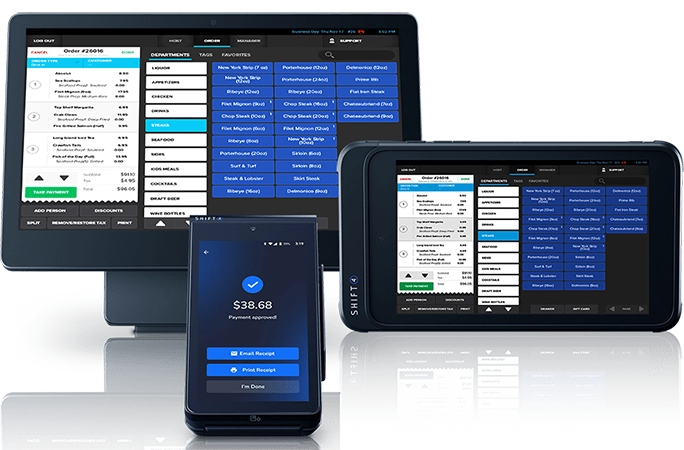
The tradeoff is processor lock-in — you’re required to use Shift4 for payment processing. For most operators, this is fine (Shift4’s rates are competitive). But if you have an existing processor relationship with favorable terms, this could be a dealbreaker.
Why Choose SkyTab?
SkyTab’s $29.99/month flat fee with free hardware makes the total cost of ownership exceptionally low for a full-featured system. Processing rates are competitive through Shift4, though you’ll want to get your specific rate in writing during the sales process. The platform includes online ordering at no extra charge — a feature that often costs $50–$100/month elsewhere.
Worth noting: SkyTab’s Advantage Program offers 0% processing fees by adding a small service fee to guest checks — a model that’s becoming increasingly common and can save high-volume restaurants thousands annually. Learn more in our full review.
→ Read our full SkyTab review | Current SkyTab promotion: $5,000 bonus
Toast POS
Toast is the industry standard for serious restaurant operations. The hardware is built specifically for restaurants — it survives grease, heat, and the occasional drop. The software handles complex modifiers, coursing, and seat-level ordering without breaking a sweat. For operators who want a single platform covering POS, online ordering, loyalty, payroll, and marketing, Toast is the safest mainstream choice.
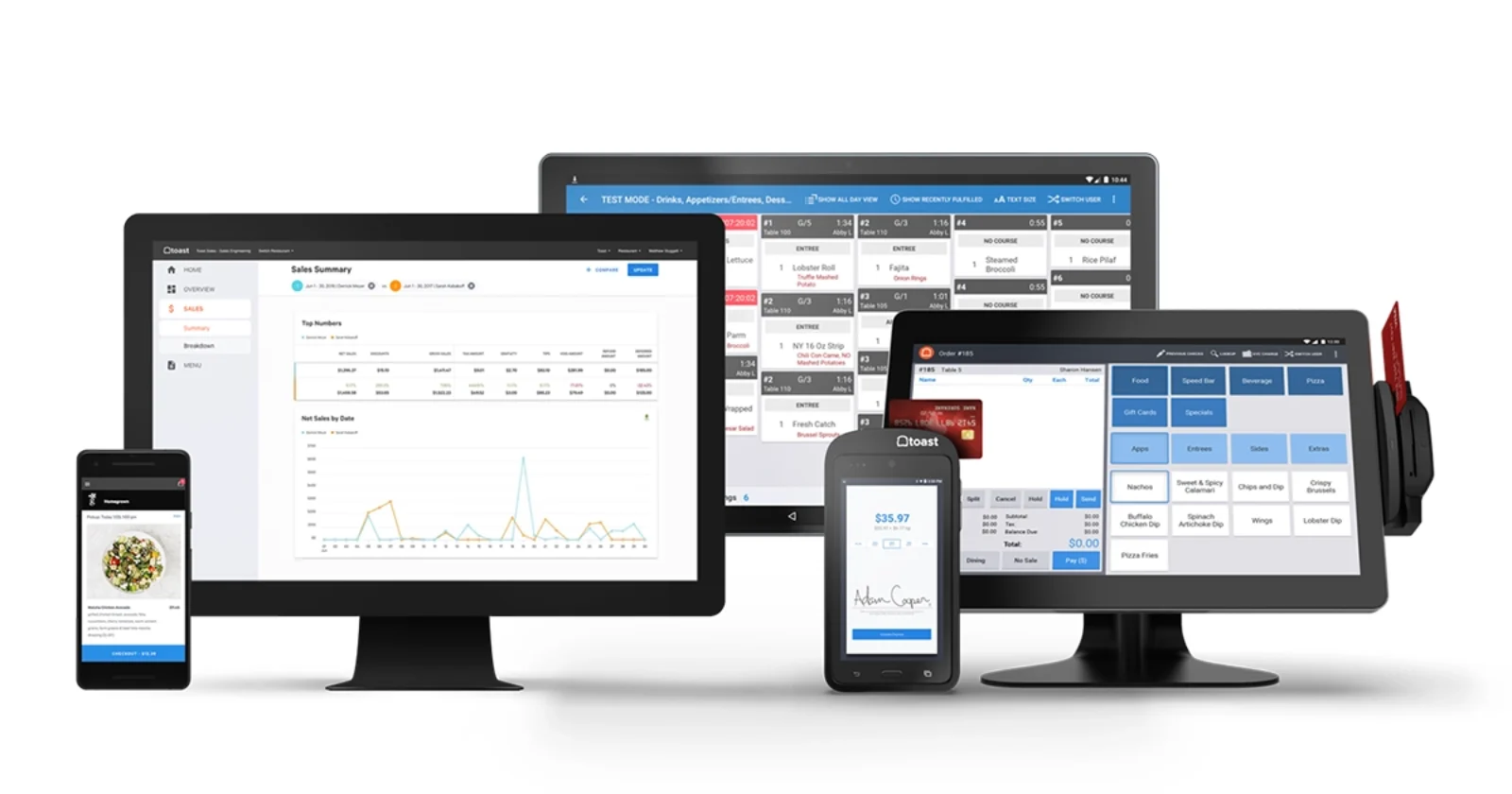
The downside is cost and commitment. Toast requires 2-year contracts, locks you into Toast Payments, and the add-on modules push total monthly costs higher than competitors. If you’re budget-conscious or hate long-term contracts, look elsewhere.
Why Choose Toast?
Toast offers a free starter kit through their Pay-as-You-Go option (higher processing at 3.09% + 15¢, no monthly fee) or standard pricing starting at $69/month with processing at 2.49% + 15¢. The all-in-one approach means fewer vendors to manage. Toast Go handhelds are excellent for tableside service, and the KDS integration is among the best available.
→ Read our full Toast review | Toast pricing breakdown | Current Toast promotions
Square for Restaurants

Square for Restaurants is the easy button. If you’re opening your first restaurant, running a small café, or just need something that works without complexity, Square removes the friction. The free plan has real functionality, the hardware is affordable, there are zero contracts, and you can be taking orders the same day you unbox it.
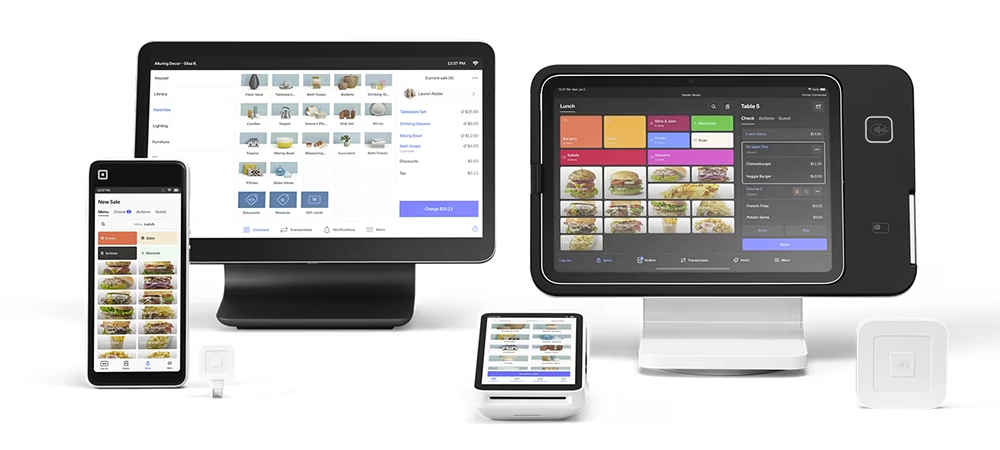
Square won’t win awards for advanced restaurant features — table management is basic, reporting is limited on the free plan, and processing fees add up at higher volumes. But for operators who need to get running fast and don’t want to be locked into anything, it’s the safest first step.
Why Choose Square?
Square’s free plan is genuinely usable — not a crippled demo. Processing runs 2.6% + 15¢ per transaction on the free plan. The Plus plan at $49/month adds split checks, advanced reporting, and a lower processing rate of 2.5% + 15¢. Hardware starts at $0 (use your own iPad) up to $799 for the full Square Register. No contracts means you can switch anytime without penalty.
→ Read our full Square for Restaurants review | Current Square promotions
Not sure which POS fits your restaurant?
Compare the top systems side-by-side and find the right match.
Lightspeed Restaurant
Lightspeed Restaurant is overkill for a simple café — and that’s exactly why certain restaurants need it. If you’re running multiple locations, dealing with complex menus and endless modifiers, or need reporting that goes beyond basic sales summaries, Lightspeed delivers tools that simpler systems don’t have.
The multi-location management is particularly strong: centralized menus, roll-up reporting, and cross-site performance comparisons. The downside is price and complexity — this isn’t a plug-and-play system, and the best features require higher-tier plans.
Why Choose Lightspeed?
Lightspeed Restaurant pricing starts at $69/month (Starter), with Essential at $189/month and Premium at $399/month. The higher tiers unlock advanced inventory, food costing, and multi-location features that justify the price for complex operations. Annual contracts are required.
→ Read our full Lightspeed Restaurant review | Current promotions
TouchBistro

TouchBistro carved out its niche as the go-to iPad POS for restaurants that need reliability when internet fails. Unlike cloud-dependent systems that panic when connectivity drops, TouchBistro runs locally — so you can keep taking orders and payments even when your ISP lets you down.
For restaurants in areas with spotty internet, or operators who’ve been burned by cloud outages during busy service, this matters. You also get flexibility on payment processing — TouchBistro lets you choose your processor rather than locking you in. The downside: add-on modules get expensive fast.
Why Choose TouchBistro?
TouchBistro starts at $69/month for base software. Add-ons like online ordering, loyalty, and reservations can push monthly costs significantly higher. The à la carte pricing means you only pay for what you need, but budget carefully if you want the full suite.
→ Read our full TouchBistro review
SpotOn Restaurant

SpotOn often gets overlooked, but it deserves serious consideration — especially if you’re tired of bleeding money on processing fees. With rates that can run lower than Toast or Square, SpotOn can save high-volume restaurants real money. On $80K/month in card sales, even a modest rate difference adds up to thousands annually.
The interface isn’t quite as polished as Toast, and brand recognition is still building. But the fundamentals are solid, and month-to-month options give you flexibility that contract-heavy competitors don’t.
Why Choose SpotOn?
SpotOn pricing can vary by region (depending on the dealer) and offer, but a typical structure looks like this. The Quick Start plan is $0/month with processing at 2.89% + 25¢ (hardware included in processing fee). POS Essentials runs $55/month with a lower rate of 1.99% + 25¢. Counter-Service is $99/month, and Full-Service is $135/month. Compare that to Toast’s 2.49% + 15¢ — on high volume, the savings are significant.
→ Read our full SpotOn Restaurant review
Clover POS

Clover works well for simpler restaurant operations — counter-service spots, quick-service restaurants, cafés, and delis. The hardware options are flexible, the app marketplace lets you add features as needed, and basic functionality is straightforward.
Critical caveat: Who you buy Clover from matters enormously. Clover is sold through Fiserv and hundreds of independent sales organizations (ISOs), and experience varies wildly. Buy from a reputable source and you’ll be fine. Buy from a random ISO and you might get locked into bad contracts with hidden fees.
Why Choose Clover?
Clover software runs $14.95–$160+/month depending on plan. Hardware ranges from $49 (Clover Go) to $1,799+ (Station Duo). Processing typically runs 2.3%–2.6% + 10¢, though rates vary by reseller. We recommend purchasing directly from Clover when possible to avoid middleman markup.
NCR Aloha (Aloha Cloud)

Let’s be clear upfront: NCR Aloha is not for most independent restaurants. It’s on this list because it remains a real-world standard for chains, high-volume multi-location groups, and — critically — for operators migrating from legacy on-premise Aloha systems.
Aloha has been in restaurants since the 1990s. The newer Aloha Cloud brings that legacy expertise into a modern cloud platform with the depth and configurability that enterprise operations need. The tradeoff is enterprise pricing and implementation complexity.
Why Choose NCR Aloha?
Aloha pricing is custom quote only — it varies by terminals, scope, support level, and implementation complexity. Expect enterprise pricing. Ask for a written total-cost breakdown including implementation, training, and ongoing support fees before signing. If you’re currently on legacy Aloha (on-premise), Aloha Cloud is the path of least resistance.
For large enterprise chains and franchises, Aloha Essentials offers a streamlined package designed specifically for high-volume multi-unit operations.
→ Read our full NCR Aloha Cloud review | Aloha Essentials for enterprise
How We Chose the Best Restaurant POS Systems
We didn’t just compile feature lists from vendor websites. In our experience helping restaurant operators navigate POS decisions over the past decade, we’ve learned that the systems that look best on paper don’t always perform best in the real world. A busy Saturday night exposes weaknesses that no demo will reveal.
Our evaluation criteria focus on what actually matters when you’re running a restaurant:
Ordering Speed Under Pressure
How fast can a server punch in a complicated order with multiple modifiers? Does the system lag during peak hours? Can you split checks without a 10-step process? We prioritize systems that keep lines moving and servers efficient even when the kitchen is slammed.
Menu Management Flexibility
Restaurants change menus constantly — daily specials, seasonal items, 86’d dishes, happy hour pricing. A good POS makes menu updates quick and painless. A bad one turns every menu change into a support ticket. We evaluate how easy it is to add items, adjust pricing, set time-based modifiers, and handle complex configurations like pizza half-and-half toppings.
Payment Processing Economics
Processing fees often cost more than software fees — and most operators don’t realize this until they’ve signed a contract. We look at effective rates (total fees divided by total volume), not just advertised rates. A 0.3% difference sounds small until you calculate it against $50,000/month in card sales: that’s $1,800/year. We also note which systems lock you into their processor versus those that offer flexibility.
Offline Reliability
Internet goes down. It happens at the worst possible times. We evaluate how each system handles connectivity loss. Can you still take orders? Process payments? Some systems are fully functional offline; others become expensive paperweights. For restaurants in areas with unreliable internet, this is a critical factor.
Support Quality (Especially Weekends)
POS problems don’t wait for business hours. We consider support availability, response times, and the competence of support staff. A system with 24/7 support that actually resolves issues beats a system with “24/7 support” that puts you on hold for 45 minutes. We pay particular attention to weekend and holiday support quality — that’s when restaurants need help most.
Reporting That Drives Decisions
Every POS generates reports. Few generate reports that actually help operators make better decisions. We look for systems that surface actionable insights: labor cost as a percentage of sales, best and worst selling items, peak hour staffing needs, food cost trends. Bonus points for systems that make this data accessible on mobile.
Online Ordering Integration
Online ordering went from “nice to have” to “essential” in the past few years. We evaluate whether online ordering is built-in or requires a third-party integration, what it costs, how orders flow into the kitchen, and whether the system can handle multiple channels (website, app, third-party delivery) without creating chaos.
Hardware Durability
Restaurant environments are brutal on hardware. Grease, heat, spills, drops — consumer-grade tablets don’t last. We favor systems with purpose-built hardware or proven track records on specific tablet models. Proprietary hardware has downsides (no resale value, replacement costs), but durability often makes the tradeoff worthwhile.
Total Cost Transparency
The advertised monthly price is rarely the actual monthly cost. We dig into what’s included and what’s extra: hardware, processing, online ordering, loyalty, reporting, support tiers, early termination fees. Systems that are transparent about total cost rank higher than those that hide fees in fine print or require lengthy sales calls to get pricing.
Best Restaurant POS Systems by Use Case
Different restaurants have different needs. A food truck doesn’t need the same features as a fine dining establishment. Here’s how our top picks match up to specific use cases:
| Restaurant Type | Top Pick | Runner-Up | Why |
|---|---|---|---|
| Quick-Service / Fast Casual | Square | Clover | Speed, simplicity, low barrier to entry |
| Full-Service Dining | SkyTab | Toast | Best value vs. most comprehensive |
| Bars / Nightlife | Toast | SkyTab | Tab management, speed bar features |
| Multi-Location Groups | Lightspeed | Toast | Centralized management, cross-location analytics |
| New / Tight Budget | Square | SkyTab | Free plan vs. free hardware |
| Pizza / Delivery | HungerRush (Honorable Mention) | Toast | Pizza builder, delivery management |
| Unreliable Internet | TouchBistro | Toast | Local operation, offline reliability |
| Enterprise / Chains | NCR Aloha | Toast | Proven at scale, deep configurability |
For full-service restaurants, the choice usually comes down to SkyTab vs. Toast. SkyTab wins on value — free hardware and $29.99/month is hard to beat. Toast wins on comprehensiveness and polish. If budget is tight, go SkyTab. If you want the industry standard and don’t mind paying more, go Toast.
For new restaurant owners still figuring things out, Square is the safest starting point. The free plan gives you room to learn without financial commitment. If you outgrow it, you can switch later — no penalty, no drama.
For multi-location operators, Lightspeed offers the centralized management and reporting depth that simpler systems lack. The higher price is justified when you’re managing multiple sites and need roll-up analytics.
Ready to Compare?
See how these systems stack up side-by-side for your specific needs.
Honorable Mentions
HungerRush — Best for Pizza & Delivery
HungerRush is purpose-built for pizza shops and delivery-focused restaurants. The pizza builder handles half-and-half toppings, size-based pricing, and complex modifier configurations that general-purpose POS systems struggle with. Delivery management, driver dispatch, and online ordering are core features, not afterthoughts. If pizza and delivery are your primary business, HungerRush is worth a serious look.
→ Read our full HungerRush review
Epos Now — Budget Option
Epos Now is a UK-based system offering an affordable entry point for budget-conscious operators. Hardware bundles can be attractive for those starting from scratch. US-based support has been inconsistent in feedback we hear from operators, and feature depth doesn’t match restaurant-specific competitors. Consider it if price is the primary concern and you’re comfortable with a less specialized platform.
→ Read our full Epos Now review
Restaurant POS FAQs
How much does a restaurant POS system cost per month?
Total monthly cost typically ranges from $30 to $300+ for software alone. But software is often the smaller expense — processing fees (2%–3%+ of card transactions) usually cost more. A restaurant doing $50K/month in card sales pays $1,000–$1,500/month in processing alone. Budget for software + processing + hardware lease (if applicable) + any add-ons to get your real monthly cost. Always request a written total-cost breakdown before signing.
What's the difference between processing fees and software fees?
Software fees are the monthly subscription you pay to use the POS system — typically $0–$300/month depending on features. Processing fees are the percentage + per-transaction fee you pay every time a customer uses a card — typically 2%–3% + $0.10–$0.30 per transaction. For most restaurants, processing fees cost 3–5x more than software fees annually. A 0.3% difference in processing rate on $60K/month in card sales equals $2,160/year.
What contract terms should I watch for?
Key contract terms to scrutinize: contract length (month-to-month vs. 1–2 years), early termination fees (can range from nothing to several thousand dollars), auto-renewal clauses, processing rate lock periods (rates may increase after year one), and hardware ownership (do you own it or lease it?). Get these terms in writing before signing. Some vendors (Square, SpotOn) offer month-to-month; others (Toast, Lightspeed) require annual commitments.
Can restaurant POS systems work offline?
It varies significantly. TouchBistro is designed for offline reliability — it runs locally and keeps working when internet fails. Toast and SkyTab have offline modes that allow order-taking with some limitations. Square’s offline mode is more basic. Cloud-only systems may become unusable without internet. If you’re in an area with unreliable connectivity, test offline functionality during your demo — this can be a dealbreaker.
Do I own the hardware or am I leasing it?
Depends on the vendor and how you purchase. With Toast, you typically purchase hardware outright ($799+ per terminal) but it has no resale value if you leave. SkyTab provides free hardware, but it’s tied to your Shift4 processing agreement. Square hardware you purchase is yours. Clover hardware ownership varies by reseller. Always clarify: Do I own this? Can I sell it? What happens to the hardware if I cancel?
What's the best POS for small restaurants?
For small restaurants, we recommend Square (free plan, no contracts, same-day setup) or SkyTab ($29.99/month with free hardware). Square is the lowest-risk starting point if you’re still figuring things out — you can switch later without penalty. SkyTab is better if you want full-service features (tableside ordering, KDS) at a low monthly cost. Both minimize upfront investment and long-term risk.
What's the best POS for full-service restaurants?
SkyTab offers the best value for full-service restaurants: tableside ordering, handhelds, KDS, and online ordering at $29.99/month with free hardware. Toast is the industry standard with the deepest feature set, but costs more and requires 2-year contracts. For most independent full-service restaurants, SkyTab delivers 90% of what Toast offers at a fraction of the price.
What's the best POS for bars?
Toast is our top pick for bars due to its strong tab management, pre-authorization features, and speed bar functionality. SkyTab is a solid runner-up at a lower price point. Key features to look for in a bar POS: fast tab opening/closing, pre-auth on cards, quick item lookup, bartender-friendly interface, and robust reporting on pour costs and comps.
How hard is it to switch POS systems?
Harder than vendors claim. You’ll need to rebuild your menu from scratch, retrain staff, potentially purchase new hardware, and may lose gift card balances and loyalty data that don’t transfer. Budget 2–4 weeks for a full transition. Switch during a slow period if possible — never right before peak season. Some data (sales history) can often be exported; customer data and integrations are harder to migrate.
What should I ask during a POS demo?
Key questions: What’s the total monthly cost including processing? What’s the contract length and early termination fee? Can I see offline mode working? How quickly can I reach support on a Saturday night at 8pm? Can I talk to other restaurant owners currently using this system? What happens to my data if I cancel? Are there price increases after year one? What’s not included that most restaurants need?
Final Verdict
After helping restaurant operators since 2011 navigate POS decisions, here’s the bottom line:
- #1 SkyTab: Best value for most restaurants. Free hardware, $29.99/month, full-service features. If budget matters, start here.
- Runner-up Toast: Industry standard with the deepest feature set. Higher cost and 2-year contracts, but the safest mainstream choice for operators who prioritize polish over price.
- Best for beginners Square: Lowest-risk starting point. Free plan, no contracts, same-day setup. Perfect for new restaurant owners still figuring things out.
Whichever direction you lean, get demos from at least 2–3 systems, ask the hard questions about total cost and contracts, and talk to other restaurant owners who’ve lived with these platforms. A 30-minute demo doesn’t tell you how a system performs during a 200-cover Saturday night.
Our #1 Recommendation: SkyTab
Compare Your Options
See how the top restaurant POS systems stack up side-by-side.
Or explore all restaurant POS options.

Jason Feemster, President of POS USA, brings over 20 years of experience in the point of sale and information technology industries. He has helped thousands of businesses, from small startups to large enterprises, find tailored POS solutions that enhance efficiency and drive growth. Jason’s insights have been featured in leading industry publications such as Inc.com, Business.com, and Restaurant Business Online. Through POS USA, Jason continues to guide business owners toward making informed decisions that drive their success.


