

Clover Mini V3 (Newest Version)
$849.00
 Jason Feemster
Clover Mini Review: V3 Pricing, Features & Pros vs Cons
Updated January 2026 • Verified Q1 2026
Table of Contents
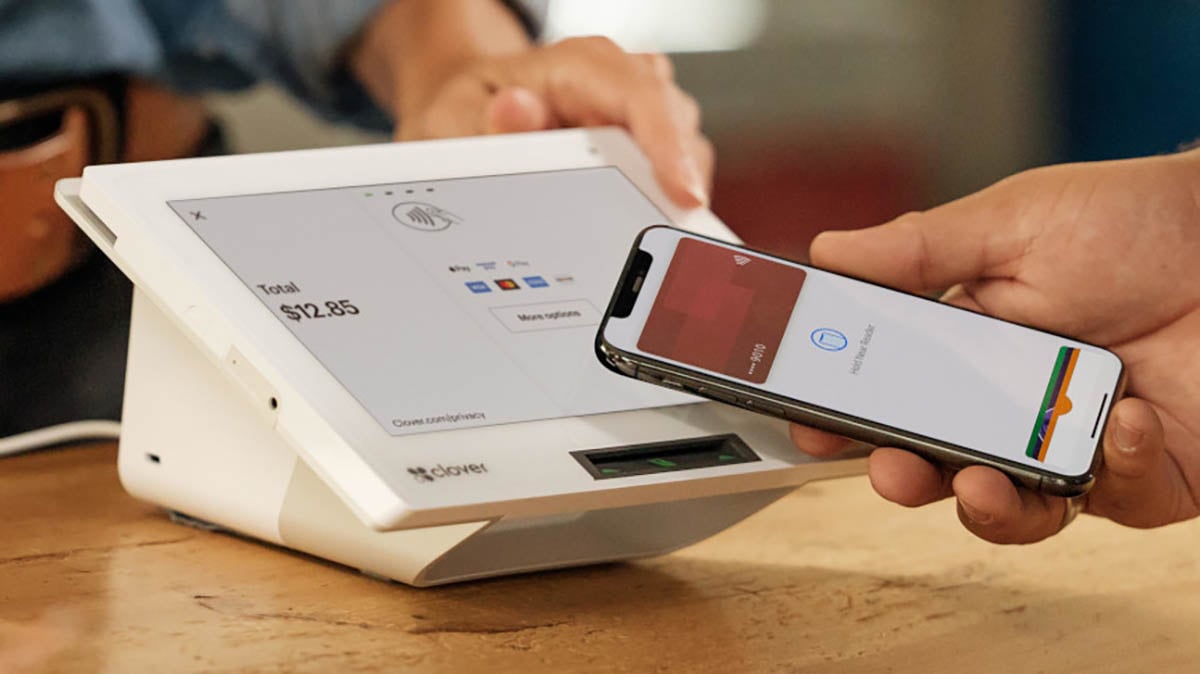
The Clover Mini (V3) is a compact countertop POS with an 8″ touchscreen and built-in receipt printer. It’s a solid device — but how you buy it matters more than the hardware itself. Clover is sold through hundreds of resellers, which means pricing, contracts, and support quality vary wildly depending on who you sign up with.
At $849 upfront (or $45-$180/month on a 36-month contract), the Mini isn’t cheap. And unlike Square, you can’t just buy the hardware and walk away — you’re locked into a payment processor and often a multi-year contract.
This review covers what the Clover Mini actually costs, what to watch out for, and whether it’s worth it for your business.
Pros vs. Cons
- Sleek, professional hardware
- Built-in receipt printer
- Accepts chip, tap, swipe payments
- Large app marketplace
- Works with cash drawer, scanner, scale
- WiFi, Ethernet, and LTE options
- 24/7 support available
- 36-month contract required
- Hardware locked to processor
- Sold through resellers (quality varies)
- Early termination fees ($500+)
- More expensive than Square
- No free software plan
- Customer service complaints common
Clover Mini Pricing
Clover Mini pricing depends on whether you buy upfront or finance, and which software plan you choose.
Hardware Cost
| Option | Price | Notes |
|---|---|---|
| Buy Upfront | $849 | One-time payment, still need software plan |
| Finance (36 months) | $45–$180/mo | Hardware + software bundled |
Software Plans (Monthly)
| Plan | Monthly Fee | What’s Included |
|---|---|---|
| Starter | $14.95 | Basic payments, tips, taxes |
| Standard | $49.95 | Inventory, employee management, reporting |
| Advanced | $84.95 | Full POS features, online ordering, loyalty |
Payment Processing Fees
| Transaction Type | Rate |
|---|---|
| Card Present (tap, dip, swipe) | 2.3% – 2.6% + 10¢ |
| Keyed-In / Online | 3.5% + 10¢ |
Note: Rates vary by reseller. Some offer interchange-plus pricing for high-volume businesses. Always get rates in writing before signing.
⚠️ Critical Warnings Before You Buy
36-Month Contracts Are Standard
Most Clover plans require a 36-month commitment. Breaking early triggers termination fees — often $500 or more, calculated based on remaining months. Read the fine print carefully.
Hardware Is Locked to Your Processor
Unlike Square (which you can cancel anytime), Clover hardware is tied to your payment processor. If you want to switch processors, you typically need to buy new hardware. You cannot reprogram a Clover device for a different processor.
Reseller Roulette
Clover is sold through hundreds of independent sales organizations (ISOs). Some are reputable; others use aggressive sales tactics, hidden fees, and bait-and-switch pricing. Common complaints include:
- Rates higher than quoted
- Unexpected monthly fees appearing after signup
- “Free” hardware tied to expensive leases
- Difficulty reaching support or canceling
Pro tip: Buy directly from Clover.com or a bank like Wells Fargo if possible. Avoid third-party resellers offering “free” hardware — the cost is usually hidden in higher processing rates or lease terms.
Watch for Hidden Fees
Beyond the advertised rates, watch for:
- PCI compliance fees ($99+/year)
- Statement fees
- Chargeback fees ($25-30 per dispute)
- App marketplace fees (many apps cost $10-50/month extra)
- Early termination fees
Clover Mini Features
Hardware Specs
| Spec | Detail |
|---|---|
| Screen | 8″ LCD touchscreen (1280 x 800) |
| Printer | Built-in thermal receipt printer |
| Payments | EMV chip, NFC contactless, magstripe |
| Connectivity | WiFi, Ethernet, LTE (optional) |
| Dimensions | 8″ W x 6″ H x 4.7″ D |
| Weight | ~2.6 lbs (with hub) |
| OS | Android 10 |
| Ports | USB, Ethernet, cash drawer |
Software Features
- Inventory management: Categories, labels, modifiers, variants
- Employee management: Timesheets, permissions, shift tracking
- Reporting: Sales by item, hour, employee; exportable data
- Virtual terminal: Take payments over phone or send invoices
- Loyalty program: Built-in rewards (free on Standard+ plans)
- App marketplace: 400+ apps for accounting, scheduling, marketing
- Offline mode: Continue taking payments during internet outages
Accessories
Clover Mini works with:
- Cash drawer (~$109)
- Barcode scanner
- Kitchen printer
- Weight scale
- Customer-facing display (tethered second Mini)
What Users Say
Based on reviews from Capterra, GetApp, and Trustpilot:
✅ What users like:
— Software Advice reviewer
— Capterra reviewer
❌ Common complaints:
— Software Advice reviewer
— Capterra reviewer
— Software Advice reviewer
Clover ratings:
- GetApp: 3.9/5 (461 reviews)
- Capterra: 3.9/5
- Trustpilot: 2.4/5 (2,000+ reviews)
The hardware gets good reviews. Most complaints are about contracts, resellers, fees, and customer support.
Clover Mini vs. Alternatives
| Feature | Clover Mini | Square Stand | Toast Starter |
|---|---|---|---|
| Hardware Cost | $849 | $149 (+ iPad $329+) | $0 (with contract) |
| Monthly Software | $14.95–$84.95 | $0 | $0 |
| Processing Rate | 2.3%–2.6% + 10¢ | 2.6% + 15¢ | 2.99% + 15¢ |
| Contract | 36 months | None | 2 years |
| Choose Processor? | Limited (reseller dependent) | No (Square only) | No (Toast only) |
| Built-in Printer | Yes | No (separate purchase) | Yes |
| Best For | Retail, services, quick-service | Small retail, cafes | Restaurants |
Choose Clover Mini if: You want an all-in-one device with built-in printer and don’t mind a contract.
Choose Square Stand if: You want no contracts, lower upfront cost, and simplicity.
Choose Toast if: You’re a restaurant and want industry-specific features.
Who Clover Mini Is For
✅ Good Fit
- Retail stores needing inventory management
- Quick-service restaurants and cafes
- Service businesses (salons, repair shops)
- Businesses wanting sleek, professional hardware
- Those comfortable with multi-year contracts
❌ Not Ideal For
- Businesses wanting no contracts (use Square instead)
- Budget-conscious startups
- Anyone who wants to switch processors later
- Full-service restaurants (consider Toast)
Frequently Asked Questions
How much does Clover Mini cost?
Clover Mini V3 costs $849 upfront, or $45–$180/month on a 36-month financing plan (hardware + software bundled). You’ll also pay monthly software fees ($14.95–$84.95) and processing fees (2.3%–2.6% + 10¢ per transaction). Total monthly cost varies significantly based on your plan and reseller.
Can I use Clover Mini without a contract?
It’s difficult. Most Clover plans require a 36-month contract. If you buy hardware upfront, you still need a software subscription, and early termination fees apply if you cancel before your term ends. Square is the better option if you want no contracts.
Can I switch payment processors with Clover hardware?
Generally no. Clover hardware is locked to the processor you sign up with. You cannot reprogram a Clover device for a different processor — you’d need to buy new hardware.
Does Clover Mini work offline?
Yes, Clover Mini has offline mode for processing payments when internet is down. However, offline transactions have limits and carry higher risk of chargebacks. Transactions sync when you reconnect.
Is Clover Mini V3 the latest version?
Yes, as of 2026, the Clover Mini 3rd Generation (V3) is the current model. Gen 1 and Gen 2 devices are approaching end-of-support (March 2026) and should be avoided.
What's the difference between buying from Clover vs. a reseller?
Clover.com offers standardized pricing and support. Resellers (ISOs) may offer lower upfront costs but often include hidden fees, higher processing rates, or unfavorable lease terms. Quality varies significantly. If using a reseller, get everything in writing and research reviews first.
Our Verdict
The Clover Mini V3 is excellent hardware — compact, professional, with a built-in printer and all the features most small businesses need. The problem isn’t the device; it’s how Clover is sold.
The reseller model creates a minefield of variable pricing, hidden fees, and inconsistent support. The 36-month contracts and early termination fees lock you in, and the hardware can’t be reprogrammed for another processor if you want to switch.
If you go with Clover, buy directly from Clover.com or a reputable bank, pay upfront for hardware if possible, and get all rates and fees in writing before signing anything.
For businesses that want simplicity and flexibility, Square is often the better choice — no contracts, transparent pricing, and you can cancel anytime. But if you specifically want Clover’s hardware and app ecosystem, just go in with eyes open.

Jason Feemster
POS systems expert and founder of POSUSA.com, a trusted industry resource since 2011. With over a decade of hands-on experience testing and reviewing point-of-sale systems, he helps business owners choose solutions that actually fit their needs.
Specification: Clover Mini V3 (Newest Version)
|
User Reviews
Be the first to review “Clover Mini V3 (Newest Version)”

















There are no reviews yet.