

Paypal Point of Sale
$29.00
 Jason Feemster
PayPal Point of Sale (Zettle) Review: Features, Pricing & Pros/Cons
Updated October 2026
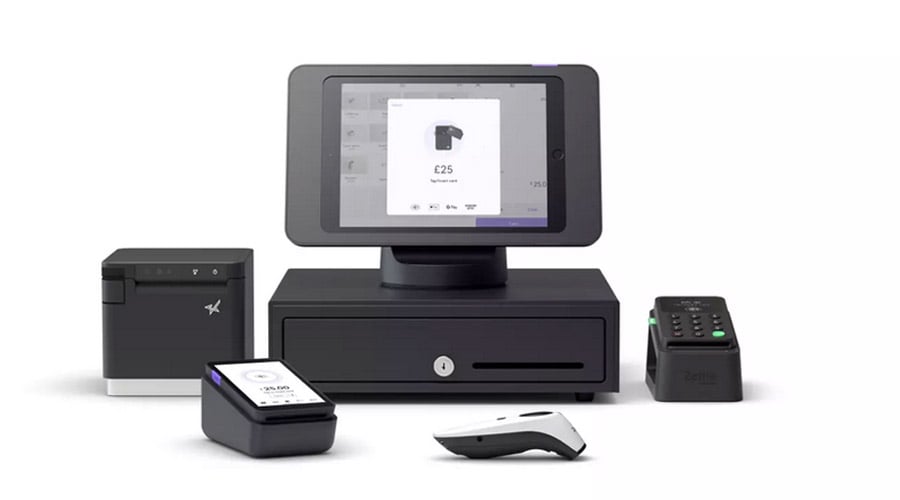
PayPal Point of Sale, formerly Zettle by PayPal, is a mobile point-of-sale system designed for small businesses, pop-up shops, and food trucks. It works on both Apple and Android devices and includes tools for managing products, inventory, customers, sales, and staff. If you’re searching for Zettle or PayPal Here, this is the product that replaced them.
Our Review Process
In our PayPal Point of Sale review, we evaluate key factors such as features, data reporting, setup speed, and pricing. We break down the cost structure to give you a clear understanding of transaction fees, hardware costs, and monthly charges.
We also evaluate customer service, looking at response times, helpfulness, and availability across multiple channels.
Pros & Cons
- Tap to Pay on smartphone
- No monthly or setup fees
- Funds available in minutes
- Low in-person processing rate
- Accepts major cards + Venmo
- No termination fees
- Few integrations available
- No loyalty or marketing tools
- No appointment scheduling
- Basic reporting only
- No offline payments in PayPal’s own app
How Much Does PayPal Point of Sale Cost?
PayPal Point of Sale has no monthly or setup fees. You pay 2.29% + 9¢ per in-person card payment and 3.49% + 9¢ for manually keyed cards, plus whatever hardware you choose.
| Item | Cost |
|---|---|
| Monthly Software Fee | $0/mo |
| Card Reader (first, new users) | $29 |
| Card Reader (standard / additional) | $79 |
| Terminal | $199 |
| Terminal + Barcode Scanner | $239 |
| In-Person Processing | 2.29% + 9¢ |
| Keyed-In Processing | 3.49% + 9¢ |
| QR Code Payments (PayPal/Venmo) | 2.29% + 9¢ |
| Invoices (paid by card) | 2.99% + 49¢ |
| Invoices (paid with PayPal) | 3.49% + 49¢ |
The $29 first reader is PayPal’s new-user price, limited to one per business, and PayPal can change it at any time. Every reader after that is $79, which is PayPal’s standard price.
If you prefer, you can skip the hardware entirely and use Tap to Pay on your iPhone or Android. Keyed-in transactions (phone orders) have a higher rate at 3.49% + 9¢.
One perk worth knowing: sales land in your PayPal balance, where you can access the money within minutes instead of waiting on a next-day deposit. PayPal notes that transactions are subject to review and may be held or delayed.
What Sets PayPal Point of Sale Apart
PayPal Point of Sale doesn’t stand out on features. What it offers new businesses is a low-risk way to start:
- Free PayPal account and POS app: No fees or subscriptions, so new entrepreneurs lose nothing by trying.
- Low in-person rate: At 2.29% + 9¢, it undercuts most flat-rate competitors on card-present sales.
- Free termination: If your business doesn’t take off, closing your account is as easy as opening it.
- Affordable hardware: Take payments on your phone before investing in a terminal.
Areas Where PayPal Point of Sale Could Improve
PayPal Point of Sale works for many small businesses, but a few gaps stand out.
- Limited add-ons: More add-ons would help growing sellers scale.
- No appointment scheduling: Limits service businesses that need booking.
- No marketing features: No email campaigns or loyalty messaging.
Key Features

PayPal Point of Sale is easy and intuitive. Hardware is optional for smaller merchants, and businesses of any size get free access to the app.
Inventory and Sales Management
The POS app lets you manage inventory and track sales. You can create and send invoices and run sales reports.
Staff Management
Multi-user access lets several staff members use the same device while keeping their sales history separate, which simplifies end-of-day reconciliation.
Accepting Payments with Your Phone
Merchants can charge customers directly from their iOS or Android phones using Tap to Pay. Payment options include contactless debit and credit cards, Apple Pay, Google Pay, and Samsung Pay.
With a card reader or terminal, you can also take chip cards, and the PayPal ecosystem adds PayPal and Venmo QR code payments.
Product Catalog
The product catalog is customizable with categories, barcodes, photos, and more. Setting up your shop is quick and easy.
Data Reporting
PayPal Point of Sale offers sales reporting you can filter by timeframe to see sales volume and average earnings.
Reports can be exported in PDF and Excel formats, and the app records customer data, including contact information.
Overall, reports are simple to understand, but we’d like to see more depth for spotting patterns and trends.
Hardware
PayPal Point of Sale runs on your tablet, smartphone, or a PayPal card reader. If you already have a smartphone for work, it costs nothing to turn it into a point of sale with Tap to Pay.
If you want dedicated hardware, new users get their first PayPal Card Reader for $29, and additional readers are $79.
Another option is the portable, all-in-one PayPal Terminal for $199, or $239 with a built-in barcode scanner.
| Card Reader | Terminal | |
|---|---|---|
| All-in-one system | No | Yes |
| Requires phone/tablet | Yes | No |
| Portable | Yes | Yes |
| Wi-Fi / 3G/4G | Via Bluetooth to your phone or tablet | Built in |
| Battery life | Up to 8 hours, depending on use | 12 hours (4-6 hours with intensive use) |
| Scans QR codes | No | Yes |
Integrations
PayPal Point of Sale integrates with some eCommerce and accounting tools:
- eCommerce: Shopify, BigCommerce, WooCommerce
- Accounting: QuickBooks and Xero
The integration options are limited compared to competitors like Square, but if you already use any of these tools, PayPal Point of Sale could be a good fit.
Customer Support
If you have a problem with your account, you can call customer service from 6 AM to 6 PM Pacific time every day, or contact an agent through online chat. PayPal also runs community forums covering payments and inventory.
Explore Other Options
If you are looking for a functional POS system for small businesses, consider these alternatives:
| System | Best For | Starting Price | In-Person Rate |
|---|---|---|---|
| Square POS | Budget-friendly, more features | $0/mo | 2.6% + 15¢ |
| Toast POS | Restaurants | $0/mo | 3.09%–3.69% + 15¢ |
| Shopify POS | eCommerce integration | $29/mo | 2.6% + 10¢ |
Frequently Asked Questions
Does PayPal Point of Sale charge a monthly fee?
No. There are no monthly or setup fees to use the PayPal Point of Sale app. You pay per transaction plus any hardware you buy.
Are Zettle and PayPal Point of Sale the same?
Yes. PayPal acquired Zettle (formerly iZettle) in 2018, replaced its older PayPal Here product with it, and has since renamed Zettle by PayPal to PayPal Point of Sale.
What percentage does PayPal Point of Sale charge?
PayPal Point of Sale charges 2.29% + 9¢ for in-person card and QR code transactions, and 3.49% + 9¢ for manually keyed transactions. Invoices cost 2.99% + 49¢ when paid by card, or 3.49% + 49¢ when paid with PayPal.
How much is the PayPal card reader?
New business users get their first PayPal Card Reader for $29. PayPal’s standard price, and the price for each additional reader, is $79. The all-in-one PayPal Terminal is $199, or $239 with a built-in barcode scanner.
Does PayPal Point of Sale work offline?
Not in PayPal’s own POS app. PayPal does support offline card payments, but only through select third-party POS apps built on PayPal’s POS SDK. Where it’s available, offline payments work with chip and contactless cards (not swipe), are capped at $1,000 per transaction and $10,000 in total queued payments per device, and must be uploaded within 24 hours. The merchant carries the risk of any offline payment that’s later declined.
Is PayPal Point of Sale cheaper than Square?
On in-person processing, usually yes: PayPal charges 2.29% + 9¢ against Square’s 2.6% + 15¢. Both have no monthly fee. Square offers far more features, including loyalty, appointments, and a deeper hardware lineup, so the right pick depends on whether you need those tools. See our Square POS review.
Our Verdict
PayPal Point of Sale is a solid entry-level POS for small businesses, pop-up shops, food trucks, and market vendors. No monthly fee, a $29 first card reader, and one of the lowest flat in-person rates around make it one of the cheapest ways to start accepting cards.
The main limitations are no offline payments in PayPal’s own app, limited integrations, and no loyalty, marketing, or scheduling features. If your Wi-Fi or cell signal is unreliable, that first one matters most. If you need those, Square offers more at a similar price point.
For businesses that just need simple, low-cost card acceptance with PayPal and Venmo built in, PayPal Point of Sale gets the job done.
Expert Rating: ⭐ 7.5/10. One of the cheapest ways to accept cards in person, with no monthly fee and a low flat rate. Thin features, with no loyalty, marketing, or scheduling tools and limited integrations, keep it below Square for most small businesses.

Jason Feemster
POS systems expert and founder of POSUSA.com, a trusted industry resource since 2011. With over a decade of hands-on experience testing and reviewing point-of-sale systems, he helps business owners choose solutions that actually fit their needs.
Specification: Paypal Point of Sale
|
User Reviews
Be the first to review “Paypal Point of Sale”










There are no reviews yet.