
Best POS Systems for Restaurants (2026 Buyer’s Guide)
We reviewed the top restaurant POS systems and ranked the best options on fit, total cost, and real operator feedback.
Get your free comparison in 60 seconds, no obligation.
Home → Restaurant POS Systems → Best POS Systems for Restaurants
By Jason Feemster, 20+ years in POS and technology · Pricing verified October 2026 · Advertiser disclosure
Restaurant POS Systems Compared
| System | Best For | Starting Price | In-Person Rate | Contract |
|---|---|---|---|---|
| Toast | Full-service restaurants and bars | $0/mo or $69/mo | 2.49% + 15¢ | 2-3 years |
| Square for Restaurants | New and small restaurants | $0/mo | 2.6% + 15¢ | None |
| Shift4 Dine | Restaurants needing hardware with no upfront cost | $29.99/mo | 2.75% + 15¢ (negotiable) | 36 months |
| Clover | Quick-service and counter service | $135/mo (QSR) | 2.3%–2.6% + 10¢ | 36 months |
| Lightspeed Restaurant | Multi-location and complex menus | $69/mo | 2.6% + 10¢ | Contract (terms by quote) |
| TouchBistro | iPad POS with offline reliability | $69/mo | Quote (cost-plus) | Annual |
| SpotOn | Published rates, month-to-month option | $0/mo or $55/mo | 2.45% + 15¢ (Essentials) | None (Essentials) |
| NCR Aloha | Enterprise and chains | Custom quote | Custom quote | Custom |
Starting prices are each system’s entry plan. Processing usually costs more than software: a 0.3% rate difference on $50K/month in card sales is $1,800 a year. Most restaurant POS systems lock you into their processor, so get total cost in writing (software, processing, hardware, and add-ons) before you sign.
Choosing the wrong restaurant POS is expensive, not just in dollars but in wasted time, frustrated staff, and lost sales. I’ve spent 20+ years in point of sale and technology and have run POSUSA since 2011, helping restaurant owners compare, switch, and negotiate POS systems. POSUSA is also an authorized dealer, so I see the real quotes, contracts, and fine print, not just the marketing. This ranking reflects that experience, plus the context you need to make the right call for your operation.
Top 3 Restaurant POS Picks for 2026

- Purpose-built hardware
- Excellent KDS and handhelds
- $0 Starter Kit available
- Free plan available
- No contracts
- Same-day setup
- Free hardware included
- Low flat monthly fee
- Full-service features
The 8 Best POS Systems for Restaurants in 2026
Below are our full top 8 picks, but if you just want the fastest answer, start with the top 3 above.
- Toast, Best Overall for Restaurants
- Square for Restaurants, Best for New & Small Restaurants
- Shift4 Dine, Best for No Upfront Hardware Cost
- Clover, Best for Quick-Service & Counter Service
- Lightspeed Restaurant, Best for Multi-Location & Complex Menus
- TouchBistro, Best iPad POS with Offline Reliability
- SpotOn, Best for Published Rates & Month-to-Month
- NCR Aloha, Best for Enterprise & Legacy Migration
Toast POS
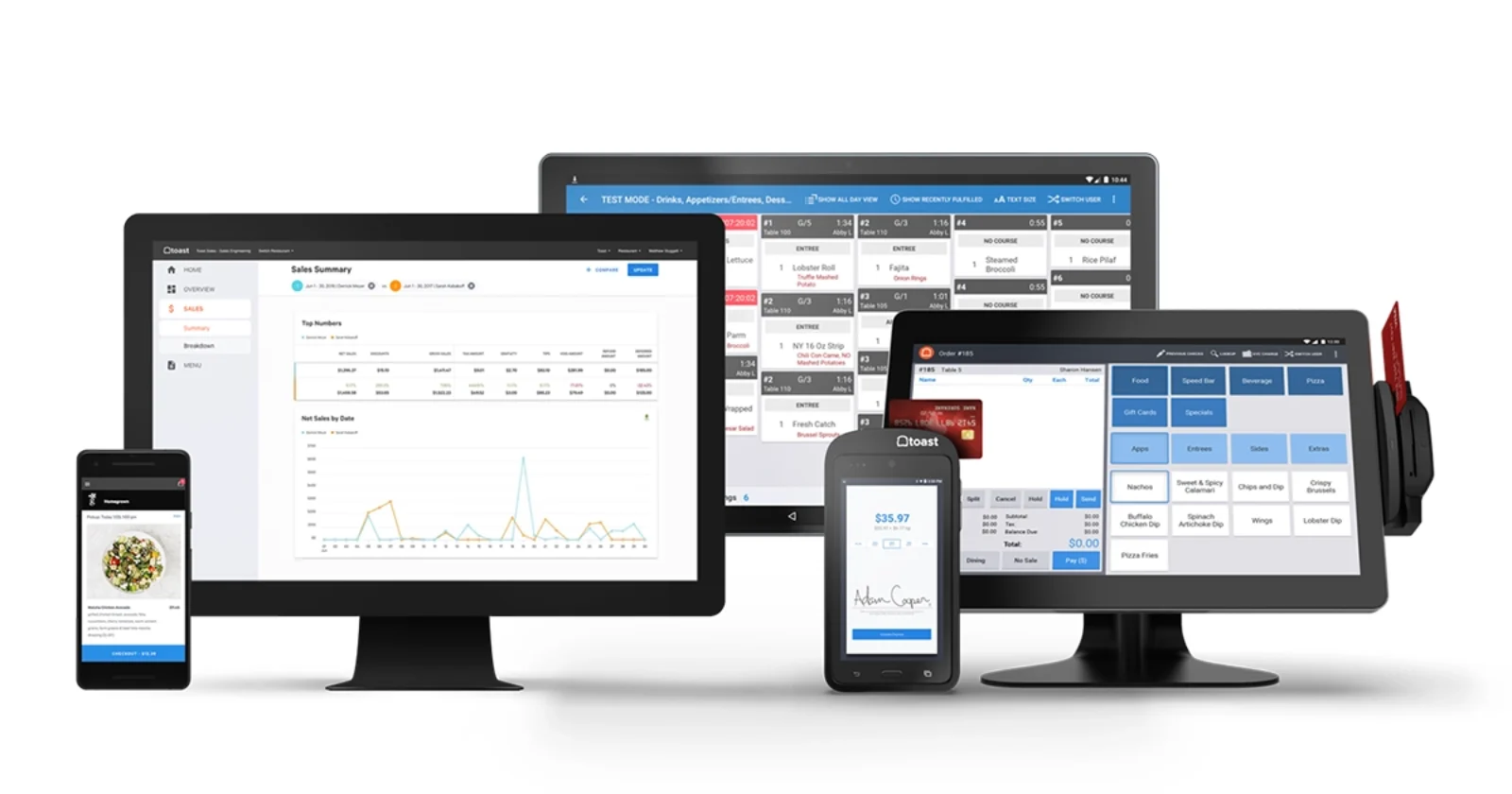
Toast is our top pick for restaurants because it handles real service better than anything else on this list. The hardware is built specifically for restaurants and survives grease, heat, and the occasional drop. The software handles complex modifiers, coursing, and seat-level ordering without breaking a sweat, the kitchen display system is among the best available, and Toast Go handhelds make tableside service fast. For operators who want a single platform covering POS, online ordering, loyalty, payroll, and marketing, Toast is the safest mainstream choice.
The downside is cost and commitment. Toast contracts typically run 2-3 years, you’re locked into Toast Payments, each additional device carries its own monthly charge, and add-on modules push total costs higher than the base price suggests. If you’re budget-conscious or hate long-term contracts, look at Square or SpotOn Essentials instead.
Why Choose Toast?
Toast offers a $0/mo Starter Kit with no upfront hardware cost (processing at 3.09%–3.69% + 15¢) or the Point of Sale plan at $69/mo with processing at 2.49% + 15¢. Above roughly $11,500/month in card sales, the paid plan usually costs less overall. The all-in-one approach means fewer vendors to manage, and support is available by phone 7 a.m. to midnight ET daily, with chat around the clock.
→ Read our full Toast review | Toast pricing breakdown | Current Toast offer
Square for Restaurants
Square for Restaurants is the easy button. If you’re opening your first restaurant, running a small café, or just need something that works without complexity, Square removes the friction. The free plan has real functionality, the hardware is affordable, there are zero contracts, and you can be taking orders the same day you unbox it. It has also grown into a capable full-service option, with KDS, coursing, handhelds, and a built-in AI assistant that helps you set up menus and troubleshoot in plain English.
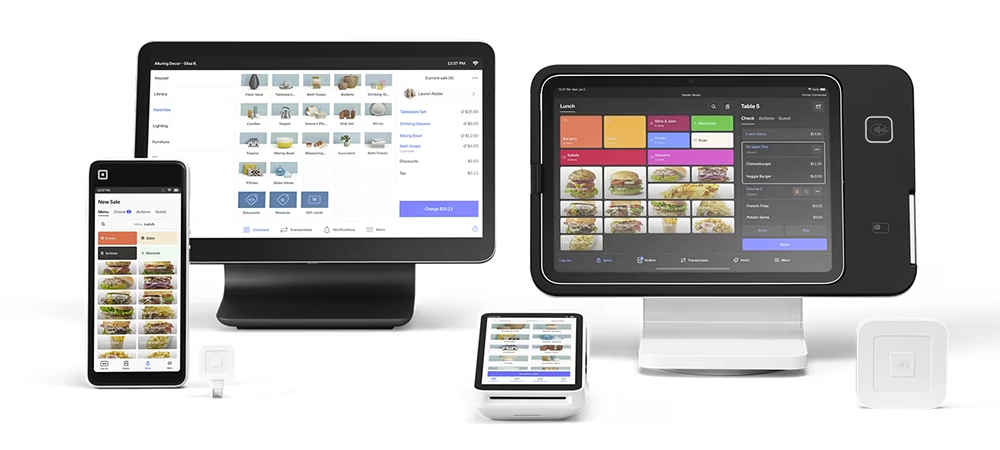
Square isn’t as deep as Toast for complex full-service operations. Reporting is lighter on the free plan, phone support is weekdays only below Premium, and flat-rate processing adds up at higher volumes. But for operators who need to get running fast and don’t want to be locked into anything, it’s the safest first step.
Why Choose Square?
Square’s free plan is genuinely usable, not a crippled demo. Processing runs 2.6% + 15¢ per in-person transaction on the free plan. The Plus plan at $49/mo adds advanced restaurant features, loyalty, and email and text marketing, with a lower processing rate. Hardware starts at $0 (Tap to Pay on your phone or your own iPad) up to $899 for the full Square Register. No contracts means you can switch anytime without penalty.
→ Read our full Square for Restaurants review | Current Square offer
Shift4 Dine
Shift4 Dine, formerly SkyTab, is the pick for restaurants that need real hardware without paying for it upfront. Terminals, handhelds, and kitchen displays come at no upfront cost for $29.99/mo per terminal, and the platform handles tableside ordering, online orders, reservations, and loyalty. For a restaurant that would otherwise spend $1,500 or more on equipment before opening day, that changes the math.
Name change: Shift4 has rebranded SkyTab POS as Shift4 Dine. It’s the same system, same pricing, and same hardware, just consolidated under the Shift4 name. You’ll see both names in the market during the transition.
Shift4 Dine is also endorsed by Jon Taffer of Bar Rescue, and given how many struggling bars he’s seen derailed by bad POS choices, that carries weight in this industry.
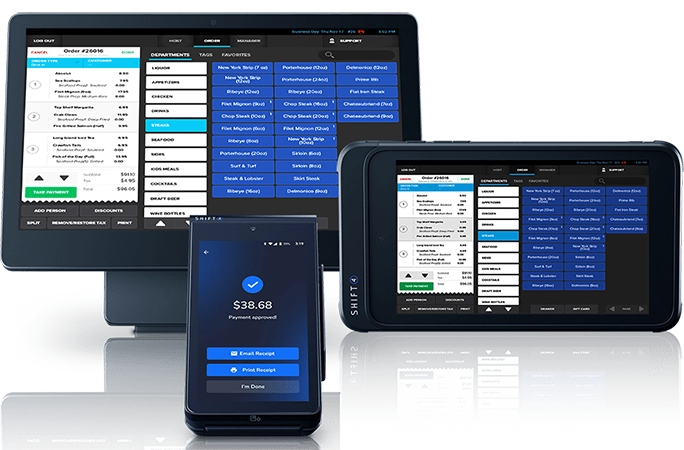
The tradeoff is processor lock-in and commitment. You’re required to use Shift4 for payment processing on a 36 months agreement. If you have an existing processor relationship with favorable terms, this could be a dealbreaker.
Why Choose Shift4 Dine?
Shift4 Dine’s $29.99/mo fee with free hardware keeps upfront cost near zero for a full-featured system. Shift4 also bills one Annual Service & Maintenance Fee each August that scales with the number of devices, so get the per-device amount in writing. Online ordering is a separate monthly add-on for new merchants, and you can opt out if you won’t use it. Processing rates are competitive but not published, so get your specific rate during the sales process.
Worth noting: Shift4 Dine’s Advantage Program can bring processing costs close to zero by adding a small service fee to guest checks or offering a cash discount, a model that’s becoming increasingly common and can save high-volume restaurants thousands annually.
→ Read our full Shift4 Dine review | Current Shift4 Dine promotion
Clover POS
Clover POS is a cloud-based point of sale system with polished hardware and a deep app marketplace, and it’s a strong fit for simpler restaurant operations. Think counter-service spots, quick-service restaurants, coffee shops, delis, and bakeries, the kinds of places that need fast checkout and solid basics more than deep full-service table management. The hardware lineup scales from a mobile card reader to a dual-screen countertop station, the app marketplace lets you add features as you grow, and staff pick it up quickly.
What to know before you buy: Who you buy Clover from matters as much as the system itself. Clover is sold directly and through banks, ISOs, and authorized dealers, and the rates, contract terms, and support can vary a lot from one seller to the next. Buy from Clover or from an authorized dealer who shows you published pricing and puts the rate, contract length, and any early termination fee in writing. POSUSA is an authorized Clover dealer, and we can often beat Clover’s published rates. New merchants may also qualify for Clover hardware starting at 1¢/month; see the current offer and terms.
Why Choose Clover?
At Clover’s published pricing, quick-service restaurant plans start at $135/mo with hardware bundled into a 36 months plan, and full-service plans start at $179/month. If you buy hardware upfront, it ranges from the Clover Go ($199) and Clover Flex ($749) to the Clover Mini ($849) and dual-screen Station Duo ($1,899). In-person processing runs 2.3%–2.6% + 10¢, and a dealer can often negotiate lower.
→ Read our full Clover review | Current Clover offer
Lightspeed Restaurant
Lightspeed Restaurant is overkill for a simple café, and that’s exactly why certain restaurants need it. If you’re running multiple locations, dealing with complex menus and endless modifiers, or need reporting that goes beyond basic sales summaries, Lightspeed delivers tools that simpler systems don’t have, including Advanced Insights and the Lightspeed AI assistant on every plan.
The multi-location management is particularly strong: centralized menus, roll-up reporting, and cross-site performance comparisons. The downside is price and complexity. It runs on iPads only, it isn’t plug-and-play, and the best features sit on higher-tier plans.
Why Choose Lightspeed?
Lightspeed Restaurant starts at $69/mo (Starter), with Essential at $189/mo and Premium at $399/month. Essential unlocks multi-location management, advanced inventory, and custom processing rates; KDS is $30 per screen per month on every plan. Lightspeed requires a contract and doesn’t publish its terms, so get them in writing.
→ Read our full Lightspeed Restaurant review
TouchBistro

TouchBistro carved out its niche as the go-to iPad POS for restaurants that need reliability when the internet fails. Its hybrid setup keeps orders, payments, and menu edits working during an outage, so you can keep serving when your ISP lets you down. TouchBistro also launched TouchBistro One, an all-in-one handheld that combines ordering, payments, and receipt printing for tableside service.
For restaurants in areas with spotty internet, or operators who’ve been burned by cloud outages during busy service, this matters. Processing runs through TouchBistro Payments on cost-plus (interchange-plus) pricing, which usually beats flat rates at real restaurant volume but is quoted per restaurant. The downside: add-on modules get expensive fast, and support reviews are mixed.
Why Choose TouchBistro?
TouchBistro starts at $69/mo for software alone, or $119/mo for the Essentials Bundle with hardware and integrated payments included. Add-ons like online ordering, loyalty, and reservations push monthly costs higher, so budget carefully if you want the full suite.
→ Read our full TouchBistro review
SpotOn Restaurant

SpotOn often gets overlooked, but it deserves a look if you want published pricing and contract flexibility. Its Essentials plan has a competitive card-present rate and runs month-to-month, which is rare among restaurant POS systems. The features are solid too: commission-free online ordering, built-in reservations and waitlist, and tableside handhelds.
The interface isn’t quite as polished as Toast, and billing discrepancies come up repeatedly in user reviews, so check your statements every month, especially early on.
Why Choose SpotOn?
SpotOn publishes three plans. The All-In Plan is $0/mo per station with hardware included, processing at 2.79% + 20¢ card-present, processing minimums, and a 2-year minimum term. POS Essentials runs $55/mo per station with processing at 2.45% + 15¢, month-to-month, and hardware priced separately (Station 15 at $750, Handheld at $297, financing available). Build Your Own is custom pricing for multi-unit and high-volume operations.
→ Read our full SpotOn Restaurant review
NCR Aloha (Aloha Cloud)

Let’s be clear upfront: NCR Aloha is not for most independent restaurants. It’s on this list because it remains a real-world standard for chains, high-volume multi-location groups, and, critically, for operators migrating from legacy on-premise Aloha systems.
Aloha has been in restaurants since the 1990s. The newer Aloha Cloud brings that legacy expertise into a modern cloud platform with the depth and configurability that enterprise operations need. The tradeoff is enterprise pricing and implementation complexity.
Why Choose NCR Aloha?
Aloha pricing is custom quote only. It varies by terminals, scope, support level, and implementation complexity. Expect enterprise pricing. Ask for a written total-cost breakdown including implementation, training, and ongoing support fees before signing. If you’re currently on legacy Aloha (on-premise), Aloha Cloud is the path of least resistance.
For large enterprise chains and franchises, Aloha Essentials offers a tailored package designed specifically for high-volume multi-unit operations.
→ Read our full NCR Aloha Cloud review | Aloha Essentials for enterprise
How We Chose the Best Restaurant POS Systems
We didn’t just compile feature lists from vendor websites. In our experience helping restaurant operators navigate POS decisions over more than a decade, we’ve learned that the systems that look best on paper don’t always perform best in the real world. A busy Saturday night exposes weaknesses that no demo will reveal.
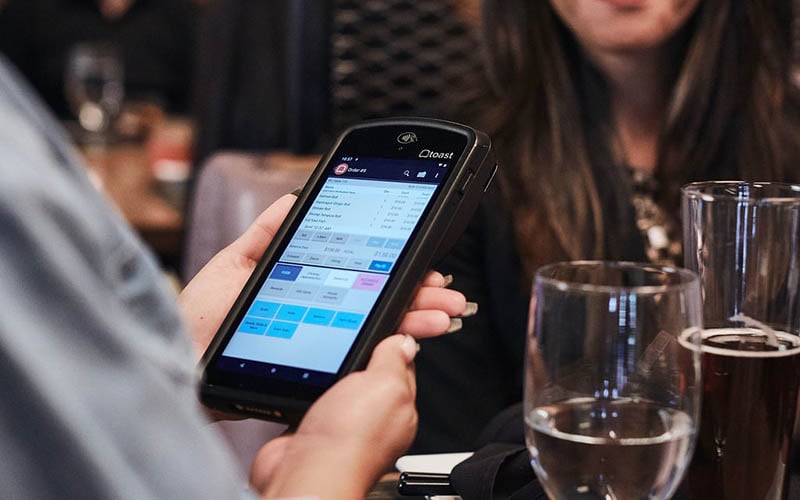
Our evaluation criteria focus on what actually matters when you’re running a restaurant:
Ordering Speed Under Pressure
How fast can a server punch in a complicated order with multiple modifiers? Does the system lag during peak hours? Can you split checks without a 10-step process? We prioritize systems that keep lines moving and servers efficient even when the kitchen is slammed.
Menu Management Flexibility
Restaurants change menus constantly: daily specials, seasonal items, 86’d dishes, happy hour pricing. A good POS makes menu updates quick and painless. A bad one turns every menu change into a support ticket. We evaluate how easy it is to add items, adjust pricing, set time-based modifiers, and handle complex configurations like pizza half-and-half toppings.
Payment Processing Economics
Processing fees often cost more than software fees, and most operators don’t realize this until they’ve signed a contract. We look at effective rates (total fees divided by total volume), not just advertised rates. A 0.3% difference sounds small until you calculate it against $50,000/month in card sales: that’s $1,800/year. We also note which systems lock you into their processor and which let you negotiate.
Offline Reliability
Internet goes down, and it happens at the worst possible times. We evaluate how each system handles connectivity loss. Can you still take orders? Process payments? Some systems keep working offline; others become expensive paperweights. For restaurants in areas with unreliable internet, this is a critical factor.
Support Quality (Especially Weekends)
POS problems don’t wait for business hours. We consider support availability, response times, and the competence of support staff. A system with 24/7 support that actually resolves issues beats a system with “24/7 support” that puts you on hold for 45 minutes, or routes you to a chatbot after hours. We pay particular attention to weekend and holiday support quality, when restaurants need help most.
Reporting That Drives Decisions
Every POS generates reports. Few generate reports that actually help operators make better decisions. We look for systems that surface actionable insights: labor cost as a percentage of sales, best and worst selling items, peak hour staffing needs, food cost trends. Bonus points for systems that make this data accessible on mobile.
Online Ordering Integration
Online ordering went from “nice to have” to “essential” in the past few years. We evaluate whether online ordering is built in or requires a third-party integration, what it costs, how orders flow into the kitchen, and whether the system can handle multiple channels (website, app, third-party delivery) without creating chaos.
Hardware Durability
Restaurant environments are brutal on hardware. Grease, heat, spills, and drops kill consumer-grade tablets. We favor systems with purpose-built hardware or proven track records on specific tablet models. Proprietary hardware has downsides (no resale value, replacement costs), but durability often makes the tradeoff worthwhile.
Total Cost Transparency
The advertised monthly price is rarely the actual monthly cost. We dig into what’s included and what’s extra: hardware, per-device fees, processing, online ordering, loyalty, reporting, support tiers, early termination fees. Systems that are transparent about total cost rank higher than those that hide fees in fine print or require lengthy sales calls to get pricing.
Best Restaurant POS Systems by Use Case
Different restaurants have different needs. A food truck doesn’t need the same features as a fine dining establishment. Here’s how our top picks match up to specific use cases:
| Restaurant Type | Top Pick | Runner-Up | Why |
|---|---|---|---|
| Full-Service Dining | Toast | Shift4 Dine | Deepest feature set vs. free hardware |
| Quick-Service / Fast Casual | Square | Clover | Speed, simplicity, low barrier to entry |
| Bars / Nightlife | Toast | Shift4 Dine | Tab management, pre-auth, speed |
| Multi-Location Groups | Toast | Lightspeed | Unified menus and reporting vs. deep analytics |
| New / Tight Budget | Square | Shift4 Dine | Free plan vs. free hardware |
| Need Hardware, No Upfront Cost | Shift4 Dine | Toast (Starter Kit) | Free hardware vs. $0 one-terminal kit |
| Pizza / Delivery | HungerRush (Honorable Mention) | Toast | Pizza builder, delivery management |
| Unreliable Internet | TouchBistro | Toast | Hybrid offline mode |
| Enterprise / Chains | NCR Aloha | Toast | Proven at scale, deep configurability |
For full-service restaurants, the choice usually comes down to Toast vs. Shift4 Dine. Toast wins on depth, polish, and kitchen tools. Shift4 Dine wins if you need hardware without paying for it upfront. If you want the industry standard and can budget for it, go Toast. If upfront cash is the constraint, look at Shift4 Dine.
For new restaurant owners still figuring things out, Square is the safest starting point. The free plan gives you room to learn without financial commitment. If you outgrow it, you can switch later, no penalty, no drama.
For multi-location operators, Toast and Lightspeed both offer centralized management. Toast is stronger on kitchen operations; Lightspeed goes deeper on reporting, AI insights, and hotel integration.
Honorable Mentions
HungerRush, Best for Pizza & Delivery
HungerRush is purpose-built for pizza shops and delivery-focused restaurants. The pizza builder handles half-and-half toppings, size-based pricing, and complex modifier configurations that general-purpose POS systems struggle with. Delivery management, driver dispatch, and online ordering are core features, not afterthoughts. If pizza and delivery are your primary business, HungerRush is worth a serious look.
→ Read our full HungerRush review
Epos Now, Budget Option
Epos Now is a UK-based system offering an affordable entry point for budget-conscious operators. Hardware bundles can be attractive for those starting from scratch. US-based support has been inconsistent in feedback we hear from operators, and feature depth doesn’t match restaurant-specific competitors. Consider it if price is the primary concern and you’re comfortable with a less specialized platform.
→ Read our full Epos Now review
Restaurant POS FAQs
What is the best POS system for restaurants?
For most restaurants, Toast is the best overall POS: purpose-built hardware, the deepest restaurant feature set, and excellent KDS and handheld tools, starting at $0/mo (Starter Kit) or $69/mo (Point of Sale). New and small restaurants that want no contract should look at Square for Restaurants, and restaurants that need hardware with no upfront cost should look at Shift4 Dine at $29.99/mo.
How much does a restaurant POS system cost per month?
Software typically ranges from $0 to $300+ per month. But software is often the smaller expense; processing fees (2%–3%+ of card transactions) usually cost more. A restaurant doing $50K/month in card sales pays roughly $1,000–$1,500/month in processing alone. Budget for software + processing + hardware + per-device fees + add-ons to get your real monthly cost, and request a written total-cost breakdown before signing.
What's the difference between processing fees and software fees?
Software fees are the monthly subscription you pay to use the POS system, typically $0–$300/month depending on features. Processing fees are the percentage plus per-transaction fee you pay every time a customer uses a card, typically 2%–3% + $0.10–$0.30 per transaction. For most restaurants, processing fees cost several times more than software fees over a year. A 0.3% difference in processing rate on $60K/month in card sales equals $2,160/year.
What contract terms should I watch for?
Key contract terms to scrutinize: contract length, early termination fees, auto-renewal clauses, processing rate changes after year one, per-device fees, and hardware ownership. Square and SpotOn’s Essentials plan are month-to-month. Toast typically runs 2-3 years, Shift4 Dine 36 months, and TouchBistro and Lightspeed require contracts too. Get the terms in writing before signing.
Can restaurant POS systems work offline?
It varies. TouchBistro’s hybrid setup keeps orders, payments, and menu edits working when the internet fails. Square and Clover can take card payments offline and sync them when you reconnect. Toast and Shift4 Dine keep core functions running with some limitations. If you’re in an area with unreliable connectivity, test offline functionality during your demo; this can be a dealbreaker.
Do I own the hardware or am I leasing it?
Depends on the vendor. Toast hardware is purchased, financed, or $0 upfront on the Starter Kit, but it only works with Toast. Shift4 Dine provides free hardware tied to your Shift4 processing agreement. Square hardware you buy is yours. Clover hardware ownership depends on whether you buy it outright or bundle it into a monthly plan. Always ask: Do I own this? Can I sell it? What happens to the hardware if I cancel?
What's the best POS for small restaurants?
For small restaurants, we recommend Square for Restaurants (free plan, no contracts, same-day setup) as the lowest-risk starting point. If you want full-service hardware like terminals and handhelds without paying upfront, Shift4 Dine at $29.99/mo is worth a quote, and Toast’s $0/mo Starter Kit works for a single-terminal setup.
What's the best POS for full-service restaurants?
Toast is the best POS for full-service restaurants, with the deepest feature set: tableside handhelds, excellent KDS, coursing, and seat-level ordering. Shift4 Dine is the value alternative, with free hardware for $29.99/mo per terminal. Choose Toast for depth and polish; choose Shift4 Dine if upfront cost is the constraint.
What's the best POS for bars?
Toast is our top pick for bars due to its strong tab management, pre-authorization features, and speed bar functionality. Shift4 Dine is a solid runner-up with free hardware and the Jon Taffer endorsement. Key features to look for in a bar POS: fast tab opening and closing, pre-auth on cards, quick item lookup, a bartender-friendly interface, and strong reporting on pour costs and comps.
How hard is it to switch POS systems?
Harder than vendors claim. You’ll need to rebuild your menu, retrain staff, potentially purchase new hardware, and may lose gift card balances and loyalty data that don’t transfer. Budget 2–4 weeks for a full transition. Switch during a slow period if possible, never right before peak season. Some data (sales history) can often be exported; customer data and integrations are harder to migrate.
What should I ask during a POS demo?
Key questions: What’s the total monthly cost including processing and per-device fees? What’s the contract length and early termination fee? Can I see offline mode working? How quickly can I reach a person on a Saturday night at 8pm? Can I talk to other restaurant owners currently using this system? What happens to my data if I cancel? Are there price increases after year one? What’s not included that most restaurants need?
Final Verdict
After helping restaurant operators navigate POS decisions since 2011, here’s the bottom line:
- #1 Toast: The best restaurant POS overall. Purpose-built hardware, the deepest feature set, and excellent kitchen and handheld tools. Budget for the contract and add-ons, and it’s the safest mainstream choice.
- #2 Square for Restaurants: The lowest-risk starting point. Free plan, no contracts, same-day setup. Ideal for new restaurant owners still figuring things out.
- #3 Shift4 Dine: The pick when you need real hardware without paying upfront. Free terminals for $29.99/mo, full-service features, and a multi-year commitment.
Whichever direction you lean, get demos from at least 2–3 systems, ask the hard questions about total cost and contracts, and talk to other restaurant owners who’ve lived with these platforms. A 30-minute demo doesn’t tell you how a system performs during a 200-cover Saturday night.
Our #1 Recommendation: Toast POS
Compare Your Options
Get your free restaurant POS comparison in 60 seconds, no obligation.
Or explore all restaurant POS options.

Jason Feemster, President of POS USA, brings over 20 years of experience in the point of sale and information technology industries. He has helped thousands of businesses, from small startups to large enterprises, find tailored POS solutions that enhance efficiency and drive growth. Jason’s insights have been featured in leading industry publications such as Inc.com, Business.com, and Restaurant Business Online. Through POS USA, Jason continues to guide business owners toward making informed decisions that drive their success.