

Thrive POS
$99.00
 Jason Feemster
Thrive POS Review: Pricing, Features & Honest Assessment
Updated: January 2026 • Verified Q1 2026
Table of Contents
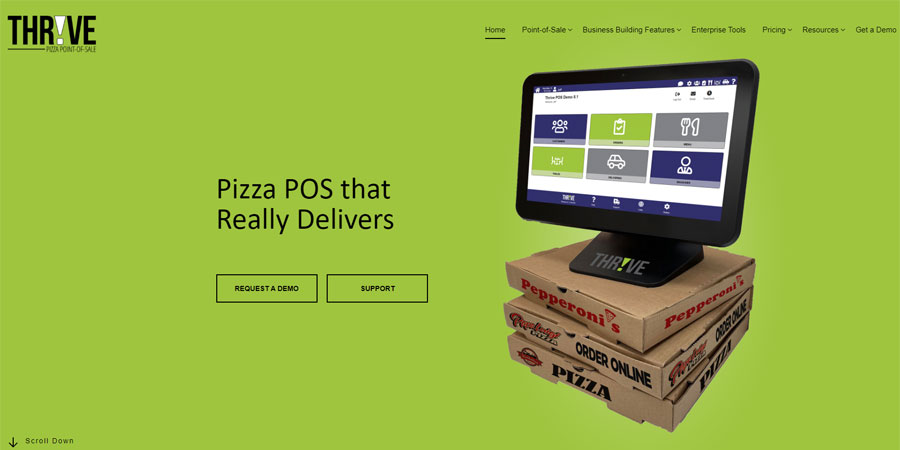
Thrive POS (formerly Granbury Solutions) is a point-of-sale system built specifically for pizzerias and delivery-focused restaurants. Founded in 2010 in Irving, Texas, the company was acquired by Jonas Software USA LLC in 2018 and now operates as a unified brand under the Thrive POS name.
The system serves pizza shops, QSR restaurants, sub and sandwich shops, and fast-casual concepts. Notable clients include Pizza Inn, along with thousands of independent pizzerias across the United States.
Thrive offers tiered pricing plans starting at $99/month, with delivery management and online ordering included in all plans at no extra cost. In 2024-2025, they expanded their feature set to include self-service kiosks, kitchen display systems, and a credit surcharge program through ThrivePay.
Pros & Cons
- Built specifically for pizza and delivery
- Transparent tiered pricing from $99/mo
- Delivery management included free
- Online ordering included at no extra cost
- DoorDash, Grubhub, Uber Eats integration (Deliverect)
- Self-service kiosks available
- U.S.-based customer support
- Mixed user reviews (Capterra 3.6/5)
- BBB: Not Rated — limited complaint data
- Support issues reported by some users
- Requires ThrivePay payment processing
- Advanced features locked to higher tiers
- Reporting accuracy complaints in reviews
- No free trial — demo only
Thrive POS Pricing
Thrive POS offers four pricing tiers. All plans require payment processing through ThrivePay. Pricing is transparent and published on their website.
Monthly Software Plans
| Plan | Monthly Cost | POS Terminals | Key Features |
|---|---|---|---|
| Starter | $99/mo | 1 terminal | POS, delivery, online ordering, gift cards, basic reporting |
| Delivery Plus | $149/mo | Up to 3 terminals | Starter + branded mobile app, analytics, 1 third-party integration |
| The Works | $199/mo | Up to 5 terminals | Delivery Plus + customer loyalty, automated marketing, 3 integrations |
| Pizza Pro | Custom | Unlimited | All features + Driver App, KDS, table service, premium integrations |
What’s Included vs. What’s Extra
| Feature | Starter | Delivery Plus | The Works | Pizza Pro |
|---|---|---|---|---|
| Point of Sale | ✅ | ✅ | ✅ | ✅ |
| Delivery Management | ✅ | ✅ | ✅ | ✅ |
| Online Ordering | ✅ | ✅ | ✅ | ✅ |
| Gift Cards | ✅ | ✅ | ✅ | ✅ |
| Branded Mobile App | ❌ | ✅ | ✅ | ✅ |
| Analytics Reporting | ❌ | ✅ | ✅ | ✅ |
| Third-Party Integrations | ❌ | 1 included | 3 included | Custom |
| Customer Loyalty | ❌ | ❌ | ✅ | ✅ |
| Automated Marketing | ❌ | ❌ | ✅ | ✅ |
| Driver App | ❌ | ❌ | ❌ | ✅ |
| Kitchen Display System | ❌ | ❌ | ❌ | ✅ |
| Table Service | ❌ | ❌ | ❌ | ✅ |
Notable Features
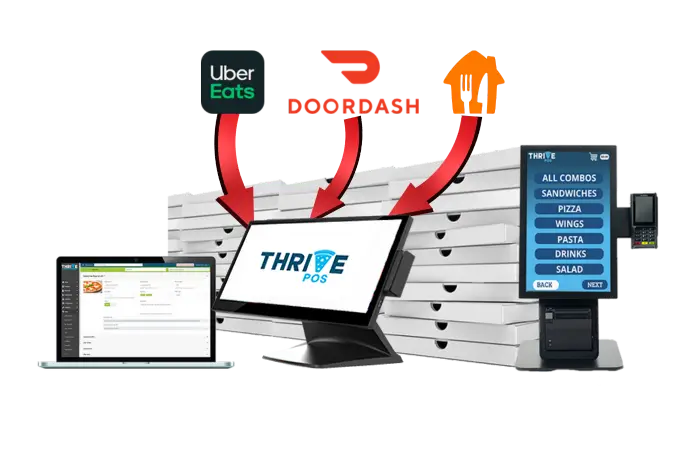
Thrive POS is designed from the ground up for pizza and delivery operations:
Pizza-Specific Capabilities
- Conversational ordering — enter items in any sequence as customers order
- Fractional pizza handling — half-and-half toppings with automatic pricing
- Complex modifier support — build-your-own pizzas with unlimited customizations
- Smart coupons — automatically apply deals when qualifying items are added
- Inventory tracking — track toppings and ingredients down to the slice
Delivery Management
- Dispatch screen — central hub for managing all deliveries
- Driver tracking — GPS-based location monitoring (with Driver App)
- Custom delivery zones — set fees, minimums, and boundaries by area
- Banks and drops — manage driver cash accountability
- Mileage tracking — automatic mileage calculations for driver reimbursement
- Tip credit wages — automatically adjust wages when drivers are on the road
- DoorDash Drive — dispatch orders to DoorDash drivers when needed
Online & Mobile Ordering
- Branded online ordering — website integration included in all plans
- Branded mobile app — customer app (Delivery Plus and above)
- Deliverect integration — DoorDash, Grubhub, Uber Eats orders flow directly to POS
- No separate tablets — third-party orders integrated into main system
Self-Service Kiosks
Thrive offers touchscreen ordering kiosks for in-store customers. Kiosks allow guests to browse menus, customize orders, and complete payment — reducing wait times and freeing up counter staff.
Credit Surcharge Program (ThrivePay)
Thrive’s Credit Surcharge Program allows restaurants to pass credit card processing fees to customers (where legally permitted). This can save thousands per year in processing costs for qualifying businesses.
Who This Is For
✅ Good Fit:
- Independent pizzerias — purpose-built for pizza operations
- Delivery-focused restaurants — comprehensive driver and dispatch tools
- Sub and sandwich shops — handles build-your-own customizations
- QSR and fast-casual concepts — quick service workflows supported
- Multi-location operators — enterprise tools in Pizza Pro tier
❌ Not Ideal For:
- Full-service restaurants — table service only in top tier
- Cafes and coffee shops — better options exist (see Square)
- Bars and nightclubs — not designed for this environment
- Retail stores — restaurant-focused, not retail
- Budget-sensitive startups — consider Square for Restaurants ($0/mo option)
Customer Support
Thrive POS offers U.S.-based customer support with multiple tiers:
- Phone Support: (817) 750-3947
- Email: support@thrivepos.com
- Support Portal: Online ticketing system available
- Business Hours: Monday-Friday, 8:30 AM – 4:30 PM CT
Thrive Control Center
All customers get access to Thrive Control Center — a cloud-based dashboard for menu management, reporting, and settings. You can make changes remotely without being at the restaurant.
Real User Feedback
What Users Like:
- “Very functional for a pizza place. Great delivery program, online ordering platform”
- “Easy to train new employees on how to use it”
- “Fits our industry like a glove — allows us to integrate POS, online services, and marketing in one product”
- “Drivers dispatch and the way it maps the area”
- “Support is great. They have a hard job and seem to not feel much resolve”
What Users Don’t Like:
- “There are constantly issues that take too long to resolve”
- “Reporting is inaccurate — daily summary report numbers do not add up correctly”
- “Payroll reports hours not reporting accurately causing us to overpay employees”
- “Tax summary report not reporting accurate numbers — caused problems with state penalties”
- “Had this POS system for 2 years and there are still features I do not know how to use”
- “Going on 5 months and still on tech support everyday, getting nowhere”
Thrive POS vs. Competitors
| Feature | Thrive POS | SpeedLine | HungerRush | Toast |
|---|---|---|---|---|
| Best For | Pizza & delivery | Pizza & delivery | Pizza & QSR | Full-service restaurants |
| Starting Price | $99/mo | Quote required | $199/mo | $0/mo (Pay-as-you-go) |
| Pizza-Specific | ✅ Built for pizza | ✅ Built for pizza | ✅ Pizza focus | ❌ General restaurant |
| Delivery Included | ✅ All plans | ✅ Included | ✅ Included | Add-on cost |
| Online Ordering | ✅ All plans | Quote required | ✅ Included | Add-on cost |
| 3rd Party Delivery | ✅ Deliverect | ✅ Marketplace | ✅ Integrated | ✅ Integrations |
| Kiosks | ✅ Available | ✅ Available | ✅ Available | ✅ Available |
| Free Trial | ❌ Demo only | ❌ Demo only | ❌ Demo only | ❌ Demo only |
| Founded | 2010 | 1990 | 2003 | 2012 |
| BBB Rating | Not Rated | A+ | A+ | A+ |
| Capterra Rating | 3.6/5 | 4.7/5 | 4.1/5 | 4.2/5 |
FAQ — Additional Questions
How much does Thrive POS cost?
Thrive POS has four pricing tiers: Starter ($99/mo for 1 terminal), Delivery Plus ($149/mo for up to 3 terminals), The Works ($199/mo for up to 5 terminals), and Pizza Pro (custom pricing for unlimited terminals). All plans include delivery management and online ordering. All plans require ThrivePay payment processing.
Does Thrive POS have a free trial?
No, Thrive POS does not offer a free trial. They provide an online demo where you can see the system in action before committing. Visit thrivepos.com or call (817) 750-3947 to schedule a demo.
Does Thrive POS integrate with DoorDash and Uber Eats?
Yes. Thrive POS integrates with Deliverect, which connects orders from DoorDash, Grubhub, and Uber Eats directly to your POS. Orders flow in automatically without needing separate tablets. Third-party integration is included in Delivery Plus and higher plans.
Is Thrive POS only for pizza restaurants?
While Thrive is built specifically for pizza and delivery, they also serve sub and sandwich shops, QSR restaurants, and fast-casual concepts. The system handles any menu with build-your-own customizations or delivery operations.
What is ThrivePay?
ThrivePay is Thrive’s integrated payment processing service. All Thrive POS plans require payment processing through ThrivePay. They also offer a Credit Surcharge Program that allows restaurants to pass processing fees to customers where legally permitted.
What is Thrive's BBB rating?
Granbury Solutions (Thrive POS) is listed with the BBB but is Not Rated and Not Accredited. The BBB states they do not have sufficient information to issue a rating. The BBB file was opened on November 7, 2016.
Verdict
Thrive POS delivers a pizza-specific point-of-sale system at a transparent price point. The $99/month Starter plan includes delivery management and online ordering — features that many competitors charge extra for. For pizza shops that need purpose-built tools for half-and-half toppings, driver dispatch, and delivery zones, Thrive is worth considering.
However, user reviews are mixed (Capterra 3.6/5). Some pizza operators praise the delivery features and ease of training, while others report ongoing issues with support response times and reporting accuracy. The two on-site reviews are both 1-star, which is concerning.
The lack of a BBB rating (Not Rated, Not Accredited) means there’s limited third-party complaint data to reference. We recommend asking detailed questions about support SLAs and requesting references from current customers before committing.
Recommendation: Thrive POS is a viable option for independent pizzerias that want delivery tools included from day one at a clear price. However, we’d suggest also getting demos from SpeedLine (higher-rated but quote-based pricing) and HungerRush for comparison. If you’re budget-focused, Square for Restaurants offers a $0/mo option, though it’s not pizza-specific.

Jason Feemster
POS systems expert and founder of POSUSA.com, a trusted industry resource since 2011. With over a decade of hands-on experience testing and reviewing point-of-sale systems, he helps business owners choose solutions that actually fit their needs.
Specification: Thrive POS
|
Videos: Thrive POS

Photos: Thrive POS
2 reviews for Thrive POS
Add a review
















I got sold on so many “great” things Thrive could do for my business. It has been nothing but an ongoing nightmare. In the pizza business for 40 years, I have made few big blunders as bringing in Thrive. Stay away. Far away. Going on 5 months and still on tech support everyday, getting nowhere.
We’ve had Thrive’s “Coffee Shop Manager” for 10 years… Initially, the system and service was outstanding with several intelligent and willing people quickly taking our calls. However, over the past two years the service has declined drastically. We’ve had continuous issues and recently decided to purchase a new server to help combat them, as Thrive’s sole support person (we pay almost $1000 a year for this service and there is now only one person who can help us) can’t fix any of the issues and insists we need a need computer. We are trying to get it installed is a nightmare! We are a coffee shop, but the ONLY time they will do the install is between 7am and 2pm Monday – Thursday. This means we have to close our business as they refuse to do it after close, or on Sundays when we are not open.
I cannot stress enough how frustrating this has been. We’ve asked for additional assistance with absolutely no response. I hope they don’t go out of business, as we’ve invested over $20,000 in this system, but there is no way anyone would find them to be valuable when there are so many other great products – with great service! – available.