

Aloha POS
$170.00
 Jason Feemster
NCR Voyix Aloha POS Review 2026
Updated: January 2026 • Verified Q1 2026
Table of Contents
- 1 Pros & Cons
- 2 NCR Voyix Aloha Pricing
- 3 Key Features
- 4 Integrations
- 5 Payment Processing
- 6 NCR Voyix Aloha vs. Competitors
- 7 Customer Support
- 8 Who Should Use NCR Voyix Aloha?
- 9 FAQ
- 9.1 How much does NCR Aloha cost?
- 9.2 What's the difference between Aloha Cloud and Aloha Essentials?
- 9.3 Can I use my own payment processor with Aloha?
- 9.4 Can I bring my own iPad or hardware?
- 9.5 What happened to NCR Corporation?
- 9.6 Is Aloha good for small restaurants?
- 9.7 How does Aloha compare to Toast?
- 10 Verdict

NCR Voyix Aloha is the granddaddy of restaurant POS systems. Founded in 1884 as National Cash Register, the company has evolved through 140+ years of payment technology. In October 2023, NCR Corporation split into two publicly traded companies: NCR Voyix (restaurants, retail, digital commerce) and NCR Atleos (ATMs). The Aloha POS brand stayed with NCR Voyix.
Today, Aloha powers over 75,000 restaurants worldwide—from local diners to chains like Chipotle, Firehouse Subs, and Wendy’s. More restaurant staff have been trained on Aloha than any other POS system, which creates a built-in familiarity advantage when hiring experienced workers.
Under new CEO James Kelly (appointed February 2025), NCR Voyix is working to shed its “legacy” reputation with a more customer-focused culture and modernized technology.
Pros & Cons
- Industry standard — staff already know it
- $0 upfront hardware option available
- Robust enterprise features and scalability
- 200+ third-party integrations
- 24/7 support included in subscription
- Strong offline mode and hybrid cloud
- Handles complex multi-location operations
- Pricing not transparent — must contact sales
- Must use NCR Voyix Payments
- Proprietary hardware only
- Mixed customer service reviews
- Complex setup and steep learning curve
- Reports of contract and billing issues
NCR Voyix Aloha Pricing
NCR Voyix Aloha Essentials is the flagship Windows-based platform designed for enterprise restaurant operations. Pricing requires a custom quote based on your specific needs.
Aloha Essentials
| Component | Estimated Cost | Notes |
|---|---|---|
| Software | ~$170/month per location | Industry-reported starting point |
| Additional Terminals | ~$45/month each | Per extra terminal beyond first |
| Hardware (subscription) | $0 upfront | Hardware included in monthly subscription |
| Hardware (purchase) | ~$1,000/terminal | Own your hardware, lower monthly fees |
| Handheld Devices | Quote required | 8-10 hour battery, compact design |
| Kitchen Display (KDS) | Quote required | Integrated with POS |
Aloha Essentials includes:
- Windows-based hybrid cloud POS
- Local server with cloud backup
- Online ordering and gift cards included
- More extensive customization options
- 380+ standard reports
- Hardware: $0 upfront with subscription or ~$1,000/terminal purchased
- Implementation: Billed separately (varies by complexity)
- Support: 24/7 included in all subscriptions
- Processing: NCR Voyix Payments required (no third-party)
Key Features
Restaurant Operations
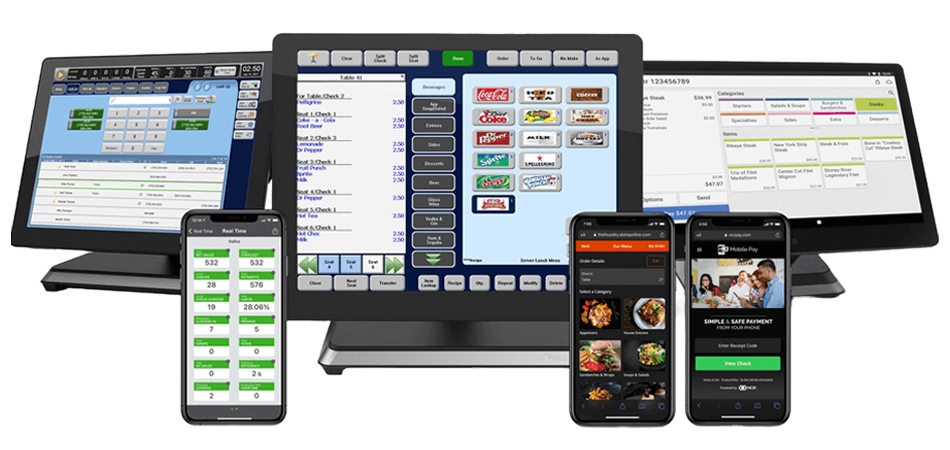
- Order management: Fixed terminals and handheld devices for tableside ordering
- Menu building: Easy customization with modifiers, combos, and forced selections
- Tab management: Open, split, transfer, and merge checks with ease
- Offline mode: Continue operations when internet goes down
- Kitchen display: Integrated KDS for order routing and timing
Online & Delivery
- Aloha Order Direct: First-party online ordering
- Third-party integration: DoorDash, Uber Eats, Grubhub orders flow directly to POS
- QR code ordering: Contactless menu and payment options
- Self-service kiosks: Customer-facing ordering stations
Analytics & Reporting
- 380+ standard reports: Sales, labor, inventory, and more
- Mobile reporting app: Real-time data access from anywhere
- Scheduled reports: Automatic email delivery
- Export builder: Custom report creation
Employee Management
- Time tracking: Clock in/out with labor cost reporting
- Role-based permissions: Granular access controls
- Payroll integration: Export to ADP, Millennium, and others
- Mobile alerts: Notifications for irregularities
Customer Engagement
- Loyalty programs: Points-based rewards
- Email marketing: Built-in campaign tools
- Gift cards: Physical and digital (Essentials plan)
- Customer database: Track preferences and history
Integrations
NCR Voyix Aloha offers 200+ third-party integrations:
- Accounting: QuickBooks, Sage, Microsoft Dynamics GP, ACCPAC
- Payroll: ADP, Millennium
- Delivery: DoorDash, Uber Eats, Grubhub
- Reservations: OpenTable, Yelp
- Inventory: Various bar and restaurant inventory systems
- Payments: NCR Voyix Payments (Clover integration available)
Payment Processing
NCR Voyix requires you to use their integrated payment processing—third-party processors are not supported.
- Processing rates: Custom quote (not publicly disclosed)
- Payment methods: EMV chip, tap-to-pay, Apple Pay, Google Pay
- Funding: Next-day merchant deposits
- Security: Point-to-point encryption, PCI compliant
Note: NCR Voyix implemented processing fee increases in April 2025 for existing customers, including a 0.25% increase to discount fees and up to $0.07 increase per authorization.
NCR Voyix Aloha vs. Competitors
| Feature | NCR Aloha | Toast | Square | Rezku |
|---|---|---|---|---|
| Pricing | Custom quote | $0-$69/mo | $0-$60/mo | $99/mo (5 stations) |
| Hardware | Proprietary only | Proprietary | iPad/Square | iPad only |
| Own Processor | No | No | No | No |
| Best For | Enterprise/chains | Mid-size restaurants | Small/simple | Pizzerias, delivery |
| Industry Standard | Yes (most trained) | Growing | Limited | Niche |
Customer Support
NCR Voyix provides 24/7 support included with all subscriptions:
- Phone support: Available 24/7/365
- In-app chat: Management app for quick support access
- Knowledge base: Online documentation and how-to guides
- Implementation team: Dedicated setup and onboarding
- Training: In-person, online courses, and video library
Customer feedback is mixed: While NCR touts 35,000 employees globally and a network of value-added resellers, user reviews tell a different story for some customers. Common complaints include:
- Difficulty reaching knowledgeable support
- Slow resolution for complex issues
- Contract and billing disputes
- Small businesses feeling neglected
Enterprise customers with dedicated account managers generally report better experiences than small independent restaurants.
Who Should Use NCR Voyix Aloha?
✅ Best fit for:
- Mid-size to large restaurants with complex operations
- Multi-location chains and franchises
- Restaurants hiring experienced staff (who likely know Aloha)
- Operations needing robust reporting and analytics
- Businesses wanting an industry-standard platform
- Enterprise operations with dedicated IT resources
❌ Not ideal for:
- Small restaurants wanting simple, transparent pricing
- Businesses that prefer iPad or bring-your-own hardware
- Operators who want to choose their own payment processor
- Restaurants without technical expertise for setup
- Budget-conscious startups
FAQ
How much does NCR Aloha cost?
NCR Aloha Essentials requires a custom quote based on your specific needs, number of locations, and features required. Hardware runs ~$1,000/terminal or $0 upfront with a subscription bundle. Contact NCR Voyix directly for pricing. For the simpler Aloha Cloud platform, see our Aloha Cloud review.
What's the difference between Aloha Cloud and Aloha Essentials?
Aloha Essentials (covered in this review) is a Windows-based hybrid platform with extensive customization for complex, enterprise operations. Aloha Cloud is a simpler Android-based system for independent restaurants—see our dedicated Aloha Cloud review for details.
Can I use my own payment processor with Aloha?
No. NCR Voyix requires you to use their integrated payment processing service. Third-party processors are not supported. Processing rates are provided as part of your custom quote.
Can I bring my own iPad or hardware?
No. NCR Aloha requires proprietary hardware. You cannot use iPads, Android tablets, or other devices. Hardware can be purchased (~$1,000/terminal) or included in a monthly subscription at $0 upfront.
What happened to NCR Corporation?
In October 2023, NCR Corporation split into two companies: NCR Voyix (restaurant, retail, and digital commerce) and NCR Atleos (ATMs). The Aloha POS brand is now part of NCR Voyix. In August 2024, NCR Voyix also sold its digital banking division for $2.45 billion to focus on restaurants and retail.
Is Aloha good for small restaurants?
Aloha Essentials is designed for enterprise operations and is generally not the best fit for small restaurants due to its complexity, custom pricing, and steep learning curve. Small restaurants should consider Aloha Cloud, Square for Restaurants, or Rezku for simpler alternatives.
How does Aloha compare to Toast?
Both are strong restaurant POS systems. Aloha has deeper industry roots (140+ years) and more staff trained on it, while Toast offers a more modern, user-friendly experience with transparent pricing. Toast has grown rapidly and is now the industry standard for mid-size restaurants. For enterprise operations, Aloha may offer more customization; for most others, Toast is likely a better fit.
Verdict
NCR Voyix Aloha remains the restaurant industry’s legacy leader—a position built on 140+ years of payment technology innovation. More restaurant staff are trained on Aloha than any other POS, which creates real operational advantages when hiring.
The 2023 corporate split into NCR Voyix and NCR Atleos, combined with new leadership in 2025, signals the company’s effort to modernize and compete with cloud-native competitors like Toast. The $0 upfront hardware option makes the platform more accessible than ever for enterprise operations.
However, significant concerns remain. Pricing is opaque (custom quotes only), you’re locked into NCR’s payment processing (which saw rate increases in 2025), and customer support reviews are mixed—especially for smaller businesses. The platform’s complexity also means longer setup times and a steeper learning curve than modern alternatives.
Rating: 6.5/10 — A powerful enterprise POS with unmatched industry presence, but opaque pricing, locked-in payment processing, mixed support experiences, and complexity hold it back from a higher score.
Recommendation: NCR Voyix Aloha Essentials is best suited for mid-size to enterprise restaurants that value industry-standard software and need robust multi-location management. The familiarity advantage—staff likely already know Aloha—is real. For small restaurants or those wanting transparent pricing and simpler operations, consider Aloha Cloud, Toast, Square for Restaurants, or Rezku instead.

Jason Feemster
POS systems expert and founder of POSUSA.com, a trusted industry resource since 2011. With over a decade of hands-on experience testing and reviewing point-of-sale systems, he helps business owners choose solutions that actually fit their needs.
Specification: Aloha POS
|
Photos: Aloha POS


User Reviews
Be the first to review “Aloha POS”
















There are no reviews yet.