Updated February 2026 • Verified Q1 2026
Clover and Square are the two biggest names in small business POS systems — and they take very different approaches. Square gives you a free plan and dead-simple pricing. Clover lets you choose your own payment processor, which can mean lower rates if you shop around. We’ve set up and worked with both systems across hundreds of businesses since 2011, and this guide breaks down exactly where each one wins.
Is Clover better or Square? Here’s the short version:
Clover POS: Our top pick overall. Best for businesses that want lower processing rates through a dedicated merchant account and need a customizable, full-featured POS. Learn more in our Clover Station review.
Square POS: Best for new businesses that want zero upfront cost and no contracts. The free plan is legitimately useful, not just a teaser. Learn more in our Square POS review.
Table of Contents
Clover vs Square at a Glance
| Clover | Square | |
|---|---|---|
| Starting Price | $0/mo (Payments plan) or $13–$16/mo with hardware | $0/mo (Free plan) |
| In-Person Processing | 2.3%–2.6% + 10¢ | 2.6% + 15¢ (Free), 2.5% + 15¢ (Plus), 2.4% + 15¢ (Premium) |
| Online Processing | 3.5% + 10¢ | 3.3% + 30¢ (Free), 2.9% + 30¢ (Plus/Premium) |
| Keyed-In Processing | 3.5% + 10¢ | 3.5% + 15¢ |
| Monthly Plans | $0–$84.95+/mo (varies by industry) | $0 / $49 / $149 per month |
| Hardware Cost | $49 (Go) to $1,899 (Station Duo) | Free (reader) to $799 (Register) |
| Choose Your Processor | Yes — works with thousands of merchant services providers | No — Square handles all processing |
| Contract Required | Often 36 months (depends on reseller) | No contract |
| Free Trial | 90 days | 30 days (Plus and Premium) |
| Best For | Established businesses wanting lower rates and customization | New/small businesses wanting zero-risk entry |
Clover
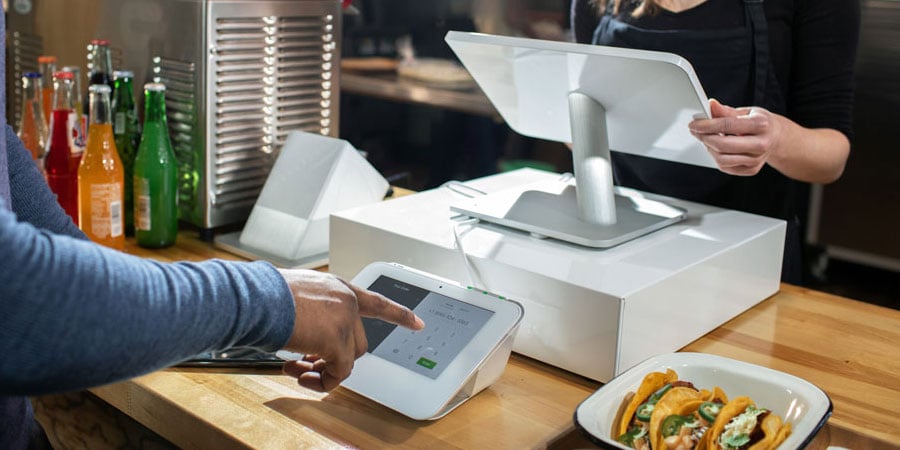

Clover Station
Clover POS System: Features and Benefits
Clover is our overall top pick in this comparison, and the reason comes down to flexibility. It’s the only major POS platform that lets you choose your own payment processor — which means you can negotiate interchange-plus rates that beat Square’s flat rate, especially at higher volumes. Here’s what else stands out:
Customizable to Your Business
Clover offers six industry-specific plan categories — full-service dining, quick-service, retail, professional services, personal services, and home/field services. Each has Starter, Standard, and Advanced tiers, so you’re not paying for restaurant features when you run a hair salon. The Clover App Market adds hundreds more integrations if the built-in tools don’t cover your needs.
Purpose-Built Hardware
Clover’s hardware lineup is more polished than Square’s. The Station Duo (with its customer-facing display) looks and feels like a premium setup. The Flex handheld is great for tableside ordering. The Go reader handles mobile payments. Every device is PCI-compliant out of the box, supports EMV and NFC, and runs on Clover OS.
Current hardware pricing: Clover Go ($49–$199), Flex ($599–$749), Mini ($849), Station Solo ($1,699–$1,799), Station Duo ($1,899). Financing over 36 months is available on most devices.
Accepts All Payment Types
Apple Pay, Google Pay, PayPal, Venmo, contactless, chip, swipe, cash, checks, and gift cards. Clover covers it all — and processes every major card brand at the same rate.
Staff and Tax Management
Clover’s built-in employee management tools let you assign roles, track hours, and manage permissions without a third-party app. Item-level tax configuration is automatic — set your rates by location and Clover applies them at checkout. Small detail, but it eliminates a common headache for multi-location businesses.
Clover Pricing: What You’ll Actually Pay
Clover’s pricing depends on your business type and whether you buy hardware upfront or finance it. When purchased directly from Clover, processing rates start at 2.3% + 10¢ per in-person transaction for restaurants and 2.6% + 10¢ for retail. Keyed-in transactions are 3.5% + 10¢ across all plans.
Software plans range from free (Payments-only, no POS features) to $84.95+/month depending on your industry and tier. The key advantage: if you use a third-party merchant services provider with Clover, you can often negotiate lower rates — especially interchange-plus pricing — that beats both Clover’s default rates and Square’s flat rate.
Clover also offers the Clover Go mobile device for accepting payments on the go, similar to Square’s reader.
If you’re considering Clover, we recommend purchasing directly from Clover to avoid inflated fees from third-party resellers. You get free overnight shipping, a 90-day return window, and avoid the contract headaches that come with some independent sellers.
Why We Recommend Clover for Small Businesses
Clover is our overall best POS for small businesses because it combines solid hardware, flexible software, and — most importantly — the ability to shop around for the best processing rates. We like it for restaurants, retail stores, salons, and service businesses that have enough volume to benefit from lower interchange-plus rates.
The hardware is easy to set up, the App Market expands functionality without switching platforms, and the 90-day free trial gives you real time to evaluate before committing.
Square
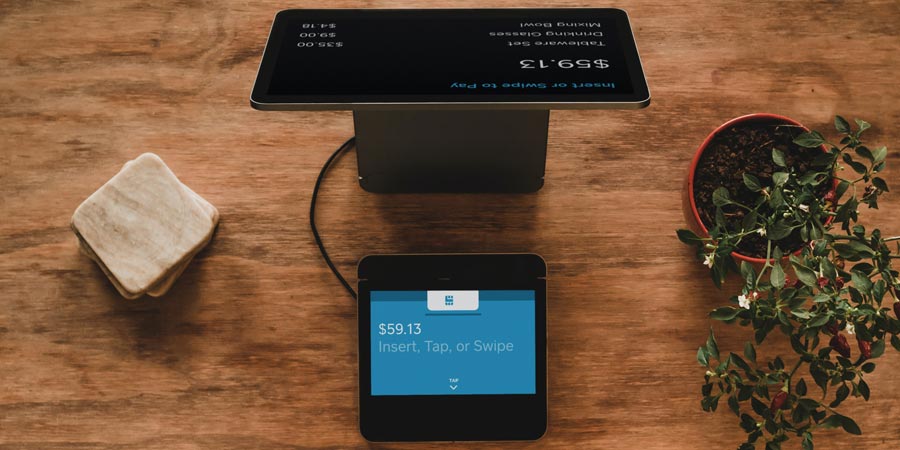

Square POS
Square POS System: Features and Benefits
Square’s pitch is simple: sign up for free, start accepting payments in minutes, no contract. It’s the fastest way to go from zero to operational, and the free plan isn’t watered down — you get real POS software with inventory, reporting, an online store, and more.
Mobile Payments and Hardware Flexibility
Square accepts Apple Pay, Google Pay, contactless, chip, and swipe payments. You can run the software on any iPhone, iPad, or Android device — no proprietary hardware required. The free magstripe reader gets you started immediately, and you can add a $59 contactless reader, $299 Terminal, or $799 Register as your business grows.
Square also introduced the $399 Handheld in its latest hardware refresh — great for tableside ordering or line-busting at busy locations.
Zero Upfront Cost
This is Square’s real advantage. No monthly fee on the Free plan, no hardware purchase required (use your phone), no contract. Whether you have a brick-and-mortar store, run a food delivery service, or sell at farmers markets — you can start accepting cards today for nothing out of pocket.
Built-In Business Tools
Square’s ecosystem is surprisingly deep for a “free” platform. Invoicing, inventory tracking, online ordering, gift cards, customer directory, basic reporting — it’s all included. The integrations library connects to QuickBooks, WooCommerce, and dozens of other platforms. If you need restaurant-specific features, check out our Square for Restaurants review.
Square Pricing: What You’ll Actually Pay
Square overhauled its pricing in October 2025. The old industry-specific plans are gone — every business now shares three unified tiers:
- Free ($0/mo): 2.6% + 15¢ in-person, 3.3% + 30¢ online. Full POS with basic features.
- Plus ($49/mo per location): 2.5% + 15¢ in-person, 2.9% + 30¢ online. Advanced reporting, team management, vendor tools.
- Premium ($149/mo per location): 2.4% + 15¢ in-person, 2.9% + 30¢ online. 24/7 phone support, waived gift card load fees.
Note: the per-transaction fee went up 5¢ (from 10¢ to 15¢) and online rates on the Free plan jumped from 2.9% to 3.3% in this update. If you’re comparing old articles that still show 2.6% + 10¢, those rates are outdated. For the full breakdown, see our Square fees and pricing guide.
Square is best for low-to-medium volume businesses with mostly in-person sales. If you serve high volume, high average tickets, or need to negotiate rates — Clover gives you more flexibility. You can get hardware discounts and promos on Square POS, so check before buying.
Clover vs. Square: Head-to-Head Breakdown
Processing Fees
Winner: Clover. Clover’s default in-person rate through Fiserv starts at 2.3% + 10¢ — cheaper than Square’s 2.6% + 15¢ on the Free plan. More importantly, Clover lets you bring your own processor. A business doing $20,000+/month can often negotiate interchange-plus pricing through a third-party provider that significantly undercuts both Clover’s default rates and Square’s flat rate.
Square locks you into its own processing at a flat rate. Simple? Yes. Cheapest option? Usually not — especially once you’re past the startup stage.
Monthly Software Cost
Winner: Square. Square’s Free plan is genuinely free and includes real POS features — inventory, online store, invoicing, and more. Clover does have a $0/month “Payments” plan, but it’s stripped down to payment processing only with no POS functionality. For actual POS software, Clover starts at $13–$16/month (retail) and goes up to $89.95+/month for restaurant plans. Square’s paid tiers ($49 and $149) are competitive with Clover’s Standard and Advanced plans.
Hardware
Winner: Depends on your budget. Square wins on entry cost — free reader, $59 contactless reader, bring your own iPad. Clover wins on build quality and professional appearance — the Station Duo is one of the best-looking countertop POS systems available. But Clover’s hardware is proprietary and expensive ($849–$1,899 for countertop units). Square gives you more flexibility to start small and scale up.
Ease of Use
Winner: Square. Square’s interface is cleaner, and the setup process is faster. Most businesses can go from signup to first sale in under 15 minutes. Clover’s software is capable but can feel cluttered — and the onboarding process is slower, especially if you’re working through a reseller.
Customer Support
Winner: Clover. Clover offers 24/7 phone support on all plans. Square limits phone support to business hours (Mon–Fri, 6 AM–6 PM PT) on the Free and Plus plans. You need Premium ($149/mo) for 24/7 access. If something breaks at 10 PM on a Saturday, Clover has a clear edge.
Contracts and Flexibility
Winner: Square. No contracts, no cancellation fees, cancel anytime. Clover often involves 36-month commitments (especially on financed hardware), and early termination fees apply with many resellers. This is a real consideration — if you’re not sure this is the right POS, Square lets you walk away cleanly.
Clover POS vs. Square POS: The Verdict
Both systems are on our best POS for small business list for good reason. But they serve different stages and different needs.
Choose Square if: You’re just starting out, want zero upfront cost, need no-contract flexibility, or your monthly card volume is under $15,000. Square’s Free plan is one of the best deals in the POS industry — period. The software is solid, the hardware is affordable, and you can be processing cards in minutes.
Choose Clover if: You’re an established business doing steady volume, you want the ability to negotiate processing rates through your own merchant account, or you need industry-specific tools and premium hardware. Clover’s real advantage isn’t any single feature — it’s that you’re not locked into a single processor. At scale, that flexibility can save you hundreds per month.
Our overall pick: Clover wins for businesses that are past the startup phase and ready to optimize their costs. The combination of lower processing rates, better hardware, 24/7 support, and processor flexibility gives it the edge for most established small businesses. But if you’re brand new? Start with Square. There’s nothing wrong with switching to Clover later once your volume justifies it.